Projects · Mini Hostpapa
How the Internet Actually Works
Packets, frames, IP addressing, subnetting, routing, NAT, ports, DNS, TLS, HTTP, and email routing explained with analogies anyone can follow.
How the Internet Actually Works
Alright. Sit down, coffee in hand, because we are about to do something most tutorials refuse to do properly.
A customer in Tunis types mysite.tn into a browser. About two hundred milliseconds later, pixels appear. In between, dozens of machines that have never met each other did exactly the right thing, in the right order, at the speed of light down a piece of glass.
Here is the uncomfortable part.
If any step of that sentence feels like magic to you, then you cannot debug a hosting platform. You can only restart services and hope. And "restart and hope" is not a business model when customers pay you for uptime.
So this is the vocabulary doc for the entire handbook. Everything in Volume 1, and honestly everything in Volumes 4, 5, 12, and 13, assumes you own the words on this page.
Every concept here gets one strong analogy first, then the technical truth, then what it means for a hosting company. If you are twelve or if you are sixty five, the analogy should land. The technical part is what you will actually be paid for.
My honest confession before we start: when I first learned networking, I memorized acronyms and passed exams while understanding almost nothing. The shift happened when I stopped asking what is the OSI model and started asking what job does each layer do, and who gets blamed when it fails. That question is the spine of this whole page.
1. Layers: why the internet is a stack of specialists
The analogy: shipping a gift in nested boxes
Imagine you are sending a fragile gift from Tunis to Berlin.
You wrap the gift in bubble wrap. You put it in a small box with a note. You put that box inside a bigger shipping box with an address label. The courier puts your box inside a container. The container goes on a plane.
Now count the layers. Nobody at any stage needed to know what the gift was. The pilot did not care about your note. The person reading your note did not care which plane flew. Each layer wrapped the previous one, added exactly the information it needed, and trusted the layer below to move it.
That is networking. Every layer wraps the layer above it and adds its own label.The technical truth
Two models describe this. Engineers speak both, sloppily, in the same sentence.
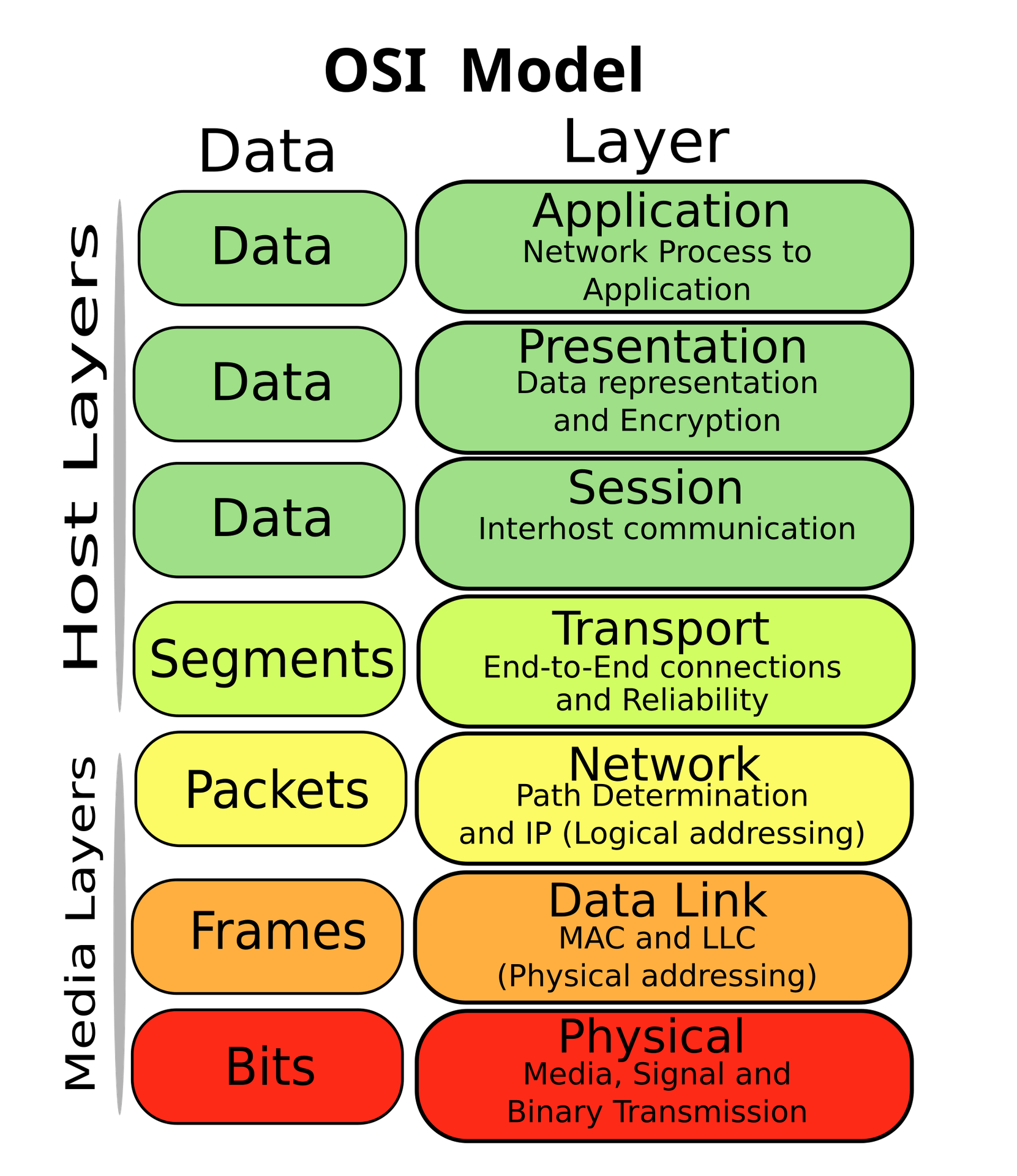
| Layer | Its one job | Data unit | Who owns it at HostKid |
|---|---|---|---|
| 7 Application | Speak the language of the app: HTTP, SMTP, DNS | Data | Product engineering, customers |
| 6 Presentation | Formatting and encryption representation | Data | Usually folded into TLS discussions |
| 5 Session | Keeping a conversation open | Data | Rarely discussed on its own |
| 4 Transport | Deliver reliably to the right program: TCP, UDP | Segment | Platform engineering |
| 3 Network | Find a path across networks: IP, routing | Packet | Infra IT |
| 2 Data link | Move it across one local link: Ethernet, MAC, VLAN | Frame | Infra IT |
| 1 Physical | Actual electrons and photons: cables, optics | Bits | Infra IT and the colo provider |
Encapsulation is the wrapping. Your data gets a TCP header, then an IP header, then an Ethernet header, like the nested boxes. Decapsulation is the receiver unwrapping it in reverse order. Every header is just a label saying "here is what the next machine needs to know."
Here is the same idea as a diagram you can hold in your head.
Why hosting people care
Because blame lives in layers. When a customer says "the site is slow," the only professional first question is which layer.
| Symptom the customer reports | Most likely layer | Who investigates first |
|---|---|---|
| Nothing works, link light is dark | 1 Physical | Infra IT, remote hands |
| Works inside the rack, not outside | 2 or 3, VLAN or routing | Infra IT |
| Small pages load, large uploads hang | 4, MTU or MSS | Platform engineering |
| Wrong site loads, or nothing resolves | 7, DNS | Support then DNS platform |
| Browser warns about security | 6 or 7, TLS certificate | Support then platform |
Here is how I use layers in real life: I do not recite them. I walk up from the bottom. Is the cable up? Does the local network see it? Does it route? Does the port answer? Does the name resolve? Does the certificate validate? Does the app respond? The first "no" is your bug.
2. Layer 2: the local conversation
The analogy: an open plan office
Picture one big office room with thirty desks and no walls.
If you stand up and shout "Who is Ahmed?", everyone hears you. That room is a broadcast domain: one shout reaches everybody in it.
Now add a receptionist at the door who, over time, memorizes which desk each person sits at. When a letter arrives for Ahmed, she walks it straight to his desk instead of shouting. That receptionist is a switch.
MAC address: a permanent hardware identifier burned into a network card, like a person's face. Unique, but only useful if you are in the same room.
Broadcast domain: the set of devices that hear each other's shouts. One VLAN equals one broadcast domain.
Switch: a device that learns which MAC lives on which port, then forwards frames only where they need to go.
MAC versus IP, the confusion that never dies
This one tripped me up for embarrassingly long, so let me give you the sentence that fixed it.
Your MAC address is your face. Your IP address is your mailing address. Your face never changes and only helps people who can see you. Your address changes when you move, and it is the only thing that works from another country.| MAC address | IP address | |
|---|---|---|
| Looks like | 00:0d:9d:86:59:e5 | 192.168.168.7 |
| Assigned by | The manufacturer | Your network administrator or DHCP |
| Scope | One local link only, never routed | Global, routable across the world |
| Changes when you move networks | No | Yes |
The Ethernet frame: the envelope of the local network
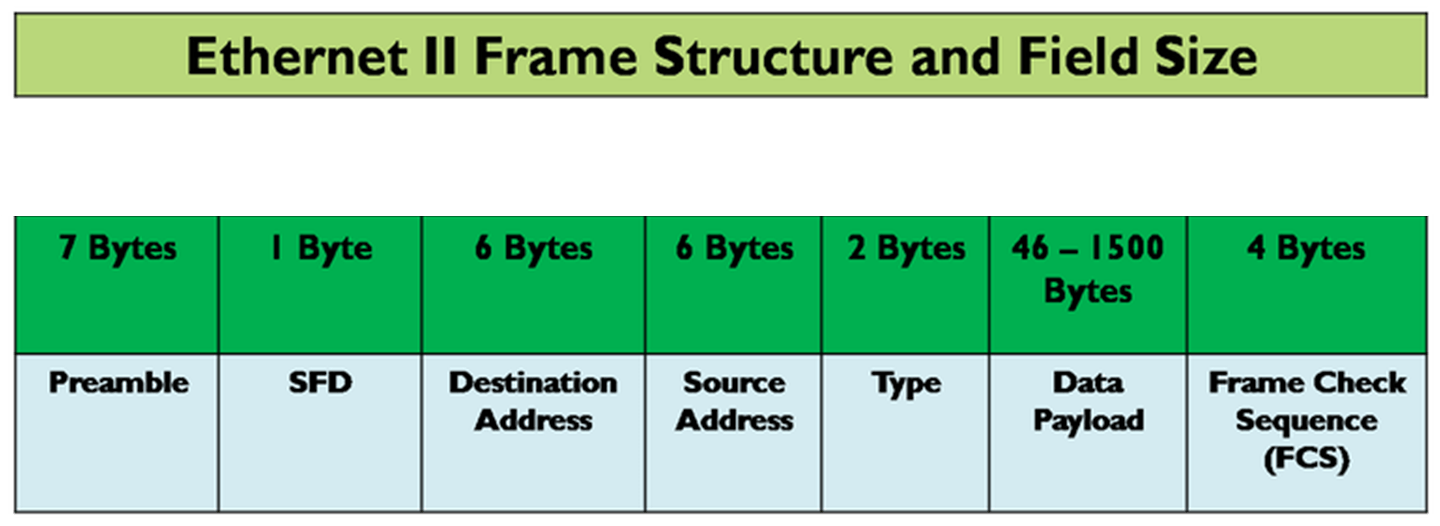
Notice the order. Destination address comes first. That is not an accident. A switch can start forwarding as soon as it reads the first field, without waiting for the whole frame. Networking is full of small decisions like this that exist purely for speed.
ARP: how a name becomes a face
Your computer knows it wants to reach 192.168.168.7. But to put a frame on the wire, it needs a MAC address. So it shouts.
That shout is called ARP, the Address Resolution Protocol. It literally says: who has 192.168.168.7? Tell 192.168.168.101.
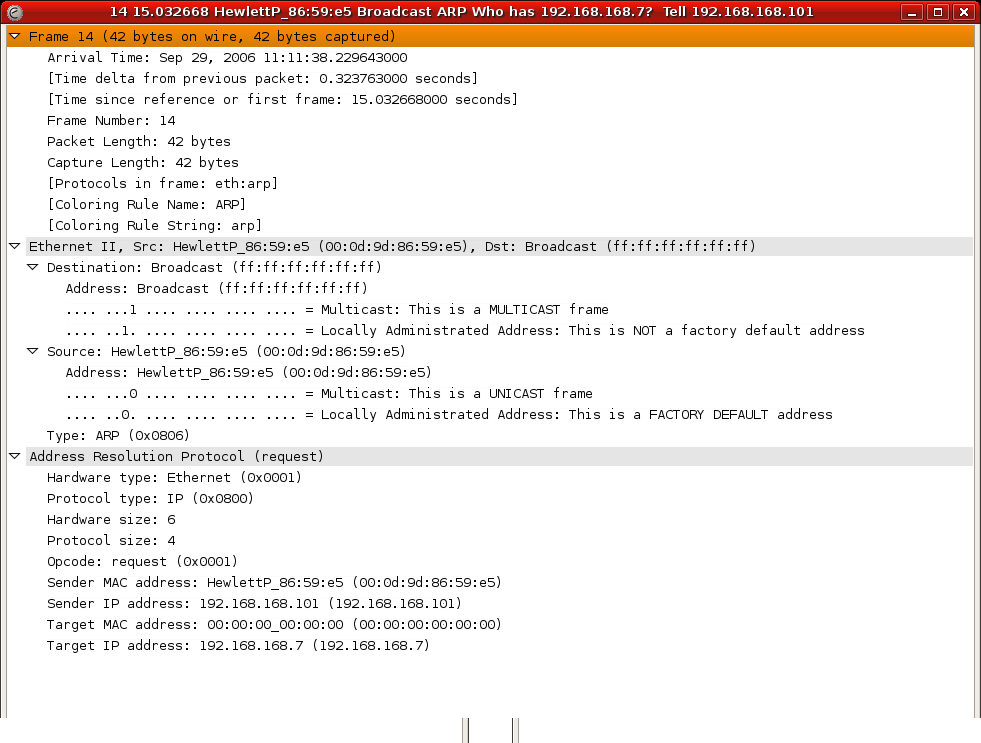
Look at that destination MAC: ff:ff:ff:ff:ff:ff. All ones. That is the address for everybody, the shout across the room.
That table is your machine's memory of "which face belongs to which address in this room." It expires on purpose, because people change desks.
ARP has no authentication whatsoever. If I shout "I am 192.168.1.1" loudly enough, your machine believes me and sends me your traffic. That attack is called ARP spoofing, and it is exactly why the switch level controls in Doc 4 exist: DHCP snooping, dynamic ARP inspection, and IP source guard. In a hosting company you rent machines to strangers on shared wires. Assume someone will try.
The hosting takeaway: layer 2 mistakes take down entire racks, because everyone in a broadcast domain shares the blast radius. Layer 3 mistakes usually take down one subnet. That asymmetry is why we obsess over VLAN design in Doc 3.
3. Layer 3: IP addressing and the math you cannot dodge
The analogy: a street address
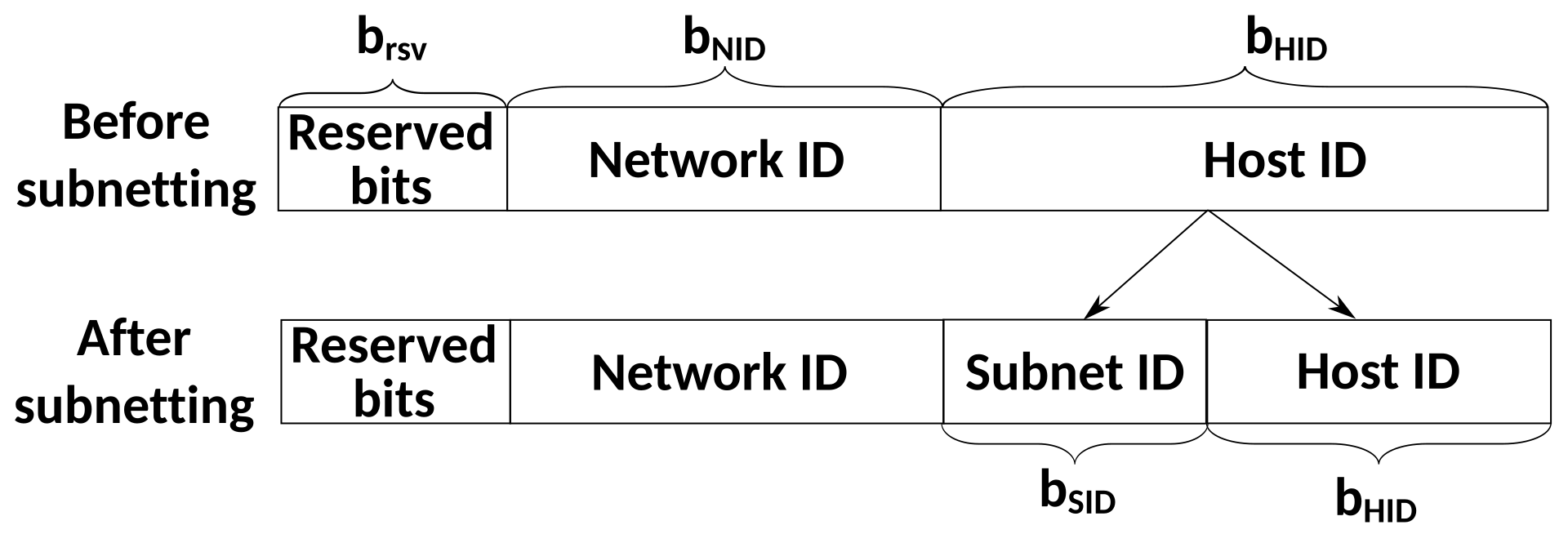
10.20.30.40 is a street address. Part of it says which neighborhood, and part of it says which house.
The trick nobody explains clearly at first: the address itself does not tell you where the split is. You need a second piece of information, the subnet mask, to know how much of the address is neighborhood.
This is the part I found genuinely strange at the beginning. An IP address alone is incomplete information. 10.20.30.40 means almost nothing on its own. 10.20.30.40/24 is a complete thought, because now I know the first 24 bits are the neighborhood and the last 8 bits are the house number.
The technical truth
An IPv4 address is 32 bits, written as four numbers of 8 bits each, so each number lands between 0 and 255.
CIDR notation, decoded once and for all
The number after the slash is how many bits belong to the network.
| Notation | Subnet mask | Total addresses | Usable hosts | Typical use at HostKid |
|---|---|---|---|---|
/30 | 255.255.255.252 | 4 | 2 | A point to point link between two routers |
/29 | 255.255.255.248 | 8 | 6 | A small block of public IPs sold to a customer |
/24 | 255.255.255.0 | 256 | 254 | One management VLAN, or the smallest globally routable block |
/22 | 255.255.252.0 | 1024 | 1022 | The largest single allocation some registries still issue |
/16 | 255.255.0.0 | 65536 | 65534 | The private management space we carve pods out of |
In every normal subnet, two addresses are reserved. The first address identifies the network itself, and the last is the broadcast address, the shout to everybody. Think of a street where house number 0 is the street sign and the highest number is the town crier. Neither is a house you can live in.
Doing it by hand, the way you will be asked in an interview
Take 192.168.10.0/24 and split it into four equal pieces. Borrow two bits, because two bits give you four combinations. /24 plus 2 becomes /26.
| Subnet | Network address | First usable | Last usable | Broadcast |
|---|---|---|---|---|
| 1 | 192.168.10.0/26 | 192.168.10.1 | 192.168.10.62 | 192.168.10.63 |
| 2 | 192.168.10.64/26 | 192.168.10.65 | 192.168.10.126 | 192.168.10.127 |
| 3 | 192.168.10.128/26 | 192.168.10.129 | 192.168.10.190 | 192.168.10.191 |
| 4 | 192.168.10.192/26 | 192.168.10.193 | 192.168.10.254 | 192.168.10.255 |
The trick that made subnetting click for me: stop thinking in bits and think in block size. A /26 has a block size of 64, so the subnets start at 0, 64, 128, 192. A /28 has a block size of 16, so they start at 0, 16, 32, 48 and so on. Find the block size and you can subnet in your head at a whiteboard.
Block size is simply 256 minus the last octet of the mask. For /26 the mask is 255.255.255.192, and 256 - 192 = 64. Done.
The special ranges you must recognize on sight
| Range | Name | Why you care |
|---|---|---|
10.0.0.0/8, 172.16.0.0/12, 192.168.0.0/16 | Private, RFC 1918 | Not routable on the internet. This is where our management and storage VLANs live. |
127.0.0.0/8 | Loopback | The machine talking to itself. 127.0.0.1 is home. |
169.254.0.0/16 | Link local | Memorize this one. CloudStack uses link local addressing for the private channel between a hypervisor and its system VMs. |
100.64.0.0/10 | Carrier grade NAT | Shared address space for providers who ran out of public IPv4. |
224.0.0.0/4 | Multicast | One sender, many listeners. CloudStack VXLAN in multicast mode depends on it. |
The IP header: the shipping label
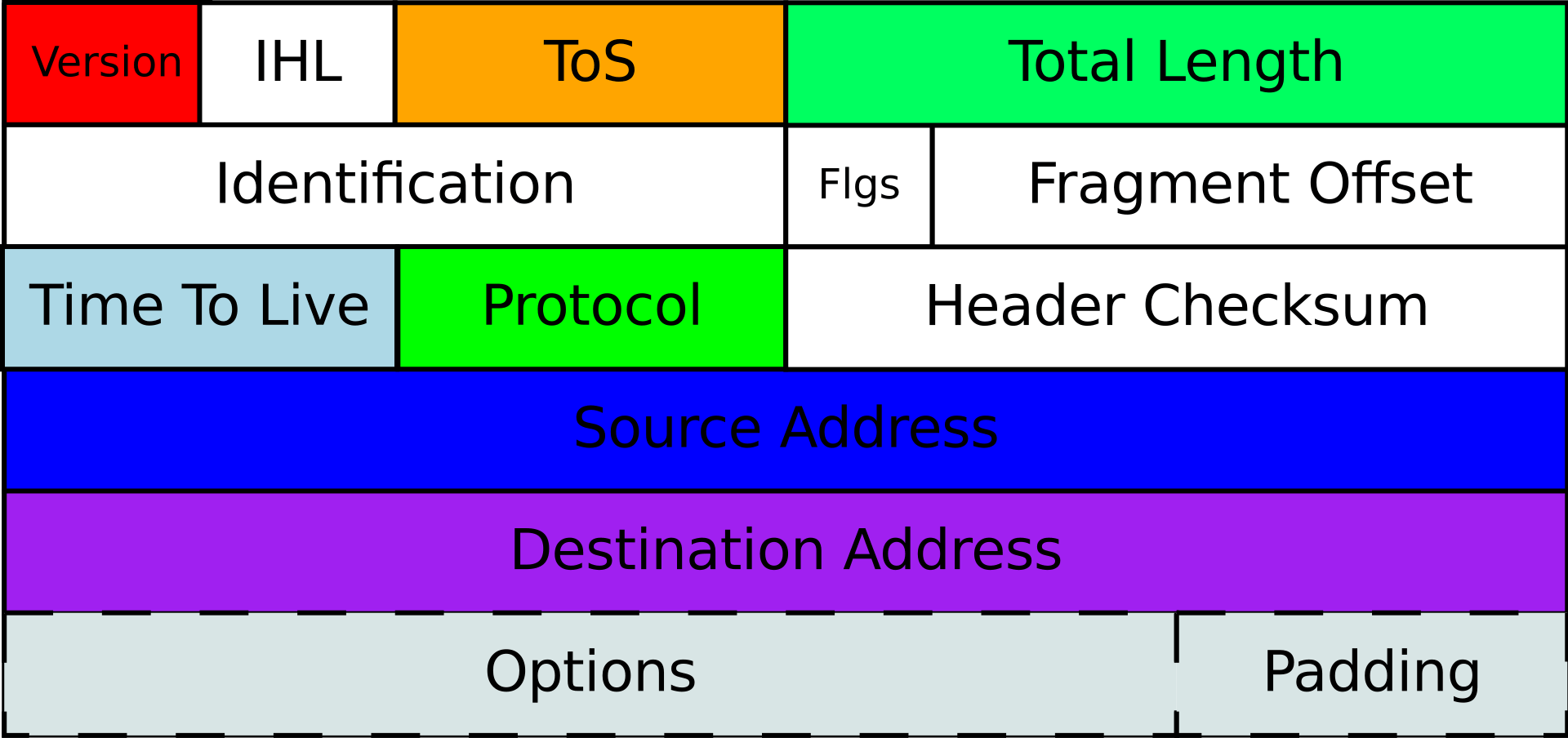
Three fields deserve your attention right now, because they come back later in this doc:
| Field | Plain meaning | Where it bites you |
|---|---|---|
| TTL, time to live | A hop counter that decreases by one at every router, then the packet dies | This is the entire mechanism behind traceroute, and it prevents packets looping forever |
| Flags and fragment offset | Whether this packet may be cut into pieces, and where this piece belongs | The MTU black hole problem later in this doc |
| Protocol | What is inside: TCP, UDP, ICMP | Firewall rules match on this constantly |
IPv6, briefly, because it is not optional anymore
IPv6 is 128 bits instead of 32. Written in hexadecimal groups separated by colons, with a rule that lets you compress one run of zero groups into ::.
| Concept | IPv4 | IPv6 |
|---|---|---|
| Address size | 32 bits | 128 bits |
| Standard subnet for a network | Varies, often /24 | Always /64, by convention and by protocol design |
| Typical customer allocation | One address, maybe a /29 | A whole /48, which is 65536 subnets |
| Link local | 169.254.0.0/16, rarely used | fe80::/10, used constantly and automatically |
| NAT | Everywhere, out of necessity | Not needed, and generally an anti pattern |
In IPv4 you count addresses like a miser, because there are none left. In IPv6 you count subnets, and you are generous on purpose. Handing a customer a /48 feels wasteful until you accept that there are more IPv6 addresses than grains of sand on earth. Doc 2 turns this into an actual allocation plan.
One IPv6 warning that costs people days: do not block all ICMPv6 the way people used to block ICMP in IPv4. IPv6 needs it for neighbor discovery and for path MTU discovery. Block it and things half work, which is the worst failure mode there is.
4. Routing: how a packet crosses the world without a map
The analogy: road signs, not a GPS
Here is the single most beautiful idea in networking, and most people get it backwards.
You are driving from Tunis to Berlin. You do not have the full route memorized. At every intersection you read a sign, and the sign only tells you one thing: which way to go next. Then you drive to the next intersection and read the next sign.
No single road sign knows the whole path. Each one only knows the next hop. And yet you arrive.That is IP routing, exactly. A router does not know the route to your destination. It knows one next hop, and it trusts that the next router knows more than it does.
Router: a device with feet in two or more networks, whose job is to move packets between them.
Routing table: the list of road signs a router has memorized.
Default gateway: the sign that says "everything else, go this way." Your escape hatch for destinations you have never heard of.
The trick nobody tells you first: longest prefix match
A router often has several signs that all match your destination. Which one wins?
The most specific one. Always.
| Route in the table | Meaning in plain words | Specificity |
|---|---|---|
0.0.0.0/0 | Everything in the universe, go this way | Least specific, the fallback |
10.0.0.0/8 | Anything starting with 10, go this way | More specific |
10.20.0.0/16 | Anything starting with 10.20, go this way | Even more specific |
10.20.30.40/32 | This exact single machine, go this way | Most specific, always wins |
Here is how I remember longest prefix match: imagine two road signs at the same intersection. One says "Tunisia" and the other says "Tunis city center." If you are going to Tunis city center, you follow the second sign, because whoever wrote it clearly knew more about your specific destination.
Read that carefully, because it is a complete lesson in three commands. The machine has three signs. Traffic for 10.20.30.40 matched the /16 sign and went to 10.10.0.254. Traffic for 8.8.8.8 matched nothing specific, so it fell through to default and went to 10.10.0.1. That is the entire algorithm.
Seeing the hops with your own eyes
Remember TTL, the hop counter in the IP header? traceroute abuses it brilliantly. It sends a packet with TTL 1, which dies at the first router and generates a complaint. Then TTL 2, which dies at the second. Every complaint reveals one more router along the path.

A single hop showing * * * is usually not a problem. Many routers deliberately deprioritize or drop the ICMP complaints that traceroute depends on, while forwarding real traffic perfectly. What matters is whether latency stays high for every hop after that point. High latency at one hop that recovers afterwards is a router being busy answering you, not a broken path.
Static versus dynamic routing
You type the routes in by hand.
Good for: small, stable networks. Management VLANs. The link between your rack and the colo provider on day one.
Bad for: anything that must survive a failure automatically. A static route does not know its next hop is dead. It will keep confidently pointing traffic into a black hole.
The hosting reality check: until we have our own ASN and BGP sessions, we are a customer of somebody else's network, and our IP addresses are borrowed. The day we announce our own prefix, we become a participant in the internet's routing conversation. That is a genuine business milestone, not a technical detail.
5. NAT: the hotel front desk
The analogy that is so good it is basically the truth
A hotel has one public phone number. Two hundred guests inside have room extensions that mean nothing to the outside world.
When a guest calls out, the world sees the hotel's number. When someone calls in and asks for a guest, the receptionist looks in her notebook and connects the call to the right room. The receptionist's notebook is the only reason any of this works.
NAT is the receptionist. The notebook is called the translation table. That is the whole concept.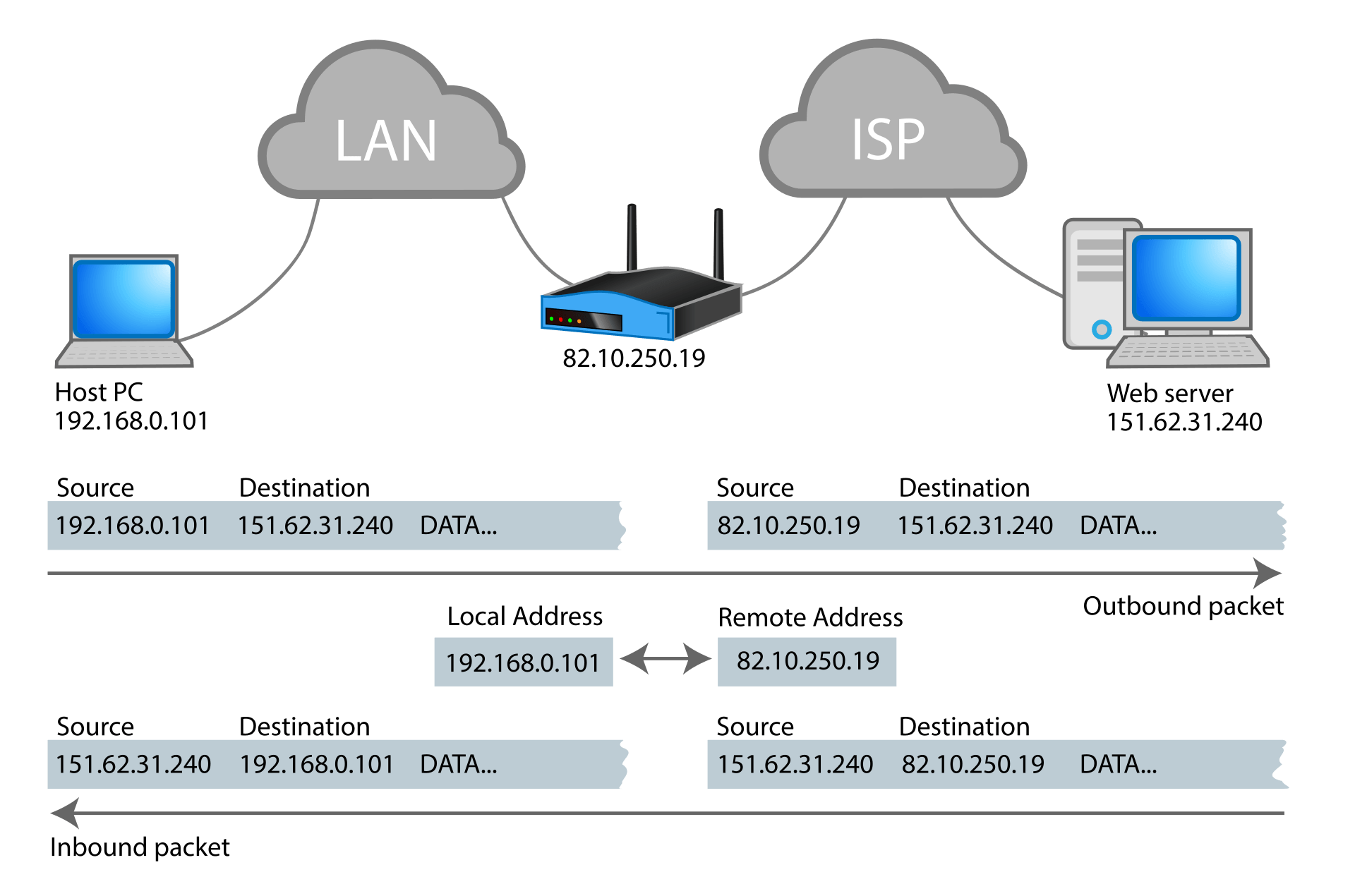
Why NAT exists at all
Because IPv4 ran out of addresses. There are about 4.3 billion of them and far more devices than that. NAT was the emergency plumbing that let the internet keep growing past its own address limit, and thirty years later the emergency plumbing is load bearing infrastructure.
The flavours, and the names people mix up
| Name | What it rewrites | Hotel analogy | Where we use it |
|---|---|---|---|
| SNAT, source NAT | The source address of outbound packets | Guest calls out, the world sees the hotel number | Customer VMs reaching the internet to fetch updates |
| DNAT, destination NAT | The destination address of inbound packets | Reception forwards an incoming call to room 412 | Publishing a customer web service on a public IP |
| PAT, also called NAT overload or masquerade | Source address and source port | Many guests share one number, tracked by call ticket | The default for a whole guest network sharing one public IP |
| Static NAT, one to one | A whole address, both directions | A guest gets a dedicated direct line | A customer paying for a dedicated public IP |
| Port forwarding | One port on a public IP to one port on a private IP | Extension 8080 always rings the kitchen | Exposing a single service without a dedicated IP |
Hairpin NAT, also called NAT loopback, is when a machine inside your network tries to reach your own public IP address. The packet leaves, hits the router, and has to be bent back inside. It is a guest in room 412 dialling the hotel's public number and asking for room 415.
Many routers get this wrong by default, and the symptom is beautifully confusing: the website works for everyone on the internet but not for the customer sitting inside their own network. If you ever hear that sentence in a support ticket, hairpin NAT should be your first suspicion.
The consequence you must internalize
NAT is not a firewall, but it accidentally behaves like one, and that confusion has caused real breaches.NAT blocks unsolicited inbound connections as a side effect of not having an entry in the notebook, not as a security decision. It has no policy, no logging intent, and no concept of allow or deny. Treating NAT as your security boundary is like treating a locked front door as a fire alarm. Related, but not the same job.
Every NAT translation is a row in a state table that must be held in memory for the life of the connection. Under a connection flood, that table fills, and when it fills your router stops translating for everybody. This is why the CloudStack Virtual Router is a capacity planning item and not just a checkbox, and why Doc 5 treats NATTED versus ROUTED network modes as an architectural decision with real money attached.
6. Layer 4: ports, sessions, and the packet size problem
The analogy: apartment numbers
An IP address gets you to the building. It does not get you to the right apartment.
203.0.113.10 is the building. Port 443 is the apartment where the web server lives. Port 25 is where the mail server lives. Port 22 is where SSH lives.
Here is how I explain a socket to people who are new: a socket is the full delivery instruction. Not just the building, and not just the apartment, but both ends of the conversation at once: your address and port, plus their address and port. Four pieces of information. That is why a thousand people can browse the same website simultaneously without their pages getting mixed up. Each conversation has a unique combination.
| Port | Service | Why a hosting company cares |
|---|---|---|
| 22 | SSH | Administration. Should never be open to the whole internet. |
| 25 | SMTP between mail servers | Often blocked outbound by providers to fight spam. |
| 53 | DNS, both UDP and TCP | Yes, TCP too. Large answers and DNSSEC need it. |
| 80 and 443 | HTTP and HTTPS | The revenue ports. |
| 587 | SMTP submission from users | The port customers should actually use to send mail. |
| 8080 and 8443 | CloudStack console websocket | Miss these and the customer console shows a black screen. |
TCP versus UDP: registered mail versus a postcard
You send a registered letter. The post office confirms delivery, in order, and resends anything lost.
TCP guarantees: every byte arrives, in the right order, exactly once. If something is lost, it is retransmitted. If the network is congested, TCP slows itself down voluntarily.
The cost: a setup conversation before any data moves, plus bookkeeping for the whole connection.
Used by: HTTP, HTTPS, SSH, SMTP, database connections. Almost everything you sell.
The three way handshake: can you hear me?
Before TCP sends any data, both sides confirm they can hear each other. It is exactly the awkward start of a phone call.
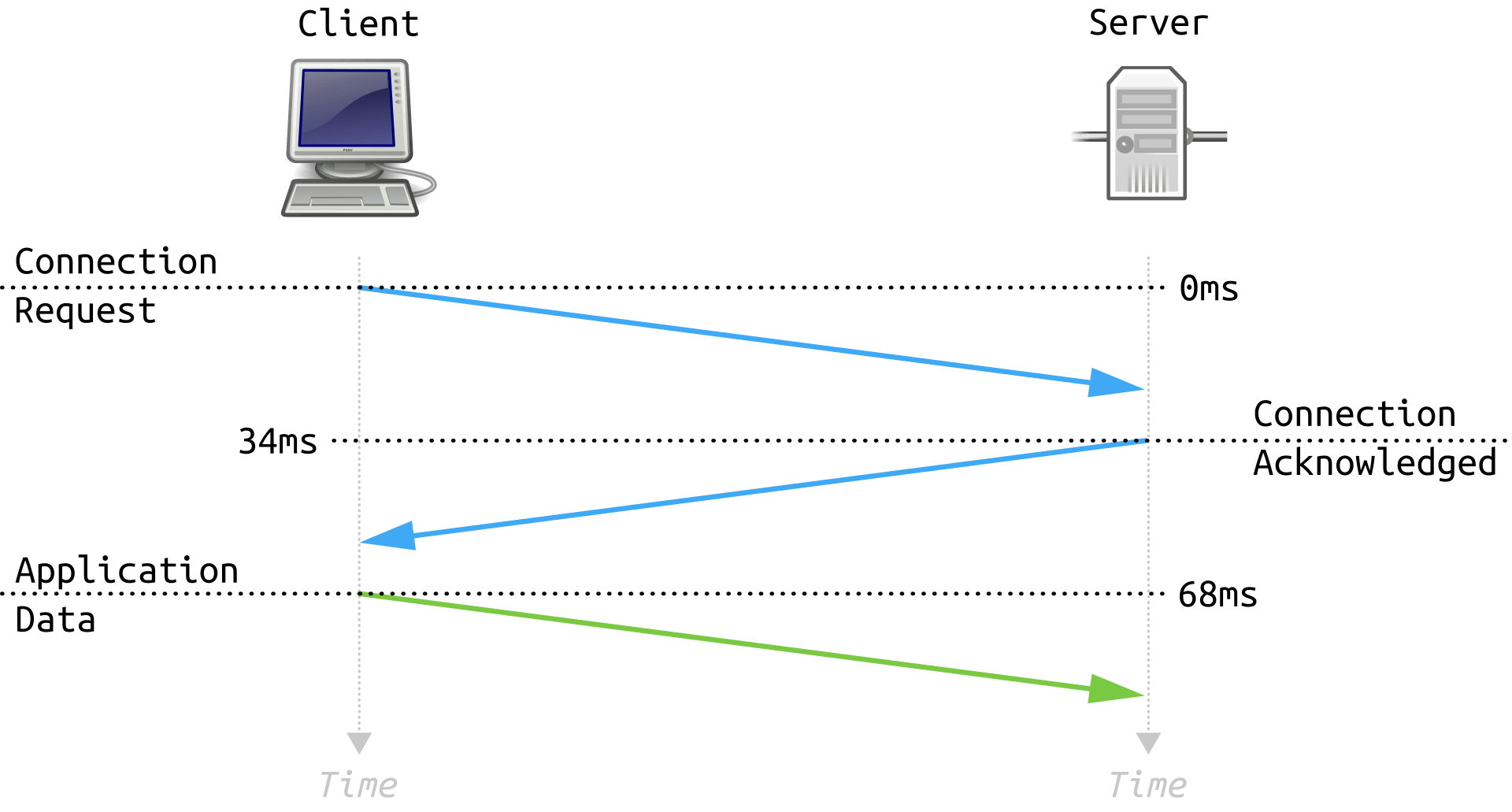
| Step | Technical name | What it means in human words |
|---|---|---|
| 1 | SYN | "Hello, can you hear me? Here is where my numbering starts." |
| 2 | SYN plus ACK | "I hear you. Can you hear me? Here is where my numbering starts." |
| 3 | ACK | "I hear you. Let us talk." |
Look at the timestamps. The handshake burned 68 milliseconds before any content moved. Then TLS adds its own round trips on top. This is why physical distance to your customers matters, why connection reuse matters, and why HTTP/3 fought so hard to collapse these round trips. Latency is not a number in a dashboard. It is round trips multiplied by the speed of light through glass.
Notice 127.0.0.1:3306. MySQL is listening on loopback only, so the outside world cannot reach it at all. Compare that with nginx on 0.0.0.0:443, which means every interface. That single difference between 127.0.0.1 and 0.0.0.0 is one of the most common real breaches in shared hosting. A database bound to all interfaces on a machine with a public IP is an open database.
MTU and MSS: the doorway problem
The analogy: moving a sofa through a doorway
You bought a sofa. The doorway is one metre wide. If the sofa is wider, you have three options: cut it into pieces, find another door, or give up.
MTU, maximum transmission unit: the widest packet a link will carry. Standard Ethernet is 1500 bytes.
MSS, maximum segment size: how much actual payload fits after the headers take their cut. On a 1500 byte MTU with IPv4 and TCP, that is typically 1460 bytes.
Jumbo frames: a deliberately wider doorway, usually 9000 bytes, used on storage networks where you move large blocks and want fewer headers per megabyte.
If a packet is too big for the next link, the router may cut it into pieces. That is fragmentation.
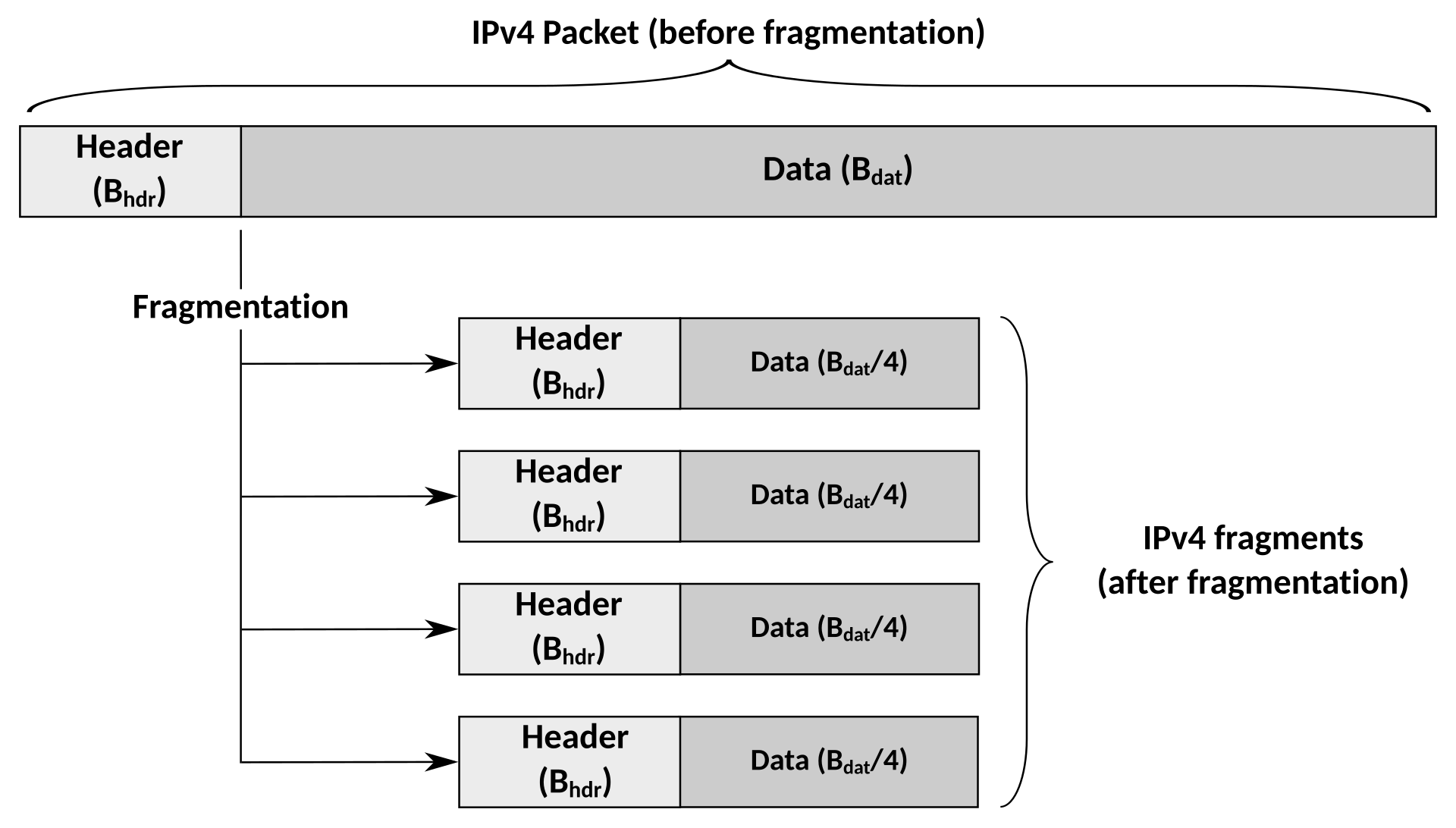
The MTU black hole, and why it is the meanest bug in networking
Here is the failure mode that has personally cost me an evening, and I want you to recognize it in five minutes instead.
Modern senders set a flag called do not fragment and rely on Path MTU Discovery: when a packet is too big, the router is supposed to send back an ICMP message saying "too big, try smaller." The sender then sends smaller. Elegant.
Now imagine a firewall in the middle that blocks all ICMP because someone read a blog post in 2003 saying ICMP is dangerous.
At first I found this genuinely strange, and here is the trick that made it click: the sender is not told anything. It sends a big packet, gets silence, assumes the packet was simply lost, and retries the same big packet forever. Meanwhile small packets sail through perfectly.
The symptom is unforgettable once you have seen it:
| What the customer says | What is really happening |
|---|---|
| "Ping works fine" | Ping is tiny. Tiny packets fit. |
| "The login page loads" | Small response. Fits. |
| "But the dashboard hangs forever" | Large response. Too big, silently dropped, retried forever. |
"And SSH connects but freezes on ls" | The handshake is small, the directory listing is not. |
The -M do flag means do not fragment, and -s sets the payload size. Add 28 bytes for the IP and ICMP headers to get the real packet size. The largest size that succeeds, plus 28, is your true path MTU. Binary search between 1200 and 1500 and you will find the ceiling in about six tries.
Any time you wrap traffic in another header you shrink the usable space inside. VXLAN adds about 50 bytes. GRE adds 24. IPsec adds more. So a customer VM configured with a 1500 byte MTU, running inside a VXLAN overlay on a physical network that is also 1500, is already over budget before it sends anything interesting. Either the physical fabric carries jumbo frames or you clamp the guest MTU. Doc 5 makes this an explicit, written down number rather than a discovery you make at 2 in the morning.
7. DNS: the internet's phone book, and the source of most outages
The analogy: asking for directions in a city you do not know
You are looking for a specific office. You do not have a map. So you ask.
You ask a police officer at the city entrance. He does not know the office, but he says "that is in the business district, ask the guard at the business district gate."
You ask the district guard. He does not know the office either, but he says "that building belongs to the Acme company, their reception knows."
You ask Acme reception. She says "third floor, room 12." Exact answer.
Three questions, three partial answers, one exact result. Nobody knew everything, and everybody knew who to ask next. That is DNS.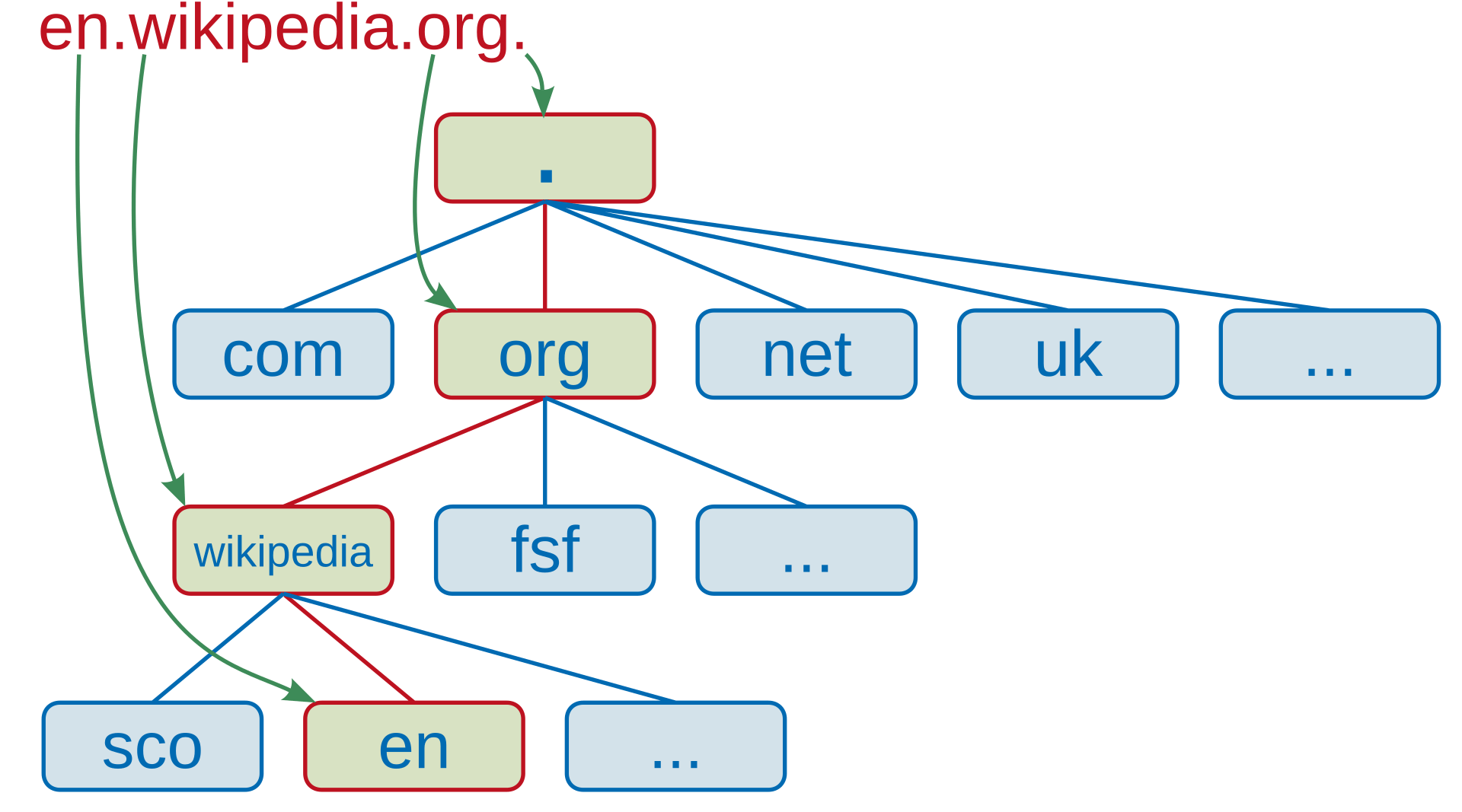
Reading a domain name backwards
This is the detail that reorganizes everything in your head once you see it.

At first I found this genuinely strange, and here is the trick to understand it: read domain names right to left, like an address, because that is the order DNS actually resolves them in.
www.shop.example.com is not "a website called www dot shop dot example dot com." It is:
| Read in this order | Part | What it is | Who controls it |
|---|---|---|---|
| 1st, invisible | The trailing dot | The root of the entire DNS tree | The root server operators |
| 2nd | com | Top level domain, the TLD | The registry for .com |
| 3rd | example | The registered domain | The customer, through a registrar |
| 4th | shop | A subdomain | Whoever runs the zone, which is often us |
| 5th | www | A hostname inside that subdomain | Same |
Yes, the trailing dot is real. example.com. is the fully correct form. Browsers hide it and everyone forgets it exists until they write a zone file and it starts to matter enormously.
Recursive versus authoritative: two completely different jobs
This distinction is worth real money, because a hosting company usually operates both and they fail in different ways.
The assistant who does the asking for you.
Your laptop does not ask the root servers anything. It asks its configured resolver, and the resolver does all the walking: root, then TLD, then authoritative, then hands you the final answer and remembers it for next time.
Who runs one: internet providers, Google at 8.8.8.8, Cloudflare at 1.1.1.1, and us for our own infrastructure.
How it fails: slowly and confusingly, usually through stale cache. Also a favourite target for amplification attacks if you leave it open to the world.
The record types you will type every single week
| Record | Answers the question | Example value | Watch out for |
|---|---|---|---|
| A | Which IPv4 address? | 203.0.113.10 | The workhorse. Most tickets involve this record. |
| AAAA | Which IPv6 address? | 2001:db8::10 | If it exists but IPv6 is broken, modern browsers try it first and the site feels slow. |
| CNAME | What is this name an alias for? | shop.example.com | Cannot exist at the root of a domain. This trips up almost everyone once. |
| MX | Where does email for this domain go? | 10 mail.example.com | The number is priority, and lower wins. It must point at a hostname, never an IP. |
| TXT | Any free text, in practice policy | v=spf1 ... | Where SPF, DKIM, DMARC, and domain ownership proofs live. |
| NS | Which servers are authoritative here? | ns1.hostkid.tn | This is the record that performs delegation. |
| PTR | Which name belongs to this IP? | mail.example.com | Reverse DNS. Owned by whoever owns the IP block, which is us. Critical for email. |
| SOA | Who is in charge of this zone and how fresh is it? | Serial, refresh, expiry values | The serial number must increase or your secondary servers will not update. |
| CAA | Which certificate authorities may issue for this domain? | 0 issue "letsencrypt.org" | Cheap, underused protection against unauthorized certificate issuance. |
One: dig +trace walks the tree from the root in front of you, so you see exactly which step of the delegation is broken instead of guessing.
Two: dig @ns1.example.com asks the authoritative server directly, bypassing every cache on earth. If the authoritative answer is correct but the customer sees the old one, you have proven the problem is caching, and the correct action is to wait rather than to change things in a panic.
TTL: the note on your fridge
TTL is how many seconds a resolver is allowed to keep an answer before asking again. It is a note on your fridge with an expiry time written on it.
Here is the operational rule I follow, and it has saved every migration I have done: lower the TTL before you change anything, not after. If a record has a TTL of 86400 seconds, that is 24 hours during which the old answer keeps being served to people who already cached it. Dropping the TTL to 300 a full day before the migration means that when you finally flip the record, the world follows you in five minutes.
| TTL value | In human time | When to use it |
|---|---|---|
| 300 | 5 minutes | During a planned migration, or for records that fail over |
| 3600 | 1 hour | A sensible default for records that change occasionally |
| 86400 | 24 hours | Stable records like NS and MX, where caching is a feature |
Delegation and glue records
Delegation is a parent zone saying "I am not the authority for this subtree, go ask those servers instead." It is done with NS records.
Now here is the chicken and egg problem that glue records solve, and it is a genuinely fun one.
Suppose example.com is served by ns1.example.com. To find the address of ns1.example.com, you would need to ask the servers for example.com. But that is the server you are trying to find. Infinite loop.
Glue records break it. The parent registry stores the actual IP addresses of the name servers alongside the delegation, so the answer arrives before the loop can form. When you set up your own branded name servers at a registrar, registering glue is the step people forget, and the symptom is a domain that resolves for nobody at all.
Reverse DNS, because email depends on it
Forward DNS turns a name into an address. Reverse DNS turns an address back into a name, and it is essentially caller ID.
The critical ownership point: reverse DNS is controlled by whoever owns the IP block, not by whoever owns the domain. Which means once HostKid has its own IP space, we control reverse DNS for every customer on it, and we become responsible for it. Mail servers around the world check that a sending IP has a sensible reverse name that matches forward DNS. Get it wrong and customer email lands in spam folders through no fault of the customer.
DNS is the most common cause of "the website is down" and almost never the actual cause of the website being down. The web server is usually fine. The name is what broke: an expired domain, a stale cache, a missing delegation, a typo in a zone file, a serial number that did not increase, a registrar that never got paid.
This is exactly why the DNS platform gets its own dedicated volume later. For now, the reflex to build: when something is unreachable, resolve the name and connect by IP address separately. Those two tests split the entire problem space in half in about ten seconds.
8. TLS: the sealed envelope and the ID check
The analogy: two jobs, not one
People think HTTPS means "encrypted." That is only half of it, and the missing half is the interesting one.
Imagine sending a confidential letter. You need two things:
- A sealed envelope, so nobody along the way can read it. That is encryption.
- Proof that the person receiving it is really who they claim to be. That is authentication.
Encryption without authentication is worthless. A perfectly sealed envelope delivered to an impostor is a perfectly secure delivery of your secrets to an attacker. This is why the certificate part of TLS matters as much as the cipher part.
The certificate: a passport, not a padlock
A certificate is a document that says "this public key belongs to example.com," signed by an authority that browsers already trust.
| Passport analogy | TLS reality |
|---|---|
| Your passport | The server certificate, naming the domain |
| The regional office that printed it | The intermediate certificate authority |
| The national government everyone recognizes | The root certificate authority, pre installed in your browser |
| Border control checking the chain of issuers | The browser validating the chain of trust up to a root it already has |
| An expiry date on the document | Certificate validity, now usually 90 days or less |
"It works in my browser but my phone app says the certificate is invalid."
Almost always the cause is a missing intermediate certificate. Desktop browsers often cache intermediates from previous visits and quietly paper over the mistake. Strict clients like mobile apps and command line tools do not. The server must send the full chain, meaning the leaf certificate plus every intermediate, in the right order. Never assume it works because Chrome on your laptop is happy.
The handshake
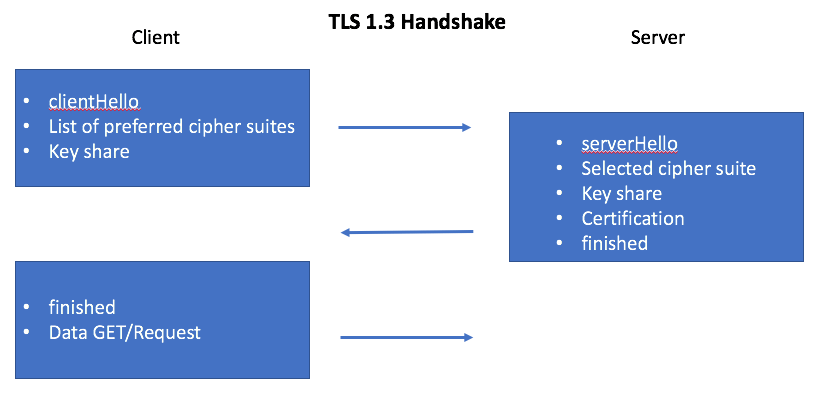
In plain words:
| Message | Human translation |
|---|---|
ClientHello | "Hello. Here are the encryption methods I speak, and here is my half of a shared secret." |
ServerHello plus certificate | "Let us use this method. Here is my half of the secret, and here is my passport proving I am who I claim." |
Finished on both sides | "We both computed the same key. Everything after this line is sealed." |
Here is the part that felt like actual magic to me until I understood it: the two sides never send the secret key across the network. They each send a public half, and both independently compute the same shared secret from their own private half plus the other side's public half. Someone recording the entire conversation still cannot derive the key. That mechanism is called a key exchange, and it is the reason the internet can have commerce at all.
SNI: the doorman question
One server, one IP address, five hundred customer websites, each with its own certificate. Which certificate should the server present?
The server cannot know from the IP address alone, and it cannot read the HTTP request yet, because the HTTP request has not been decrypted yet. Chicken and egg again.
SNI, Server Name Indication, is a field in the very first ClientHello where the client says which hostname it is trying to reach, in the clear, before encryption begins. The doorman asks "which apartment are you visiting?" so the right key can be brought to the door.
Without SNI there is no shared hosting with HTTPS. Every site would need its own IP address. SNI is the single feature that makes our entire shared hosting economics possible.
ACME and Let's Encrypt: certificates as a robot job
Certificates used to cost money and involve email threads. Then Let's Encrypt made them free, and ACME made them a protocol a robot can perform.
The challenge is simply a proof of control:
| Challenge type | What you prove | Best for |
|---|---|---|
| HTTP-01 | You can place a specific file on the web server for that domain | Single hostnames. Simple. Needs port 80 reachable. |
| DNS-01 | You can create a specific TXT record in the domain's DNS | Wildcards, and servers not reachable from the internet |
| TLS-ALPN-01 | You control the TLS service on port 443 | Environments where port 80 is closed |
The operational reality nobody puts in the marketing: free certificates mean renewal is now an uptime dependency. A 90 day certificate that fails to renew is a scheduled outage you agreed to in advance. So renewal must be monitored as a first class alert, and the alert must fire at 30 days remaining, not at expiry. Expiry monitoring is not paranoia. It is the whole point.
Two things to read in that output every time. Verify return code: 0 (ok) means the chain validated, which is the check most people skip. And -servername is you manually supplying SNI, which is how you test a specific customer's certificate on a shared IP address.
HSTS, redirects, and mixed content
| Thing | What it does | The trap |
|---|---|---|
| HTTP to HTTPS redirect | Sends visitors who arrive on port 80 to the secure version | The very first request still travelled in the clear and could be intercepted |
| HSTS | Tells the browser "for the next N days, never even try plain HTTP for me" | Hard to undo. Browsers honour it for the full duration. Enable it with a short duration first and grow it. |
| Mixed content | An HTTPS page loading images or scripts over plain HTTP | Browsers block it, and the customer reports "my site looks broken after you installed SSL" |
Setting HSTS with includeSubDomains and a long duration on a customer domain is a commitment that every subdomain they will ever create must have a valid certificate. If they later add a subdomain without one, it becomes unreachable and there is no quick fix from our side. Powerful feature, and one that deserves a conversation before it is switched on.
9. HTTP: ordering food at a restaurant
The analogy
You sit down. You tell the waiter what you want. The waiter brings it, or brings you an explanation of why he cannot.
| Restaurant | HTTP |
|---|---|
| "I would like the couscous" | GET /couscous, the request line |
| "No salt, and I am allergic to nuts" | Request headers, extra instructions about the request |
| The waiter says "here you go" | Status code 200 |
| "That is not on the menu" | 404 Not Found |
| "The kitchen is on fire" | 500 Internal Server Error |
| "I asked the kitchen and got no answer" | 502 Bad Gateway |
| The actual plate of food | The response body |
HTTP is just text, and that is the best news in this whole document
This is the moment a lot of people stop being intimidated. Here is a real HTTP conversation typed by hand into a raw connection.
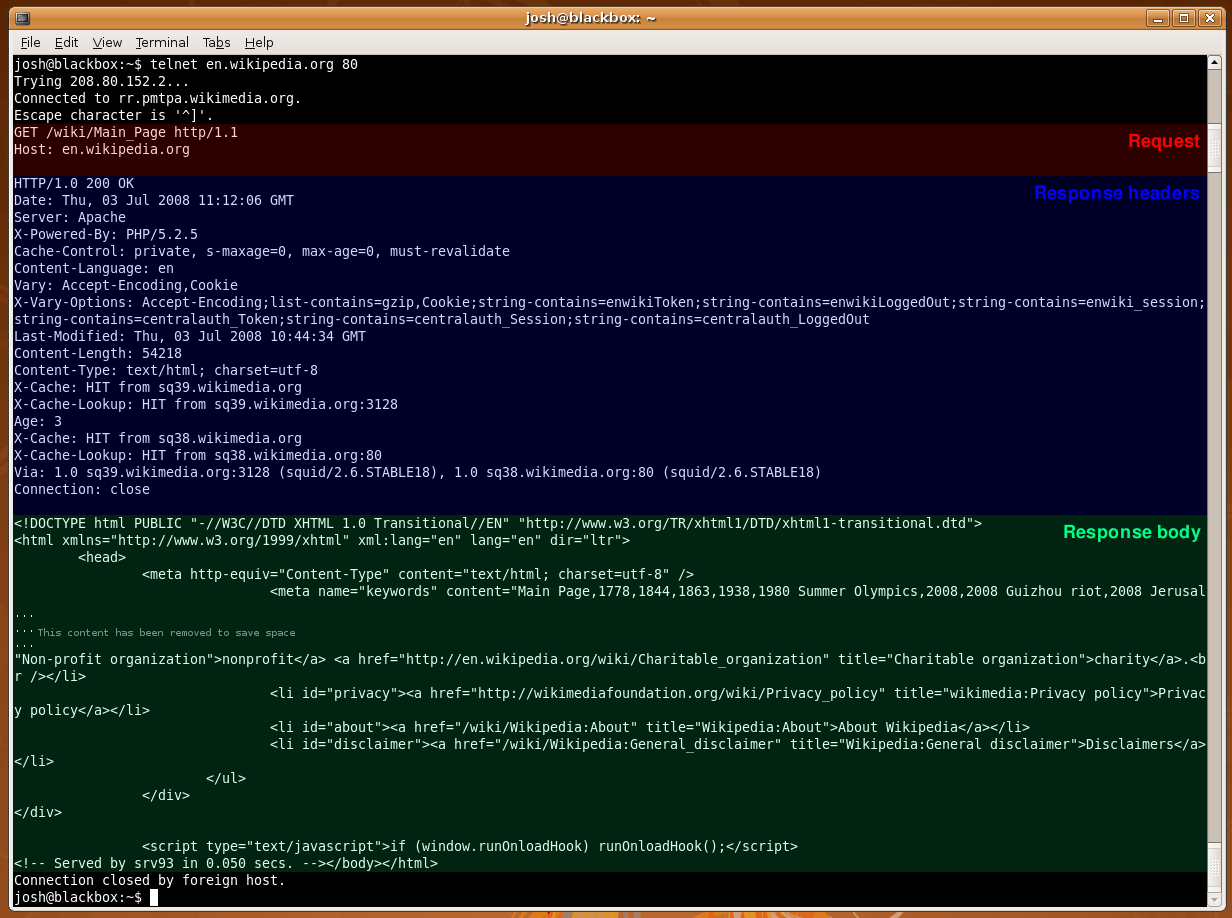
Two lines. That is the entire request. GET /wiki/Main_Page HTTP/1.1 and Host: en.wikipedia.org. Everything else in modern web performance is optimization layered on top of that.
Look at that second line again. Host: en.wikipedia.org.
The connection already reached the right IP address, so why repeat the name? Because one server hosts many websites on one IP. The Host header is how the server knows which of its five hundred sites you actually wanted. It is the plain HTTP equivalent of SNI, and it is the feature that makes shared hosting possible at all.
Status codes, grouped so you never memorize them again
| Family | Means | Whose fault | Ones you will actually see |
|---|---|---|---|
| 2xx | It worked | Nobody, celebrate | 200 OK, 201 Created, 204 No Content |
| 3xx | It moved, go there instead | Nobody, but check for loops | 301 permanent, 302 temporary, 304 unchanged |
| 4xx | You asked wrong | The client | 400, 401, 403, 404, 429 too many requests |
| 5xx | We broke | Us. This is the on call number. | 500, 502, 503, 504 |
These four look similar and mean completely different things. Knowing the difference cuts diagnosis time enormously.
500 Internal Server Error: the application itself crashed. The code is the problem. Check the application log.
502 Bad Gateway: the reverse proxy reached the backend, and the backend gave a broken or empty answer. The backend is probably down or crashing on start. Check whether the backend process is running.
503 Service Unavailable: the server is deliberately refusing right now, usually overload or maintenance mode. Check capacity and worker pool limits.
504 Gateway Timeout: the backend was reached and simply never finished answering in time. Almost always a slow database query or an external API hanging. Check slow query logs first.
The one line version I keep in my head: 500 means the code broke, 502 means the backend is dead, 503 means we are full, 504 means something is slow. Four different teams, four different first actions.
The versions, and why they exist
One conversation, one item at a time.
Each connection handles one request until it finishes. Browsers worked around this by opening six connections per site.
The problem: head of line blocking. One slow item stalls everything behind it in that queue. Like a supermarket lane where the person in front has a price check.
Keep-alive was the first fix: reuse the connection instead of paying the TCP and TLS setup cost again for every image.
That first command is the single most useful support command in this document. It breaks one page load into its phases, so you can tell exactly which layer is slow instead of arguing about it. Slow dns means the name lookup, which is section 7. Slow tcp means network distance or packet loss, which is sections 4 and 6. Slow tls means the handshake, which is section 8. Slow total with everything else fast means the application is the problem, and nothing about the network needs touching.
Reverse proxy and caching
A reverse proxy sits in front of your real servers and takes the requests on their behalf. It is the receptionist of the web tier.
| Job it does | Why it matters to us |
|---|---|
| Terminates TLS in one place | Certificates managed centrally instead of on every backend |
| Routes by hostname or path | Hundreds of customer sites behind one public IP |
| Caches responses | The cheapest performance win that exists, by a wide margin |
| Absorbs and rate limits abuse | The first line of defence in Doc 4 |
Adds X-Forwarded-For | Without it, every log entry shows the proxy's IP and you can never identify an attacker |
When you put a reverse proxy in front of an application, the application suddenly sees every request coming from the proxy's IP address. Your access logs become useless, your rate limiting punishes everybody equally, and your abuse investigation has nothing to work with.
The fix is to forward the real client address with X-Forwarded-For and configure the backend to trust that header only from the proxy. Trusting it from anywhere means an attacker can simply claim to be someone else, which turns your defence into a tool for framing innocent customers.
10. Email routing: the layer where reputation is currency
The analogy: certified mail through several post offices
Email is not one hop. Your message passes through several post offices, each of which can stamp it, delay it, or refuse it.
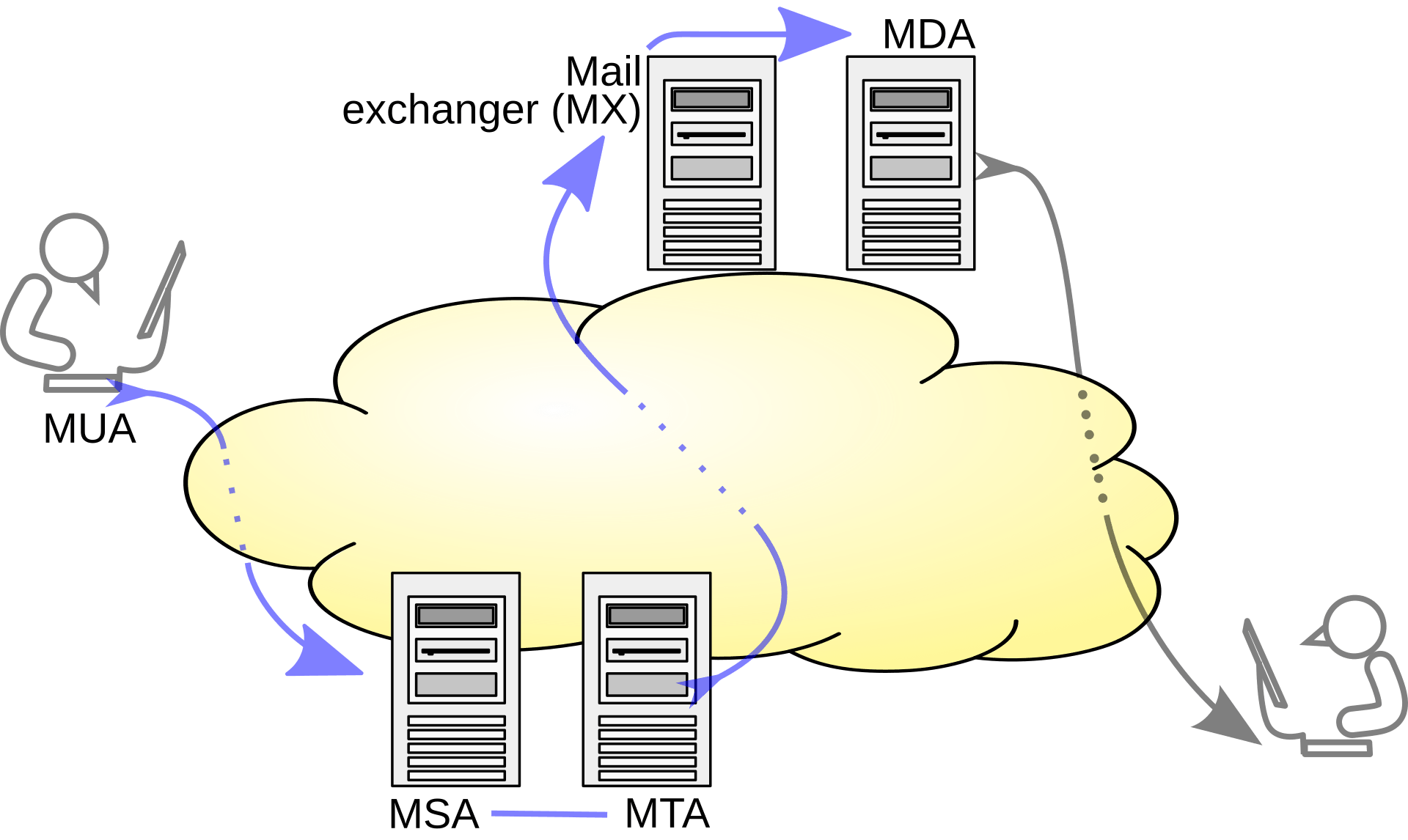
| Acronym | Post office role | In practice |
|---|---|---|
| MUA | The person writing the letter | Outlook, Thunderbird, a webmail page, a PHP script |
| MSA | The counter that accepts your letter and checks your ID | Our submission service on port 587, always authenticated |
| MTA | The sorting office that relays between offices | Postfix or Exim talking port 25 to other servers |
| MX | The destination city's receiving office | Found by looking up the recipient domain's MX record |
| MDA | The postman who puts it in the actual box | Dovecot writing to the mailbox |
How the sender finds the destination
Lower priority number wins, so 5 is tried first and the others are fallbacks. That third command is a reverse DNS lookup, and it is the first thing the receiving server does to your sending IP.
The three letters that decide whether your customer's email arrives
This is where a hosting company either builds a reputation or destroys one.
The published list of authorized post offices.
A TXT record on the domain that says "only these IP addresses are allowed to send mail claiming to be from me."
The ending matters enormously. -all means reject anything not listed. ~all means "treat as suspicious but accept," which is the soft option most people leave in place forever and which weakens the whole point.
What it does not protect: SPF checks the envelope sender, not the From address the human actually sees. Which is exactly why DKIM and DMARC exist.
PTR: the reverse DNS name of your sending IP. Receiving servers check that it exists and that it resolves forward back to the same IP. A sending IP with no PTR record is treated as suspicious by essentially everyone.
HELO or EHLO: the name your server announces itself as when the conversation opens. It should be a real, resolvable hostname that matches your PTR. A server announcing itself as localhost is a very loud signal that something is misconfigured or malicious.
Bounces, and reading them correctly
| Type | Code family | Meaning | Correct action |
|---|---|---|---|
| Soft bounce | 4xx | Temporary. Mailbox full, server busy, rate limited. | Retry later. This is normal and expected. |
| Hard bounce | 5xx | Permanent. No such user, domain does not exist, blocked. | Stop sending and remove the address. |
Here is the rule that protects our IP reputation: repeatedly retrying a hard bounce is one of the strongest spam signals a mail platform can emit. Legitimate senders remove dead addresses. Spammers hammer them. If our platform hammers them, the receiving world concludes we are a spammer, and it does not matter that we are not.
In every other service, a bad customer hurts that customer. In email, one compromised customer script hurts every customer sharing our sending IP addresses. One spam run can land our IP on a blocklist, and then legitimate invoices from unrelated customers stop being delivered.
That shared fate is why email needs outbound rate limits per account, alerting on sending volume anomalies, separate IP addresses for transactional and bulk mail, and an abuse mailbox that a human actually reads. Blocklist operators are far more forgiving to a provider who responds in an hour than to one who never answers. The policy side of this sits in Governance, risk and compliance, and the technical enforcement lands in Doc 4.
11. Putting it together: one URL, every layer, in order
Now the payoff. A customer in Tunis types https://mysite.tn and presses enter. Here is everything that happens, using only words you now own.
Read as a checklist, that is:
| Step | Layer | Section here | What breaks if it fails |
|---|---|---|---|
| Name becomes an address | 7 | DNS | "Server not found." Nothing else even gets a chance. |
| Packet leaves the house | 3 and 2 | IP and Layer 2 | No route to host, or ARP never resolves the gateway |
| Source is rewritten | 3 | NAT | Reply has nowhere to come back to |
| Path is chosen hop by hop | 3 | Routing | Timeout, or traffic dies in a black hole |
| Port answers and handshake completes | 4 | TCP | Connection refused if closed, timeout if silently dropped |
| Identity is proven and traffic sealed | 6 | TLS | A browser security warning, which customers read as "you were hacked" |
| The right site is selected | 7 | SNI and Host header | The wrong customer's website loads, which is a genuine incident |
| The application answers | 7 | HTTP | A 5xx, and now it is our on call problem |
The triage flow to actually use at 3 in the morning
The whole point of learning layers is that you can cut the problem in half with every test. Eight layers means about three good tests to find the culprit. Guessing means eight, in a random order, while a customer watches.
Read that sequence as a story. The name resolves. The host is reachable. Port 443 accepts connections. The certificate validates. And then a 502. Four layers just got eliminated in under a minute, and we know with certainty that the network, DNS, and TLS are all innocent. The backend behind the proxy is not answering. Go look at the application process, not the firewall.
Labs and deliverables
Reading this page is not the same as owning it. These are the exercises that convert reading into skill.
Take 10.50.0.0/16 and carve it into a plan for one rack:
- A
/24for management - A
/24for storage - A
/22for guest networks - A
/29for the uplink to the colo provider
Write down, for each one, the network address, the first and last usable address, and the broadcast address. Then check yourself with ipcalc.
Deliverable: a one page IP plan table. This becomes the first draft of the real plan in Doc 2.
Side definitions, all in one place
Keep this as your lookup table when a later volume uses a word without explaining it.
| Term | One sentence definition |
|---|---|
| Packet | A unit of data at layer 3, carrying an IP header with source and destination addresses. |
| Frame | A unit of data at layer 2, carrying MAC addresses, valid only on one local link. |
| Encapsulation | Wrapping data from one layer inside the headers of the layer below it. |
| Broadcast domain | The group of devices that receive each other's broadcasts, normally one VLAN. |
| VLAN | A logical separation of one physical switch into several independent networks. |
| ARP | The unauthenticated protocol that maps an IP address to a MAC address on a local link. |
| Default gateway | The router a device sends traffic to when the destination is outside its own subnet. |
| CIDR | The slash notation stating how many leading bits of an address identify the network. |
| Longest prefix match | The rule that the most specific matching route always wins. |
| ASN | The number identifying an independently routed network in BGP. |
| NAT | Rewriting addresses or ports as traffic crosses a boundary, tracked in a state table. |
| Socket | The four part identity of a connection: source address and port plus destination address and port. |
| MTU | The largest packet a link will carry, normally 1500 bytes on Ethernet. |
| MSS | The payload that fits in one TCP segment after headers, normally 1460 bytes. |
| Recursive resolver | The DNS server that does the asking on your behalf and caches the answer. |
| Authoritative server | The DNS server that holds the real records for a zone. |
| TTL | How long a DNS answer may be cached, in seconds. |
| Glue record | Name server addresses stored at the parent, breaking the resolution loop for in domain name servers. |
| SNI | The hostname sent in the clear at the start of a TLS handshake so the right certificate is served. |
| Chain of trust | The path from a server certificate through intermediates to a root the client already trusts. |
| ACME | The protocol that automates proving domain control and issuing certificates. |
| HSTS | A header telling browsers never to use plain HTTP for this site again for a stated duration. |
| Reverse proxy | A server that accepts requests on behalf of backends, terminating TLS and often caching. |
| MX record | The DNS record naming which servers accept email for a domain, lowest priority first. |
| PTR record | Reverse DNS, mapping an IP address back to a hostname, controlled by the IP block owner. |
| SPF, DKIM, DMARC | Published authorization, cryptographic signature, and failure policy for a domain's email. |
Success criteria for this document
You are done with this page when you can do all of these without looking anything up.
| You can | Proving you understand |
|---|---|
| Explain to a non technical manager why a website loads for some people and not others | DNS caching and TTL |
Subnet a /16 into named blocks on a whiteboard, no calculator | CIDR and block size |
| Say what a router does with a packet it has never seen a route for | Default route and longest prefix match |
| Explain why NAT is not a firewall, and why it still runs out of capacity | State tables and security boundaries |
| Diagnose "small pages work, large uploads hang" in under five minutes | MTU, MSS, and the ICMP black hole |
| Tell the difference between a recursive and an authoritative failure from one ticket | DNS architecture |
| Explain why five hundred HTTPS sites can share one IP address | SNI and the Host header |
| Name the first thing to check for each of 500, 502, 503, and 504 | HTTP status semantics |
| Explain why one bad customer can break email for all the others | Shared IP reputation |
| Run the five command triage and correctly name the guilty layer | The entire document, working together |
You now have the vocabulary. The rest of Volume 1 turns it into decisions with numbers attached.
Doc 2, IP space, ASN and BGP: stop borrowing addresses and become a real network on the internet.
Doc 3, Datacenter and physical network foundations: the racks, power, cables, and switches that all of this actually runs on.
Doc 4, Segmentation, firewalls and edge defense: keeping tenants apart and attackers out.
Doc 5, CloudStack network requirements: every number CloudStack demands before it will boot a single customer VM.
One last thing from me. Do not aim to memorize this page. Aim to reach the point where, when something breaks, your instinct is to ask which layer instead of restarting a service. That instinct is the entire difference between an operator and an engineer, and it is the only reason this document exists.