Projects · Mini Hostpapa
IP Space, ASN & BGP
How a hosting company gets its own IPv4 and IPv6 space, an AS number, transit and peering, RPKI, and reverse DNS delegation, explained from zero.
IP Space, ASN & BGP
Alright. Doc 1 taught you what an IP address is.
This document answers a completely different question, and it is the one that quietly separates a hosting company from a guy with servers in a rack:
Whose addresses are you selling?
Sit with that for a second, because it is not a technical question. It is a business question wearing technical clothes.
If the answer is "my upstream provider's addresses," then you are a reseller in a hosting company costume. And the day you change providers, or the day they raise your price by forty percent, here is what happens: every customer IP address changes. Every DNS record. Every firewall allowlist your customers wrote and forgot about. Every bit of mail sending reputation you spent two years building. All of it, gone in one migration.
This is a lead time problem, not a configuration problem.
Becoming a registry member, receiving an allocation, obtaining an AS number, and signing transit contracts takes weeks to months. Racks arrive in days. Address space does not. This document exists so we start that clock early, in parallel with everything else, instead of discovering it on the week we planned to launch.
Here is how I think about address space, and it reframes the whole document: IP addresses are inventory. They sit on the balance sheet next to RAM and disk. They have a unit cost, a utilization rate, a reclaim process, and a resale value. The moment you treat them as inventory instead of as configuration, every decision in this document becomes obvious.
Why this document sits so early in the handbook
| Decision made here | What it blocks downstream |
|---|---|
| Own space versus provider space | Whether customers keep their IPs when we change transit provider |
| IPv4 budget per product | Pricing in the product catalog, because IPv4 is a real cost line |
| IPv6 prefix size | How many CloudStack guest networks can ever be dual stack |
| ASN and BGP versus a static default route | Whether we can be multihomed at all, and whether CloudStack ROUTED mode is even on the table |
| Reverse DNS strategy | Mail deliverability, and whether customers can self serve PTR records |
1. Who hands out addresses, and the rules they enforce
The analogy: vehicle licence plates
You do not own your car's licence plate. You hold a registration for it.
There is one global body that decides how plate ranges are divided between countries. Each country has a regional office that hands ranges to dealerships and large fleet operators. Those operators assign individual plates to actual vehicles. And the whole thing only works because every level keeps its records accurate, and because nobody is allowed to invent a plate that was never issued to them.
IP addresses work exactly like that. Nobody owns them. Everybody holds a registration, and the registration comes with obligations.The chain of custody
| Level | Who they are | Licence plate equivalent |
|---|---|---|
| IANA | The global function that allocates large blocks to the five regional registries | The international body that divides plate ranges between countries |
| RIR | A regional registry serving one part of the world, governed by its own members | The national vehicle authority |
| LIR | A member of an RIR that receives allocations and sub assigns them to customers | A large fleet operator or dealership |
| End user | The organization actually using the addresses | The person driving the car |
The five regional registries, and which two matter to us
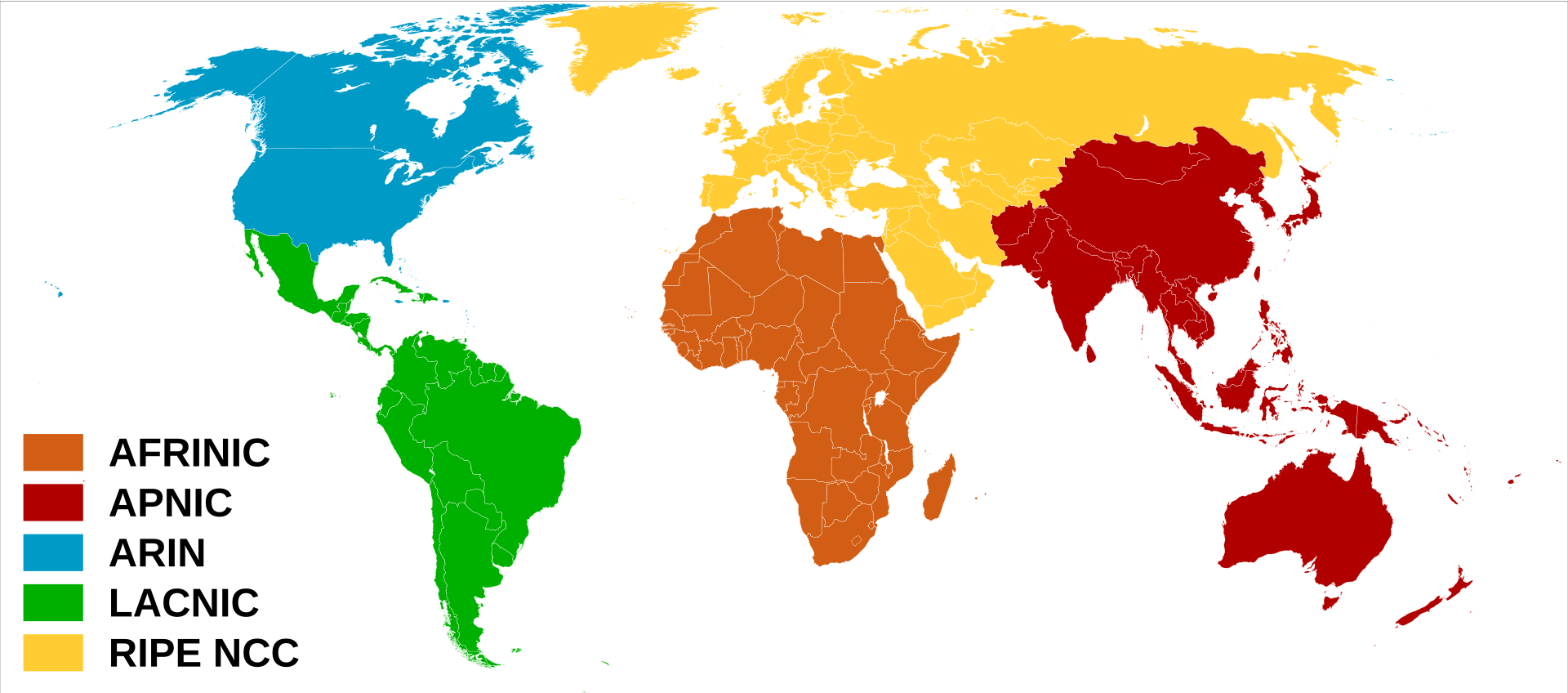
Find Tunisia on that map. It is orange, which means our registry is AFRINIC.
| Registry | Region | Relevance to HostKid |
|---|---|---|
| AFRINIC | Africa | Our home registry. Tunisia is served here. |
| RIPE NCC | Europe, Middle East, parts of Central Asia | Relevant if we place infrastructure in Europe, and worth understanding because many providers we buy from are members |
| ARIN | North America | Context only |
| APNIC | Asia Pacific | Context only |
| LACNIC | Latin America and the Caribbean | Context only |
Becoming a Local Internet Registry is a membership, not a purchase. It comes with four things:
A joining fee and an annual fee, which is an operating cost line, not a one off.
The right to receive allocations and to sub assign them to customers, which is the part a hosting company genuinely needs.
An obligation to keep the registry database accurate, including contact objects, an abuse contact that a human reads, and assignment records. This is not optional paperwork. Stale records are how providers end up unreachable during an abuse incident.
A voting seat in the policies that govern your own region, which matters more than people expect.
The part nobody enjoys: IPv4 is gone
Not "running low." Gone. Here is the timeline, and it is worth actually looking at.
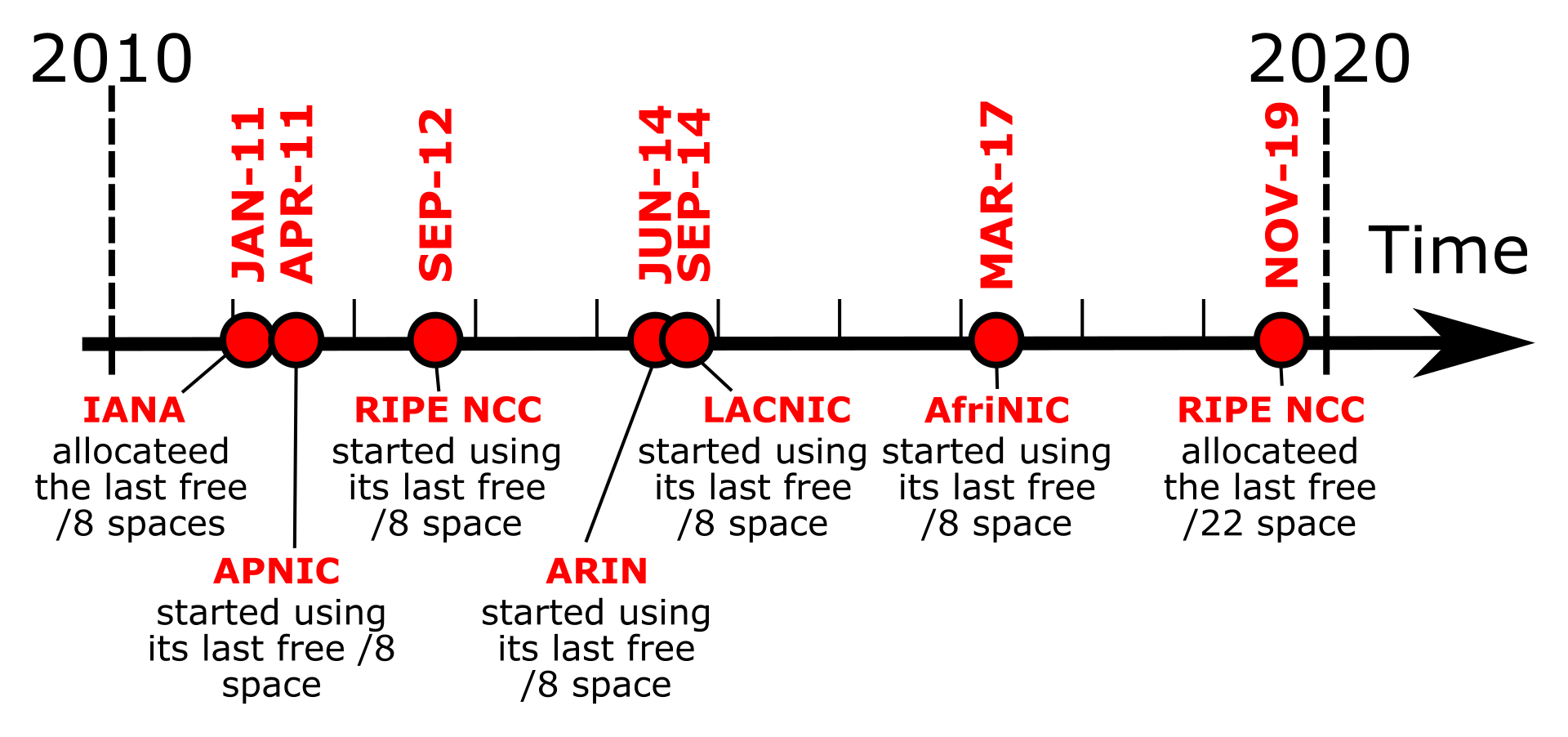
Read the dates on that image again. The last free IPv4 space at the global level was handed out in 2011. Every allocation since then has come out of reserves, recovered space, waiting lists, or the transfer market. There is no queue you can join that ends with "and then you receive a generous block of IPv4."
What that means in practice, per registry:
AFRINIC entered its final exhaustion phase, which changed the rules significantly:
- Allocations are capped: a minimum of a
/24and a maximum of a/22per request - You must demonstrate high utilization of what you already hold before receiving more
- Requests are evaluated against a planning window of roughly eight months of documented need, not years
The honest planning conclusion: budget for starting at /24 to /22 scale. Design the product so that this is enough, rather than designing a product that quietly assumes abundance.
AFRINIC has been through a period of governance and legal turbulence, which at various points has affected the speed and predictability of membership and allocation processing. This is not a reason to avoid it, but it is a reason to verify current status, current fees, and current processing times directly with the registry before you build a launch timeline on top of an assumption. Treat the specific numbers in this document as a starting point to re-verify, not as a quote.
Three things follow from everything above, and they shape the rest of this volume:
One. Plan for a small IPv4 footprint, in the /24 to /22 range, and design the product so that this is sufficient rather than embarrassing.
Two. Price IPv4 as the scarce resource it actually is. An extra public IPv4 address is a paid add on, not a free courtesy, because it genuinely costs us money.
Three. Be generous with IPv6 from day one, because it is the only address space where we can afford to be, and because every year we delay is a year of technical debt accruing.
2. PA versus PI, and the trap hidden in the names
The analogy: subletting
Imagine two ways to have an office.
Option A: you lease a floor in a landlord's building, and your lease explicitly permits you to sublet individual rooms to other businesses. The building is not yours. If you leave, your tenants have to move too.
Option B: you buy your own small building outright. It is yours, permanently, and you take it with you in any commercial sense. But the zoning permit says you may not sublet rooms to third parties. It is for your own use only.
Here is what genuinely tripped me up at first, and here is the trick to understand it: PI stands for Provider Independent, and it sounds like the obviously better option. Independent! Portable! Mine! So I assumed a serious company would obviously want PI space.
That is exactly backwards for a hosting provider. PI space may not be sub assigned to customers. It is Option B, the building you own but cannot sublet. And sub assigning addresses to customers is literally our entire business. So we need PA space, the one whose name sounds less impressive.
The technical version
| PA, Provider Aggregatable | PI, Provider Independent | |
|---|---|---|
| Who holds it | An LIR, meaning us | An end user organization |
| May be sub assigned to customers | Yes. This is the whole point. | No. This is the whole restriction. |
| Typical IPv6 size | A /32 allocation | A /48 assignment |
| Aggregation | Announced as one block, which keeps the global routing table smaller | Announced separately, adding an entry to everyone's routing table |
| Right choice for a hosting provider | Yes | No |
Database status values you will actually see
When you look at real registry records, these strings appear and they are not decoration. They are policy statements.
| Status value | What it means |
|---|---|
ALLOCATED PA | Space allocated to an LIR, sub assignable. This is what we want to see on our own block. |
ASSIGNED PI | Space assigned to an end user, not sub assignable |
ASSIGNED PA | A specific chunk of our PA block documented as assigned to one customer |
AGGREGATED-BY-LIR | A shortcut that lets us document many similar small assignments as one record instead of hundreds, which is how you stay compliant without drowning in paperwork |
Seeing it in a real registry record
You do not have to take my word for any of this. The registries are public, and reading a real record makes the whole section concrete.
Two commands, and you have read the chain of custody with your own eyes. The first shows who holds the space and under which status. The second shows the route object, which is the public declaration that this prefix is announced by this ASN. That second record is what upstream providers build their filters from, and a missing or wrong one is a very common reason a new announcement is silently dropped.
People say PI space is "portable" and PA space is not. The precise version matters:
When you change transit providers, PA space that is allocated to you as an LIR comes with you, because it was allocated to you, not to your transit provider. You announce it through whoever you buy transit from.
The thing that does not come with you is space that was assigned to you out of your transit provider's own allocation. That space belongs to them, and it stays with them.
So the real distinction is not PA versus PI. It is your own allocation versus your provider's addresses. That is the sentence to remember, and it is the one that answers the question this whole document opened with.
3. IPv4 planning under scarcity
The analogy: prime downtown real estate that stopped being built
There is a fixed amount of land in the old city centre. No more is being made. Every plot has an owner. If you want one, you buy it from someone who has one, and you use it efficiently, because you are paying downtown prices for it.
That is IPv4 now. Which means the design question changes from "how do we assign addresses?" to "how do we serve the maximum number of customers with the minimum number of public IPv4 addresses, without degrading the product?"
The single biggest lever we have
Here is the architectural decision that determines whether a /24 serves fifty customers or five hundred.
| Approach | Public IPv4 consumed | What the customer gets | Verdict |
|---|---|---|---|
| One public IPv4 per VM | One per VM. A /24 serves about 250 VMs total, forever. | Direct inbound on every port, no translation | Unaffordable. This is how you run out in month three. |
| One public IPv4 per tenant network, shared via source NAT | One per customer network, regardless of how many VMs are inside it | Outbound works for every VM. Inbound via port forwarding or a dedicated static NAT address. | This is the default, and it is the right one. |
| Additional public IPv4 as a paid add on | Only what customers actually pay for | A dedicated address for customers who genuinely need one, such as mail senders | Correct commercially. Scarcity becomes revenue instead of loss. |
CloudStack's default isolated guest network model already works this way. Each guest network gets a Virtual Router with one public IP performing source NAT for everything behind it. Inbound access is then explicitly configured as port forwarding or static NAT.
In other words, the platform we chose already implements the address efficient model as its default behaviour. We are not fighting the tool to save addresses, we are using it as designed. The mechanics land in Doc 5.
The addresses you will forget to budget for
Every plan I have seen budgets for customer addresses and forgets the infrastructure. Then you are two addresses short on install day.
| Consumer | Rough need | Note |
|---|---|---|
| Uplink to the transit provider | A /30 or /29 | Often provided by them out of their own space |
| CloudStack public IP range for guest networks | The bulk of the block | One per tenant network plus paid extras |
| Console proxy system VMs | One per system VM, from the public range | Customers reach the console over this. Forgetting it is a visible outage. |
| Secondary storage system VMs | One per system VM | Needed for template and snapshot operations |
| Load balancer front ends | A few, growing with product | Shared across many customer sites via SNI and Host headers |
| Mail sending addresses | At least two or three | Separate transactional from bulk, so one bad sender does not poison both |
| Monitoring and management egress | One or two | Stable addresses that customers can allowlist |
| Reserve held back | Roughly ten percent | For incidents, migrations, and the thing you did not predict |
The habit that saves you: write the address plan as a table with an owner and a purpose for every single block, before you configure anything. An IP plan that exists only inside a router configuration is not a plan, it is an archaeology project for whoever comes next.
Utilization, reclaim, and why both are automated or dead
Two operational disciplines that sound boring and are worth real money.
| Discipline | What it means | Why it must be automated |
|---|---|---|
| Utilization tracking | Knowing what percentage of our IPv4 is actually assigned and in use, as a live metric | It is both a capacity alarm and the evidence a registry demands before allocating more. A spreadsheet updated quarterly is neither. |
| Reclaim discipline | An address returns to the pool automatically when a service is destroyed | Manual reclaim never happens. Addresses leak into a permanent limbo of "probably still needed by someone," and you buy more space you already had. |
This connects directly to executive metrics. IPv4 utilization is a KPI, with a threshold that triggers a procurement conversation long before the pool is empty, because procurement takes months and empty pools do not wait.
CGNAT: the tempting shortcut, and where it destroys the product
Carrier grade NAT means putting many customers behind a shared public address, using the 100.64.0.0/10 range internally.
| Verdict | Situation | Why |
|---|---|---|
| Acceptable | Outbound only workloads, such as a build agent fetching packages | Nothing needs to reach it from outside, so nothing is lost |
| Acceptable | Internal management tooling reaching the internet | Same reasoning |
| Unacceptable | Any product where the customer hosts a service others connect to | Shared inbound addressing breaks the core promise of hosting |
| Unacceptable | Anything sending email | Shared IP reputation with strangers, and no controllable PTR record |
CGNAT saves addresses by taking away the ability to be reached, and "being reachable" is the actual thing a hosting customer is paying for. It is a legitimate tool for the right workloads and a product destroying shortcut everywhere else. Decide per product, write the decision down, and never let it drift silently into a tier where customers expected inbound access.
4. IPv6 planning, where we finally get to be generous
The analogy: from counting grains of rice to counting sacks
For three sections you have been in scarcity mode, counting individual addresses like a miser counting grains of rice.
Now put the rice down. In IPv6 you count sacks, and there are more sacks than you can meaningfully imagine.
Here is the number that reframed IPv6 for me, and it is worth internalizing properly: a single /64 network, the standard size for one IPv6 subnet, contains more addresses than the entire IPv4 internet, squared. Not doubled. Squared. And a modest /48 allocation contains 65,536 of those networks.
So the scarcity instinct you just spent three sections developing is now actively harmful. The mistake people make in IPv6 is being stingy, and being stingy in IPv6 creates work rather than saving anything.
Reading an IPv6 address without panicking
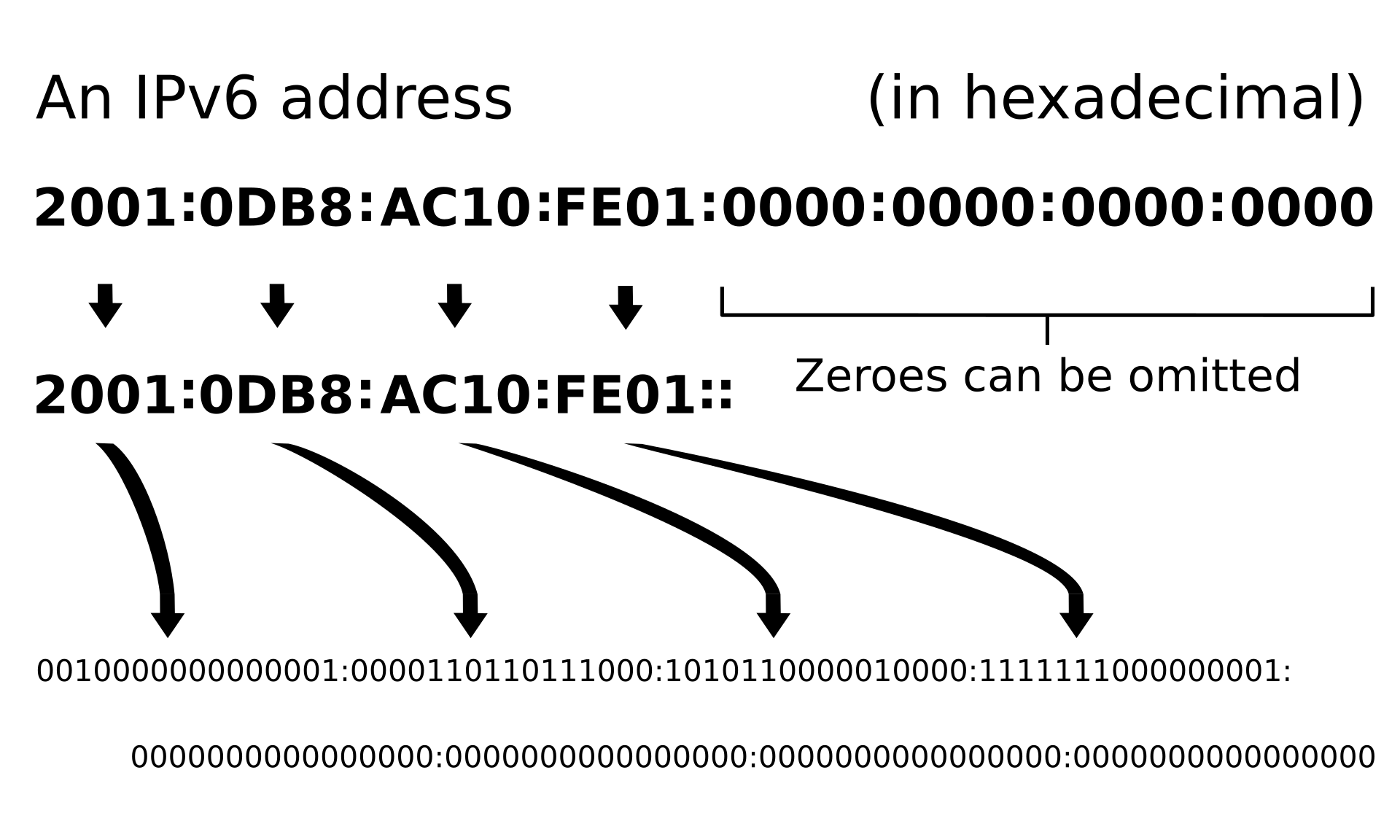
Three rules and you can read any IPv6 address:
| Rule | Example |
|---|---|
| Eight groups of four hexadecimal digits, separated by colons | 2001:0db8:ac10:fe01:0000:0000:0000:0001 |
| Leading zeros inside a group may be dropped | 2001:db8:ac10:fe01:0:0:0:1 |
One run of all zero groups may become ::, and only one | 2001:db8:ac10:fe01::1 |
Because two of them would be ambiguous. If you wrote 2001::db8::1, nobody could tell how many zero groups belong on each side of each gap. One :: is solvable arithmetic, since you know the total must be eight groups. Two is guesswork. That is the entire reason for the restriction, and once you see it the rule stops feeling arbitrary.
The hierarchy, which is where the planning actually happens
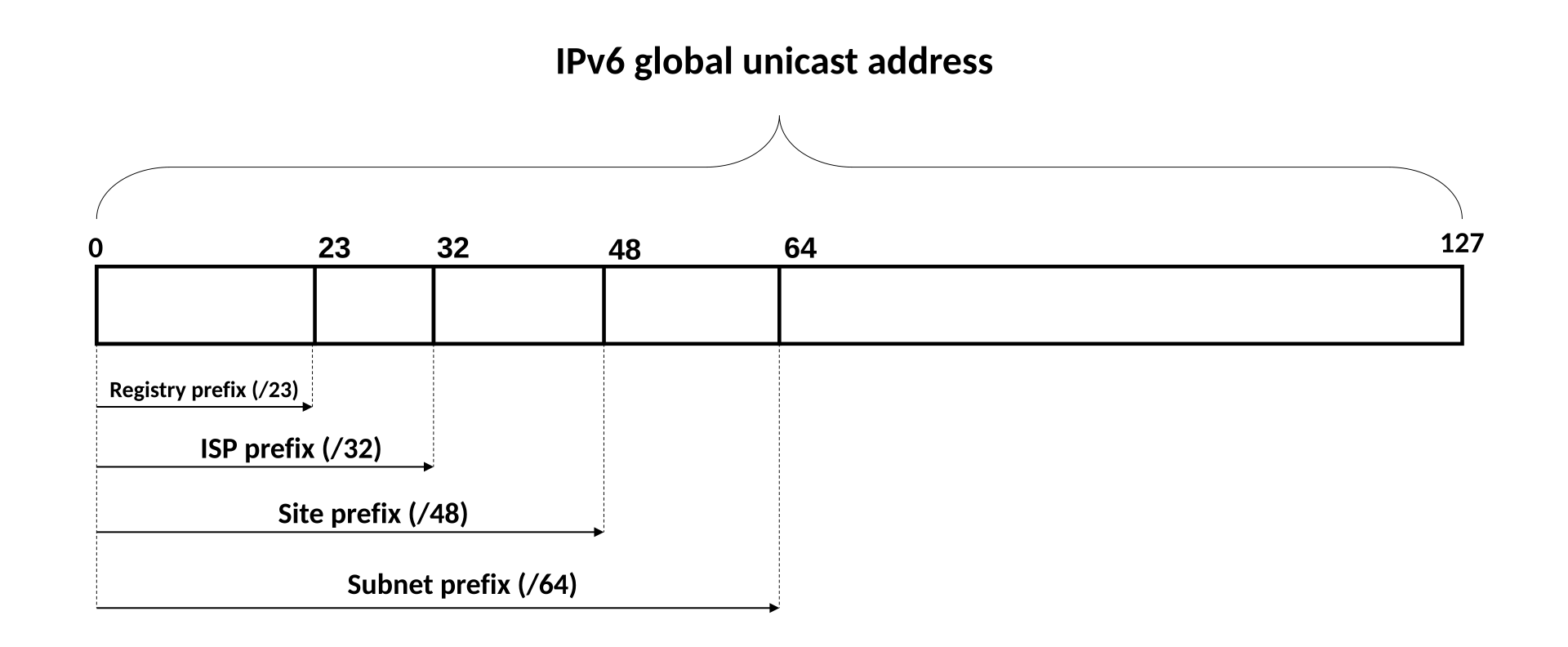
That single image is the entire IPv6 plan. Read the labels left to right and you have the whole delegation chain, with our position in the middle.
| Prefix | Who holds it | How many of the next level down it contains |
|---|---|---|
/23 | The registry | 512 ISP allocations |
/32 | Us, as an LIR. The standard allocation. | 65,536 customer sites |
/48 | One customer site | 65,536 networks |
/56 | A smaller customer allocation, if we choose to be less generous | 256 networks |
/64 | One single network. The floor. | Astronomically many addresses |
The one rule you must never break
It is technically possible to configure a /112 or a /127, and people do it because their IPv4 instincts tell them to conserve.
Do not do it on customer networks. A /64 is the assumed size across the whole protocol. SLAAC, which is how IPv6 hosts autoconfigure their own addresses, requires exactly 64 bits for the interface identifier. Go smaller and autoconfiguration silently stops working, and you have spent a week debugging a problem you created to save address space you have infinite amounts of.
The one commonly accepted exception is a /127 on a point to point router link, where no host autoconfiguration happens. Everywhere else, /64 is the floor.
The allocation pattern we should adopt
A clean, boring, defensible scheme:
- A
/32for HostKid as the LIR allocation - A
/48per customer, which is the registry default for an end site and requires no extra justification - A
/64per network inside that customer's/48 - A separate
/48for our own infrastructure, carved into/64networks for management, storage, and system services
That gives every customer 65,536 networks, which is absurd, and that is the point. You never have to renumber a customer, ever, because they can never outgrow it.
The IPv6 mistakes that cost real time
| Mistake | Symptom | Fix |
|---|---|---|
| Blocking ICMPv6 broadly | Things half work. Neighbor discovery fails, path MTU discovery breaks, large transfers hang. | Permit the ICMPv6 types the protocol requires. IPv6 is not IPv4 with more digits. |
| Forgetting RA guard | A customer VM advertises itself as a router and hijacks traffic for its whole segment | RA guard on switch ports, covered in Doc 4 |
| Assuming NAT exists | Every VM is directly reachable, and the accidental NAT protection from IPv4 is gone | Explicit firewall policy. In IPv6 the firewall is the only boundary, because there is no NAT hiding anything. |
| Publishing AAAA records before IPv6 works | Modern clients try IPv6 first, fail, then fall back. The site feels slow for no visible reason. | Publish AAAA only after testing the path end to end |
Subnetting smaller than a /64 | SLAAC silently stops working | Do not. Ever, on host networks. |
Read the third row again. In IPv4, a customer VM behind source NAT is accidentally protected from unsolicited inbound traffic, because there is no NAT table entry for it. Nobody designed that protection, it is a side effect.
Turn on IPv6 and that side effect disappears completely. Every VM becomes globally reachable on every port the moment it has a global IPv6 address. If your firewall policy was implicitly relying on NAT, enabling IPv6 is a security event, not a feature launch. The default deny policy has to exist first.
5. AS numbers: getting your own routing identity
The analogy: having your own foreign policy
A province follows the capital's foreign policy. It does not sign its own treaties. A country decides for itself who it trades with, on what terms, and through which borders.
An Autonomous System is a network with its own routing policy. It is not about being big. It is about deciding for yourself where your traffic goes and who you accept traffic from.An Autonomous System is a collection of IP networks under a single, clearly defined routing policy.
An ASN is the number identifying it, written like AS64500. It is the name your network is known by in the internet's routing conversation.
The word autonomous is the important one. A huge network that simply does whatever its single upstream tells it is not autonomous. A small network with two upstreams and its own decisions about which to prefer is.
The qualification requirement, and why it is not a formality
Here is where people get surprised. You do not get an ASN by being large, or by asking nicely, or by paying more. You generally get one by demonstrating that you are multihomed, meaning you have at least two peering or transit partners.
The logic is actually elegant once you see it. If you have only one upstream, you have no routing decisions to make. Everything goes to that one provider, and that provider can announce your space on your behalf. There is no policy for you to express, so there is nothing for an ASN to represent. The requirement is not bureaucratic gatekeeping. It is the registry saying "prove you actually need to make routing decisions."
| What you submit | What it is |
|---|---|
| Multihoming evidence | Contracts, letters of authorization, or confirmations from at least two partners |
| Routing policy | Which prefixes you will originate and who you will exchange routes with, often expressed in a formal policy language |
| Contact objects | Admin, technical, and an abuse contact a human genuinely reads |
| The prefixes you hold | The address space this ASN will announce |
16 bit versus 32 bit, and private ranges
| Type | Range | Note |
|---|---|---|
| 16 bit public | 1 to 65535 | The original space. Exhausted, so new members receive 32 bit numbers. |
| 32 bit public | Up to 4294967295 | What we will most likely be issued. Functionally identical. |
| Private, 16 bit | 64512 to 65534 | For internal use that is never announced to the internet |
| Private, 32 bit | 4200000000 to 4294967294 | Same, with more room |
A private ASN is not a lesser version of a real one. It is the correct tool when routing decisions happen inside your network and never leave it.
The case that matters here: CloudStack 4.20 and later can run dynamic routing, where the Virtual Router of a customer network speaks BGP to our infrastructure. Those sessions are internal. They should use private ASNs from a pool we manage, one per tenant network, never leaking outward.
So we may end up operating a private ASN scheme and a public ASN, for completely different jobs. That is normal, and confusing them is a genuine outage.
The honest decision for launch
Being honest beats being impressive here, so let us lay out both positions.
The case for deferring: a single transit provider with a static default route is simpler, cheaper, and faster to launch. It removes an entire category of failure, namely misconfigured BGP announcements, which are visible to the whole internet when they go wrong. And you cannot qualify for an ASN with one upstream anyway.
The case for doing it early: it is a prerequisite for redundancy. Without it we have a single upstream and therefore a single point of failure that no amount of internal engineering can fix. It is also a prerequisite for CloudStack ROUTED mode with dynamic routing, and for negotiating blackhole based DDoS mitigation directly.
The decision this document must produce is not a preference. It is either own ASN at launch, or deferred with written trigger conditions. A trigger looks like: "when we sign a second transit provider," or "when a single customer's uptime commitment exceeds what one upstream can honestly support," or "when monthly transit spend passes the point where peering pays for itself."
A deferral without triggers is not a decision. It is a thing you forgot about, and it will resurface as an incident.
6. BGP for a small provider
The analogy: neighbours who gossip but do not trust each other
Every routing protocol inside your own network assumes everyone is honest, because you own all of it.
BGP assumes nothing of the kind. It is designed for networks run by different companies, with different interests, who may be competitors, and who each want control over what they accept and what they advertise.
Here is how I understand BGP, and it is the sentence that made it stop being intimidating: BGP is not really about finding the shortest path. It is about expressing business relationships as routing preferences. When a network prefers one route over a technically faster one, it is usually because that route is cheaper or contractually preferred, not because it is better engineering. BGP is commercial policy encoded as a protocol.
The three ways to connect to the rest of the internet
| Relationship | Analogy | What it costs | What it buys |
|---|---|---|---|
| Transit | Paying for a taxi that will take you anywhere | A monthly commit plus usage, per megabit | Reachability to the entire internet. You need at least one. |
| Peering | Two neighbours agreeing to carry each other's mail for free | Usually nothing beyond the port, hence "settlement free" | Direct, low latency reach to that peer's customers only. Not the whole internet. |
| IXP | A shared marketplace building where you rent one stall and can trade with everyone inside | A port fee plus cross connect, and often membership | Many peering relationships over one physical connection. The efficient way to peer. |
Peering does not replace transit. Ever.
A peer gives you a path to their network and their customers, and nothing more. If you peer with twenty networks and drop transit, you can reach those twenty networks and are invisible to the rest of the world.
The correct mental model: transit is your baseline reachability, and peering is an optimization on top of it that reduces cost and latency for the traffic that happens to be going to your peers. Regionally this matters a lot, because keeping Tunisian and Maghreb traffic local instead of routing it through Europe and back is both faster for customers and cheaper for us.
What you actually announce, and what gets filtered
Most large networks filter out announcements longer than a /24 for IPv4 and a /48 for IPv6.
Read that again, because it is a hard constraint on everything in this document. If you buy a /25, which is 128 addresses, large parts of the internet will simply refuse to carry it. It is not a configuration you can fix on your side. The filter is on their side, and it exists to stop the global routing table from growing without limit.
This is why a /24 is the smallest IPv4 block worth acquiring, and why a /48 is the IPv6 equivalent. Nothing smaller is independently useful.
| Object or concept | What it does |
|---|---|
| eBGP | A session between different autonomous systems. This is how we talk to transit and peers. |
| iBGP | A session within our own ASN, keeping our internal routers consistent about external routes |
route and route6 objects | Registry records declaring "this prefix is originated by this ASN." Upstreams build their filters from these. |
| AS path | The list of autonomous systems a route travelled through. Shorter is generally preferred, and it also prevents loops. |
| AS path prepending | Deliberately making your path look longer through one provider so traffic prefers the other. The blunt but reliable lever for steering inbound traffic. |
| Communities | Tags attached to routes that ask an upstream to treat them a certain way. The mechanism behind blackholing. |
The cheapest DDoS control you will ever configure
RTBH, remote triggered black hole, lets you tag a route with a special community that tells your upstream: discard all traffic to this address, at your edge, before it reaches my link.
Why this is the highest value item in this section: when a single customer IP is under a volumetric attack large enough to saturate your uplink, nothing you configure on your own equipment can help. The traffic has already consumed the link before it arrives. The only fix is upstream, and blackholing is how you ask for it.
The operational point, and it is the whole reason this is a callout: the community values, the authorization, and the contacts must be agreed and tested in advance. Discovering the process during an attack, over email, at 2 in the morning, is how a thirty minute incident becomes a six hour one.
The tradeoff to be honest about with customers: blackholing completes the attacker's goal for that one IP, because the address becomes unreachable. You are sacrificing one customer's address to keep every other customer online. That is the right call, and it needs to be a written policy the customer agreed to, not an improvised decision.
Watching BGP from the outside
You can inspect the global routing table without owning a single router. This is the habit to build now, because it is exactly how you will verify our own announcements later.
Read the middle command carefully, because it is a genuinely useful trick. It asks a public service "which ASN originates this address, and out of which prefix?" and gets back the ASN, the prefix, the country, and the registry. That is a one line answer to "who actually runs this IP address," which is the first question in almost every abuse investigation and peering conversation.
The -A flag on traceroute annotates each hop with the ASN that owns it, so you can literally watch a packet cross from one company's network into another's. Run it once against a site in Europe and you will see exactly why regional peering matters to latency.
Route leaks and hijacks
| Event | What happens | Damage to a hosting brand |
|---|---|---|
| Route hijack | Someone announces your prefix, or a more specific piece of it, and steals your traffic | Customer traffic is intercepted. This is a security incident with disclosure obligations, not a routing glitch. |
| Route leak | A network re announces routes it should not have, often accidentally, and pulls traffic through a path that cannot carry it | Severe congestion and packet loss for something entirely outside your control |
| Being the one who leaks | We misconfigure and announce space we do not hold | Upstreams filter us, peers lose trust, and reputation in the operator community takes years to rebuild |
That third row is the one that should worry you. The first two are things done to you. The third is a mistake you make, at scale, visible to the entire internet, with your ASN attached to it. Which is the perfect introduction to the next section.
7. RPKI and routing security
The analogy: a notarized deed versus shouting
Imagine a city where property ownership works purely on assertion. You stand in the square and announce "I own the building at 12 Main Street," and everyone believes you, especially if you shout a more specific address than the last person.
That is BGP without RPKI. Announcements are believed because they were made. There is no proof of ownership in the protocol at all.
RPKI adds the notary. It is a signed, verifiable statement saying "this ASN is authorized to originate this prefix," so when someone else claims your space, routers can check the deed and refuse the claim.How it works, in four steps
A ROA, Route Origin Authorization, is a signed object you create at your registry. It says three things:
Which prefix the authorization covers.
Which ASN is allowed to originate it.
The maximum prefix length that ASN may announce from within it.
The mistake I want you to never make
When you create a ROA you set a maximum length. It is tempting to set it permissively, so that you never accidentally block yourself. /24 for an IPv4 block feels safe and flexible.
Suppose you hold a /22 and announce it as a single /22. If your ROA permits up to /24, then you have just authorized anyone who can inject a route to announce a /24 out of your space and have it validate as RPKI VALID. And because longest prefix match always prefers the more specific route, their /24 beats your own /22 everywhere it is accepted.
The rule: set maxLength to exactly what you actually announce. If you announce a /22, set maxLength to 22. A permissive maxLength is not flexibility. It is a pre signed permission slip for hijacking your own space.
Here is how I keep this straight: a ROA is not a description of what you could announce. It is an authorization for what may be announced. Every bit of extra permission you grant is permission granted to whoever gets there first.
Why this is effectively mandatory now
| Reality | Consequence for us |
|---|---|
| Major transit providers drop RPKI invalid routes | A ROA mistake on our side means we become unreachable from large parts of the internet, and it will look like a total outage |
| Major IXPs validate at their route servers | Invalid routes are not distributed to peers, so peering silently stops working |
| Large content networks validate | Customer traffic to major platforms can break in ways that are very hard to diagnose from inside |
| Having no ROA is currently tolerated | But it leaves us unprotected against hijacking, and the tolerance is shrinking every year |
RPKI is a control where a mistake in your own configuration takes you off the internet, and it looks identical to a catastrophic network failure. Announce a prefix that conflicts with your own ROA and validating networks drop you, while your routers, links, and servers all report perfect health.
So RPKI belongs in the change control process with a verification step, not in the category of things one person adjusts on a Friday. Every ROA change gets validated from an external looking glass before it is called done.
Verifying RPKI before and after a change
This is the verification step referenced in the callout above. After any ROA change, you check the validation state from a network that is not ours, because the only opinion that matters is the opinion of the networks doing the dropping. Checking from inside our own infrastructure tells you nothing, since our own routers accept our own routes regardless.
The rest of the routing hygiene set
| Control | What it does | Who audits it |
|---|---|---|
| ROAs | Cryptographic proof of which ASN may originate our prefixes | The whole internet, automatically, every day |
| IRR objects | Routing registry records that upstreams build prefix filters from. Older mechanism than RPKI, still widely used. | Transit providers when they rebuild filters |
| BCP 38 ingress filtering | Never let a packet leave our network with a source address we do not hold. This is what makes spoofed reflection attacks possible when providers skip it. | Us, and increasingly our transit providers as a contract term |
| Prefix limits on sessions | A cap so that if a peer leaks their entire routing table at us, the session drops instead of our routers falling over | Us |
Every item in that table is exactly the kind of control that Governance, risk and compliance demands: a named owner, a documented procedure, a verification method, and evidence it was checked.
BCP 38 in particular is a moral obligation as much as a technical one. A provider that permits source address spoofing is supplying ammunition for attacks against everyone else. It costs almost nothing to implement at the edge, and skipping it makes you part of the problem the whole industry is trying to solve. Enforcement detail is in Doc 4.
8. Reverse DNS delegation
The analogy: caller ID, and a phone book organized in fixed sections
Forward DNS turns a name into an address. Reverse DNS turns an address back into a name, and it is caller ID for servers.
Now the quirk. The reverse phone book is organized into fixed sections that you cannot subdivide. You can be given control of a whole section, but not of half a section. And as you saw in Doc 1, reverse DNS is controlled by whoever holds the IP block, which once we have our own space means us.
Why we care enough to give it a section
| Reason | Impact if we get it wrong |
|---|---|
| Mail deliverability | Receiving servers check that a sending IP has a sensible PTR that resolves forward to the same IP. Missing or mismatched PTR means customer mail lands in spam, and the customer blames us, correctly. |
| Log readability | Investigating an incident with names instead of raw addresses is dramatically faster |
| Customer expectation | Any customer who has run mail before will ask whether they can set their own PTR. "No" loses the deal. |
| Professional signalling | Correct reverse DNS is a quiet marker of a provider who knows what they are doing, and the operator community notices |
The 8 bit boundary problem for IPv4
Reverse DNS for IPv4 lives under in-addr.arpa, with the address written backwards, and delegation happens only on whole octet boundaries.
| Your block | Reverse zone | Domain objects needed |
|---|---|---|
203.0.113.0/24 | 113.0.203.in-addr.arpa | One. Clean, because a /24 is exactly one octet. |
203.0.112.0/22 | 112, 113, 114, 115 each under 0.203.in-addr.arpa | Four. A /22 is four /24 blocks, so four separate delegations. |
203.0.113.8/29 | Smaller than an octet, so it does not align at all | Needs the classless trick below. |
When you need to delegate less than a full /24, for example a /29 sold to a customer who wants to control their own PTR records, the octet boundary rule blocks you.
The workaround is genuinely clever. Inside the /24 zone you keep, you create a CNAME for each individual address pointing into a sub zone that you delegate to the customer. The lookup follows the CNAME into their zone, they answer it, and the octet boundary was never violated.
It is fiddly, and it is worth automating from day one, because doing it by hand for eight addresses per customer across dozens of customers is exactly the kind of manual work that produces mistakes.
IPv6 reverse, and the nibble rule
IPv6 reverse DNS lives under ip6.arpa and delegates on nibble boundaries, where a nibble is 4 bits, meaning one hexadecimal digit.
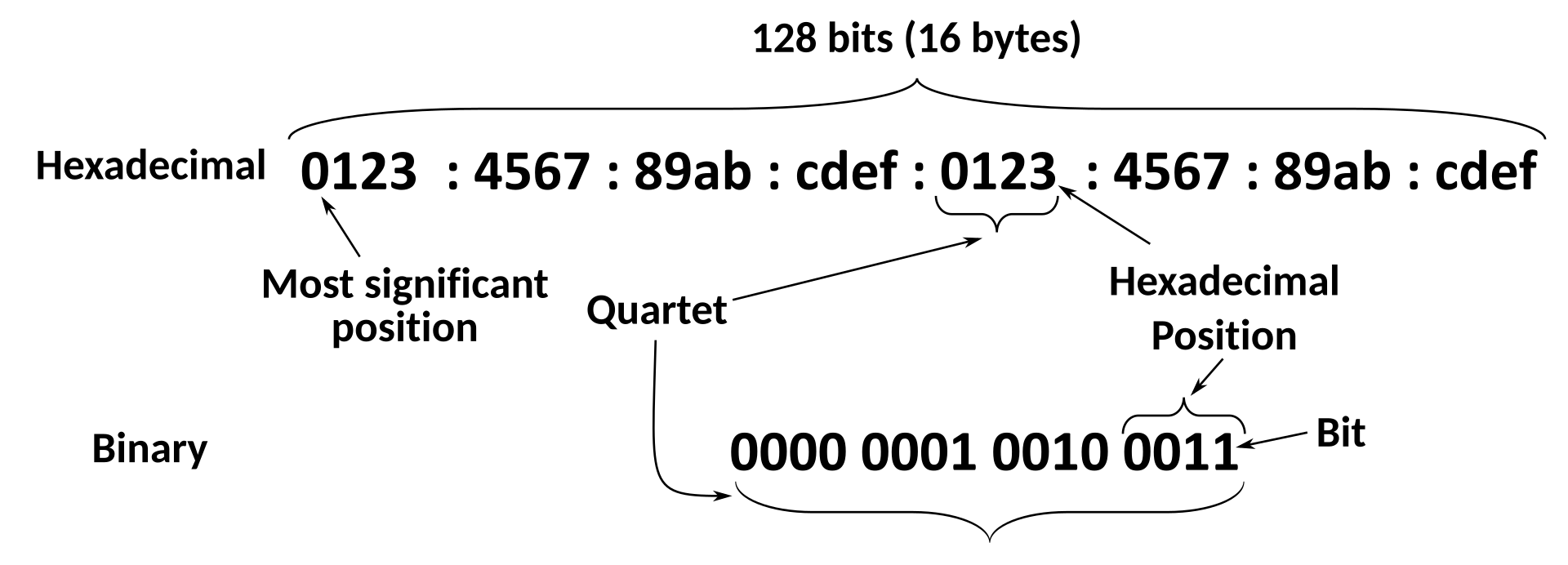
At first I found ip6.arpa genuinely absurd, and here is the trick that made it manageable: you write every single hexadecimal digit, individually, separated by dots, in reverse order. That is all it is. It looks insane because it is long, not because it is complicated.
| Prefix | Nibbles to write | Reverse zone |
|---|---|---|
2001:db8::/32 | 8 nibbles, because 32 divided by 4 | 8.b.d.0.1.0.0.2.ip6.arpa |
2001:db8:1200::/48 | 12 nibbles | 0.0.2.1.8.b.d.0.1.0.0.2.ip6.arpa |
2001:db8:1200:3400::/64 | 16 nibbles | 0.0.4.3.0.0.2.1.8.b.d.0.1.0.0.2.ip6.arpa |
Because /32, /48, and /64 are all exact multiples of 4 bits, they all land perfectly on nibble boundaries.
Which means the ugly RFC 2317 CNAME workaround that IPv4 forces on you is never needed in IPv6. Delegating a customer's /48 is a single clean delegation. The notation is uglier and the operation is dramatically simpler.
The prerequisite everyone hits
Registries will generally refuse to create the delegation if the nameservers you name are not already answering authoritatively for that reverse zone.
So the order is not negotiable:
- Build the reverse zone on at least two nameservers
- Confirm both answer authoritatively for it
- Then create the domain object at the registry
- Verify from outside with a reverse lookup
People try step 3 first, get rejected, and assume something is broken with their account. Nothing is broken. The check is doing its job.
Verifying a delegation actually worked
Those four commands in that order are the whole reverse DNS acceptance test. The first proves the delegation exists and points at our nameservers. The second proves the PTR record answers. The third is the one people skip and it is the one mail servers actually care about: it proves the name resolves forward back to the same address, which is the match a receiving mail server checks. A PTR that points at a name that does not resolve back is worse than no PTR at all, because it looks like a deliberate attempt to appear legitimate.
The delegation chain, and the product decision at the end of it
Customers who send mail will ask to set their own PTR record. There are three ways to answer, and one of them is wrong.
Support ticket per change. Works at ten customers. Becomes an unbearable, unscalable queue at two hundred, and creates delay on something customers consider urgent.
Self service PTR editing in the portal, validated so a customer can only touch addresses assigned to them. This is the right answer, and it is a genuine differentiator against providers who still make you open a ticket.
Delegate the reverse zone to the customer entirely. Correct for larger customers who run their own DNS, and it removes us from the loop completely.
The portal requirement generated here flows into Volume 12. That is exactly why this document exists at outline depth before anyone writes portal code: the address plan generates product requirements, and finding them later means rework.
9. Bringing it back to CloudStack
Everything above is abstract until it becomes numbers in a form field. So here is where the plan lands.
| Plan artifact from this document | Becomes this in CloudStack |
|---|---|
| Public IPv4 block, minus infrastructure reserve | The zone public IP range, which feeds source NAT addresses and static NAT |
| Management subnet | The pod reserved system IP range, used by system VMs and hypervisors |
| Guest network addressing policy | Guest network CIDRs, normally private space behind the Virtual Router |
Public IPv6 /64 | The zone public IPv6 range, which must be exactly a /64 |
IPv6 guest prefix, sized as a /48 | The guest IPv6 prefix, from which one /64 is carved per guest network |
| Private ASN pool | ASN ranges for dynamic routing, one per tenant network in ROUTED mode |
| Reverse DNS delegation | PTR automation hooked to IP assignment events |
The network mode decision, stated honestly
The default. Each guest network gets a Virtual Router with one public IP doing source NAT, plus port forwarding and static NAT for inbound.
Strength: by far the most address efficient model, which is the whole reason it wins under IPv4 scarcity.
Weakness: the Virtual Router is a stateful chokepoint. Its NAT table is a capacity limit and a failure domain, exactly as described in Doc 1.
A worked example plan for the first zone
Illustrative numbers using documentation prefixes, in the shape Doc 5 consumes directly. Replace with real allocations once the registry process completes.
| Purpose | Block | Notes |
|---|---|---|
| Transit uplink | 198.51.100.0/30 | Usually provided by the transit provider |
| Zone public IPv4 range | 203.0.113.32 to 203.0.113.239 | Source NAT and static NAT addresses for guest networks |
| Infrastructure public IPv4 | 203.0.113.16/28 | Mail senders, load balancers, monitoring egress |
| Held reserve | 203.0.113.240/28 | Roughly ten percent, untouched until an incident needs it |
| Management | 10.50.0.0/24 | Hypervisors, out of band, management server |
| Pod reserved system IPs | 10.50.0.128 to 10.50.0.200 | System VMs, sized with room to grow |
| Storage | 10.50.1.0/24 | Isolated, jumbo frames, no gateway needed |
| Guest private space | 10.60.0.0/16 | Carved per tenant network behind the Virtual Router |
| Zone public IPv6 | 2001:db8:0:1::/64 | Must be exactly a /64 |
| Guest IPv6 prefix | 2001:db8:1::/48 | One /64 per guest network, so 65,536 available |
| Private ASN pool | 4200000000 to 4200000999 | For dynamic routing sessions, never announced externally |
203.0.113.0/24, 198.51.100.0/24, and 2001:db8::/32 are reserved for documentation. They exist precisely so examples cannot accidentally reference somebody's real network.
Using them is a small habit worth adopting: it means a copied and pasted example fails safely instead of sending traffic at a real, unrelated company.
Labs and deliverables
Look up a real hosting provider you admire and read their public records. Find their allocations, their ASN, their route objects, and their abuse contact.
Deliverable: a one page profile of how a real provider is registered, including how much IPv4 they hold and how many prefixes they announce. Seeing a competitor's actual footprint is the fastest way to calibrate what is normal.
| Deliverable | What it contains |
|---|---|
| Address inventory plan | Every IPv4 and IPv6 block, its purpose, owner, and utilization target |
| Registry readiness checklist | Membership steps, documents required, expected timelines, cost estimate, re verified against the registry |
| ASN decision record | Either a multihoming justification, or a documented deferral with written trigger conditions |
| IPv6 allocation scheme | Prefix per customer, per network, per infrastructure role, sized against the product roadmap |
| RPKI and IRR register | Every ROA, its maxLength, and the external verification step for changing one |
| Reverse DNS runbook | How to delegate, how customers edit PTR, how to verify |
| DDoS escalation contact sheet | Blackhole community, contacts, out of band numbers, and the decision tree |
Decisions this document must produce
Not opinions. Recorded decisions with reasoning, in the Volume 0 style.
| Decision | Options we weigh | What it costs to get wrong |
|---|---|---|
| Address sourcing at launch | Provider space, registry membership, transfer market purchase, or lease | Every customer IP changes on the first provider change |
| ASN timing | Own ASN from day one, or single transit with a static default route | No redundancy is possible until this is resolved |
| IPv4 product policy | One shared source NAT IP per tenant network with paid extras, versus one public IP per VM | Running out of address space in the first year |
| IPv6 posture | Dual stack from launch, or a fast follow with a committed date | A firewall policy gap on launch day, or years of accumulating debt |
| IPv6 prefix sizes | /48 or /56 per customer, and the guest prefix size per zone | A zone level renumbering project once growth exceeds the cap |
| CloudStack network mode | NATTED, ROUTED, or NATTED IPv4 plus routed IPv6 | Either address exhaustion or a stateful chokepoint under load |
| Customer PTR self service | Support ticket, portal self service, or full zone delegation | An unscalable support queue on something customers treat as urgent |
Every one of these becomes a customer visible promise or a cost line. Undocumented address decisions do not stay quiet. They resurface eighteen months later as pricing arguments, migration pain, and support escalations, at which point nobody remembers why the choice was made and there is no one to ask.
Success criteria
You are done with this document when you can:
| You can | Proving you understand |
|---|---|
| Answer "whose addresses are you selling?" in one sentence, with evidence | The entire point of this document |
| Explain why PI space is the wrong choice for us despite the better sounding name | Sub assignment policy |
| State the smallest IPv4 and IPv6 blocks worth acquiring, and why | Minimum routable prefix filtering |
| Justify our ASN position in policy language rather than in vibes | The multihoming requirement |
| Explain why peering does not replace transit | Reachability versus optimization |
| Explain how a permissive ROA maxLength enables hijacking of your own space | RPKI plus longest prefix match, working together |
| Size an IPv6 guest prefix that will not cap CloudStack growth | The one /64 per guest network rule |
Describe the reverse DNS path for a /24, a /29, and a customer /48 | Octet boundaries, RFC 2317, and nibble boundaries |
| Name who to call, and with which community value, during a volumetric attack | That you prepared before you needed it |
Addresses are identity. Get this layer right and everything downstream, from mail reputation to customer migrations to the day we add a second transit provider, becomes dramatically easier. Get it wrong and you will be renumbering customers while apologizing to them, which is the least pleasant work in this industry.
Doc 3, Datacenter and physical network foundations. Now we stop drawing on whiteboards and go touch metal: racks, power, cables, optics, and the switches that carry every packet in this document.