Projects · Mini Hostpapa
Segmentation, Firewalls & Edge Defense
VLAN zone design, edge firewall policy, management plane protection, tenant isolation, anti spoofing, DDoS response, and abuse handling for a hosting network.
Segmentation, Firewalls & Edge Defense
The rack is built. Cables are labeled. VLANs are trunked and verified.
Now the question that decides whether you sleep at night:
Who is allowed to talk to whom, and what happens when something hostile shows up?
Volume 0 made a promise in security and trust posture: defense in depth, fail closed, least privilege, everything auditable. Those are excellent words and they are, on their own, worth nothing.
This document is where those words become VLAN boundaries, firewall rules, and an abuse process with a phone number attached.A normal company defends against outsiders. The threat is outside, the assets are inside, and the firewall is the line between them.
A hosting company also defends against its own customers, because we are deliberately renting compute to strangers on the internet and taking their money for it.
Some of those customers will be compromised, running a vulnerable application that somebody else now controls. Some of them will be the attacker, having signed up with a stolen card specifically to abuse the platform. And some will be perfectly legitimate and simply incompetent, which produces similar traffic.
Your design has to assume all three, from day one, as normal operating conditions rather than incidents. That single assumption is what separates a hosting network design from a corporate one, and almost every decision in this document follows from it.
This is the last conceptual document before we check our design against the platform in Doc 5, so it closes every loop that Docs 1 through 3 left open. The ARP spoofing problem from Doc 1, the RPKI and prefix filtering from Doc 2, the DHCP snooping and switch features from Doc 3: they all get resolved here.
Every section works the same way. The concept, explained with something you already understand. Then the decision we make for HostKid, with the reasoning. Then how we verify it actually works, because a security control you have not tested is a security control you are hoping about.
Two firewalls, and the confusion that genuinely wastes days
Volume 0 flagged this and it needs repeating loudly, because engineers argue about it for hours without realizing they are discussing different objects.
| Layer | What it protects | Who changes it | How often |
|---|---|---|---|
| Edge firewall, physical | The company perimeter: management network, control plane, our own services | Infra IT, through change control | Rarely. Measured in months. |
| CloudStack Virtual Router | Each tenant network: customer NAT, port forwarding, customer firewall rules | Customers, through the portal and API | Constantly. Per tenant, per day. |
| Security groups, an alternative model | Per instance filtering enforced in the hypervisor itself | Customers, per instance | Constantly |
Edge firewall rules must not need to change when a customer is provisioned. CloudStack documents this itself, and it is the single most important architectural boundary in this document.
Why it matters so much: if selling a VPS requires an engineer to hand edit an edge firewall rule, then your business cannot scale, your change control becomes theatre, and your rule set rots into hundreds of permits nobody can explain. Within a year you have a firewall configuration that no living person is willing to clean up, because nobody knows which rule some customer depends on.
So: per tenant policy lives in the Virtual Router or in security groups, where it is created and destroyed by automation. The edge firewall expresses company policy, which is stable, reviewable, and small enough that a human can read the whole thing in one sitting.
If you ever find yourself adding a customer specific rule to the edge firewall, stop. Something upstream in the design is wrong.
1. Segmentation philosophy
The analogy: a ship's hull
A ship does not have one big hollow interior. It has watertight compartments.
Puncture the hull and one compartment floods. The ship rides lower, the crew has a problem, and the ship stays afloat. Remove those bulkheads and the exact same puncture sinks it.
Segmentation is bulkheads. It does not stop the puncture. It decides whether a puncture is an incident or a company ending event.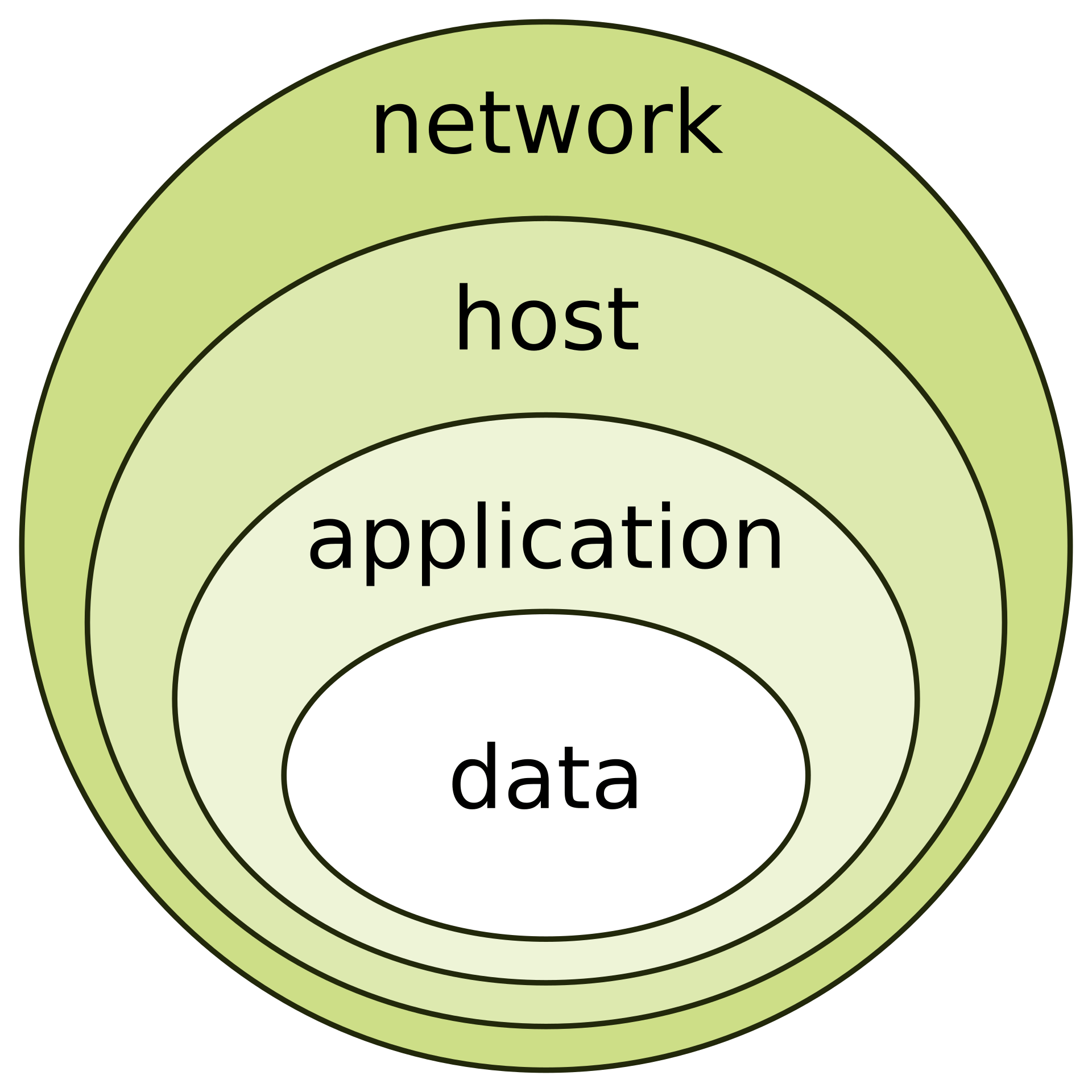
People say "segmentation is good practice" without saying what it buys. It buys four distinct things, and knowing which one you are arguing for makes design discussions much shorter.
Blast radius. One compromised machine reaches a handful of things instead of everything. This is the bulkhead.
Lateral movement cost. An attacker who lands somewhere has to cross a boundary to reach anything valuable, and boundaries are where you get to log, alert, and block. Flat networks give attackers free movement, which is why they love them.
Compliance scope. If cardholder data or personal data lives in a defined segment, the audit covers that segment. Flatten the network and your audit scope becomes everything you own, which is expensive in a way that shows up in the budget.
Clarity of ownership. A named zone has a named owner and a named purpose. "It is on the LAN" is not a design, it is an absence of one.
The honest question, asked for every zone pair
Here is the discipline. For every pair of zones, you answer three questions and write the answer down:
Is traffic allowed? In which direction? And is it logged?
That is it. Do that for every pair and you have produced the zone matrix, which becomes the source of truth that the firewall configuration is checked against.
"Management can reach guest" and "guest can reach management" are completely different statements with completely different risk.
The first is normal and necessary. The second is a tenant escape path.
Because firewalls are stateful, allowing management to initiate connections to guest networks does not allow guests to initiate connections back. Return traffic for an established session is permitted automatically. New inbound sessions are not.
That asymmetry is the whole mechanism, and if you do not have it clear in your head, you will write rules that are twice as permissive as you intended. Every cell in the matrix below is directional for exactly this reason.
Our zones, finalized
Doc 3 gave us the VLANs. Here they are again as trust zones, with the addition the outline promised: a deliberate place for deception.
| Zone | VLAN | Trust level | What lives there |
|---|---|---|---|
| WAN | Handoff | Zero. Hostile by definition. | The internet, arriving from the carrier |
| Edge and DMZ | 50 | Low. Internet exposed, therefore assumed reachable by attackers. | Portal, public API, authoritative DNS, mail, status page |
| Public | 40 | Low. Carries customer traffic. | Virtual Routers, SSVM, CPVM, customer public addresses |
| Guest | 100 to 999 | Untrusted, deliberately. This is the product. | Customer VMs. Assume some are hostile. |
| Management | 20 | High. Owning this owns everything. | CloudStack management servers, hypervisor management interfaces |
| Storage | 30 | High, and closed. No gateway. | NFS traffic between hypervisors and the storage node |
| Out of band | 10 | Highest, and isolated. A separate trust domain. | Every BMC, plus switch and firewall management ports |
| Deception | 60 | Expected to be compromised. That is its job. | T-Pot honeypot sensors |
The zone to zone matrix
Read this as row initiates connection to column. This is the artifact the firewall configuration gets audited against.
| From, to | WAN | DMZ | Public | Guest | Mgmt | Storage | OOB |
|---|---|---|---|---|---|---|---|
| WAN | Selective, published services only | Selective, per customer rules | Deny, only via Public | DENY | DENY | DENY | |
| DMZ | Selective egress | Deny between hosts by default | Deny | Deny | Selective, API calls only | DENY | DENY |
| Public | Allow, this is customer internet | Deny | Deny | Via Virtual Router only | DENY | DENY | DENY |
| Guest | Allow, rate limited | Deny | Via Virtual Router | Deny across tenants | DENY | DENY | DENY |
| Mgmt | Selective, patches via proxy | Allow | Allow | Allow, needed for orchestration | Allow | Allow | Deny, via jump host only |
| Storage | DENY | DENY | DENY | DENY | Deny | Allow | DENY |
| OOB | DENY | DENY | DENY | DENY | DENY | DENY | Allow |
| Deception | Allow, monitored, rate limited | DENY | DENY | DENY | DENY | DENY | DENY |
The Management row is permissive and the Management column is almost entirely deny. That is not an inconsistency, it is the asymmetry from the callout above, made concrete. Management initiates to everything because orchestration requires it. Almost nothing initiates to management. Stateful inspection makes both true at once.
The Storage and OOB rows are nearly solid deny. Those zones have no legitimate reason to start a conversation with anything outside themselves. A connection attempt from storage to the internet is not a policy question, it is an alert, because it means something is running on your storage node that should not be.
The Deception row allows outbound to WAN. This looks alarming and it is intentional, because a honeypot that cannot be reached and cannot respond attracts nothing and teaches you nothing. It is rate limited, heavily monitored, and completely walled off from every internal zone. Compromise is the expected outcome there, and the design accounts for it.
Default deny, and the exception discipline
Every firewall has a final rule. Ours drops and logs.
That sounds obvious and the failure mode is subtle: teams start with default deny, then hit a problem at 2 a.m., add a broad permit to make it work, and never come back. Six months later the broad permits are the policy and default deny is a comment at the bottom of the file.
So every exception carries three things, matching the exception rule from governance, risk and compliance:
A named owner. A person, not a team, because teams do not answer questions.
A documented reason, in the rule comment, written for someone who was not in the room.
An expiry date. This is the one that actually works. An exception that expires forces a conscious decision to renew it, which is how temporary access stops becoming permanent by neglect.
Where deception fits, and why we do it at all
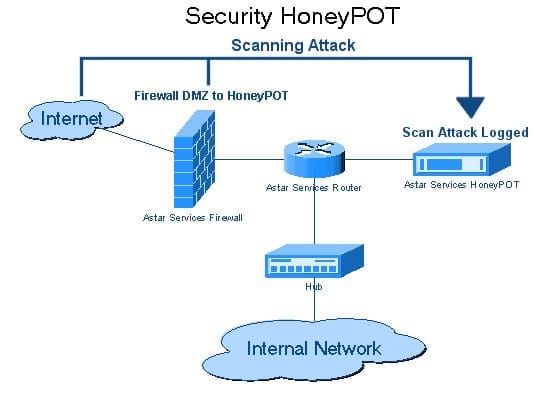
Volume 0 committed to cyber deception as a deliberate practice, with T-Pot as the platform. This is the section where it gets a network address.
Here is how I understand the value, and it took me a while to articulate it properly. Every other security control tells you about traffic you decided to care about in advance. A honeypot tells you what attackers are actually trying right now, against your specific address space, with no prior assumption from you about what matters.
Your firewall logs contain a colossal amount of traffic, and separating attack from noise is genuinely hard work.
A honeypot has no legitimate users. It serves no purpose, hosts nothing real, and nobody has any reason to connect to it.
Therefore every single connection to it is, by definition, unauthorized. There is no false positive problem to solve, no baseline to establish, and no tuning to do. The signal is one hundred percent signal.
That is why honeypot data is worth so much more per byte than firewall logs, and why the attack dashboards promised in governance are fed primarily from deception sensors rather than from production telemetry.
That framing is not pessimism, it is the design constraint. You are deliberately running deliberately vulnerable services and inviting attackers to succeed against them. Some of them will.
Therefore VLAN 60 is walled off from everything. No route to management, no route to storage, no route to guest networks, no shared credentials with anything real, and no trust relationship of any kind with production. Read the Deception row of the matrix again: outbound to the internet, rate limited and monitored, and deny to every internal zone.
A honeypot that can reach your production network is not a security control. It is an attack path you built on purpose and pointed at yourself.2. The edge firewall
The analogy: the security desk in a building lobby
Every visitor passes one desk. The guard has a list, checks it, and either lets you through or does not.
Critically, the guard does not decide who is allowed into individual offices on the fifth floor. That is the fifth floor's problem, handled by the fifth floor's own locks. The lobby desk handles building policy.
That division of labour is exactly the edge firewall versus Virtual Router boundary, and it is why the lobby guard's list stays short enough to actually read.CloudStack's own installation guidance is unambiguous: all deployments should have a firewall protecting the management server.
Take a moment on why the project bothers to say something so apparently obvious. It is because of what the management server is. It holds the API that creates and destroys every customer VM, the database of the entire platform, and the credentials to every hypervisor.
An exposed CloudStack management server is not a vulnerability, it is a total loss of the platform, and section 3 is dedicated to that single problem.
What the edge firewall actually has to do
| Job | Why |
|---|---|
| Protect the management plane | Nothing from the internet may reach it. Section 3. |
| Publish our own services | Portal, API, DNS, mail, console proxy, status page. Controlled inbound. |
| Route between internal zones | Enforce the matrix where the ToR switch does not |
| Terminate VPN | Staff access, and site to site if needed |
| Egress control | Limit what our own compromised machines can do. Explained below. |
| Log everything relevant | Section 8. You cannot investigate what you never recorded. |
| Anti spoofing at the border | Section 5. Do not become part of somebody else's attack. |
Topology: what we build, and what we grow into
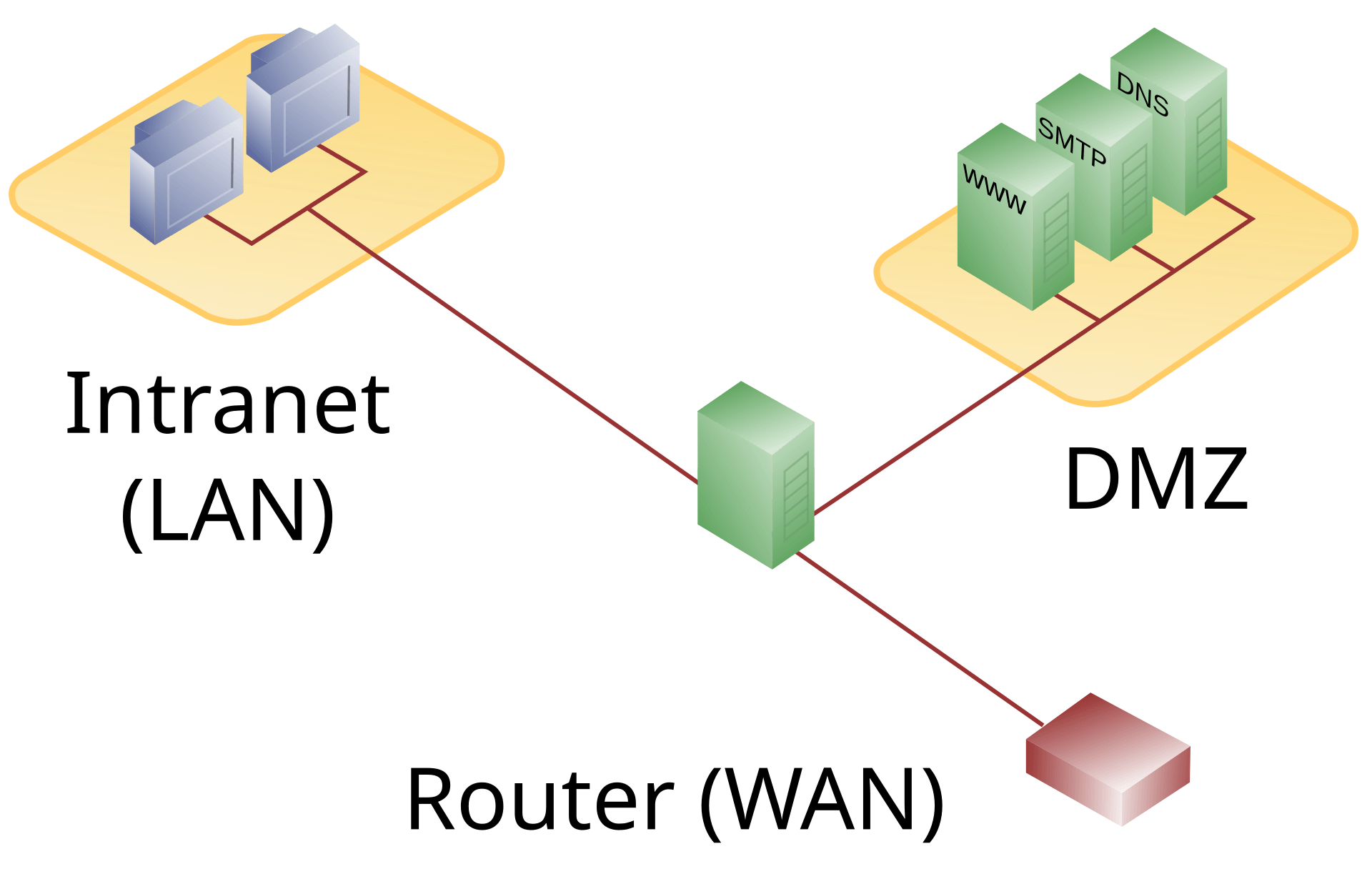
The naive design has two interfaces: outside and inside. Everything internal is on one side of the line and therefore everything internal trusts everything internal.
The three legged design gives the DMZ its own interface, which means traffic between the DMZ and the internal network has to traverse the firewall and be evaluated by policy.
Why that specific improvement matters more than any other: the DMZ is where you get breached. Those are the machines exposed to the internet, so they are the ones an attacker reaches first. A compromised web server is a normal Tuesday.
With two interfaces, that compromised web server sits inside your trusted network and can reach your management plane. With three, it sits in its own compartment and every packet it sends toward management is a policy decision that gets logged.
Read the DMZ row of the zone matrix now and it should land differently: DMZ to Management is "selective, API calls only", and DMZ to Storage and OOB are hard deny. That row exists precisely because we expect the DMZ to fall.
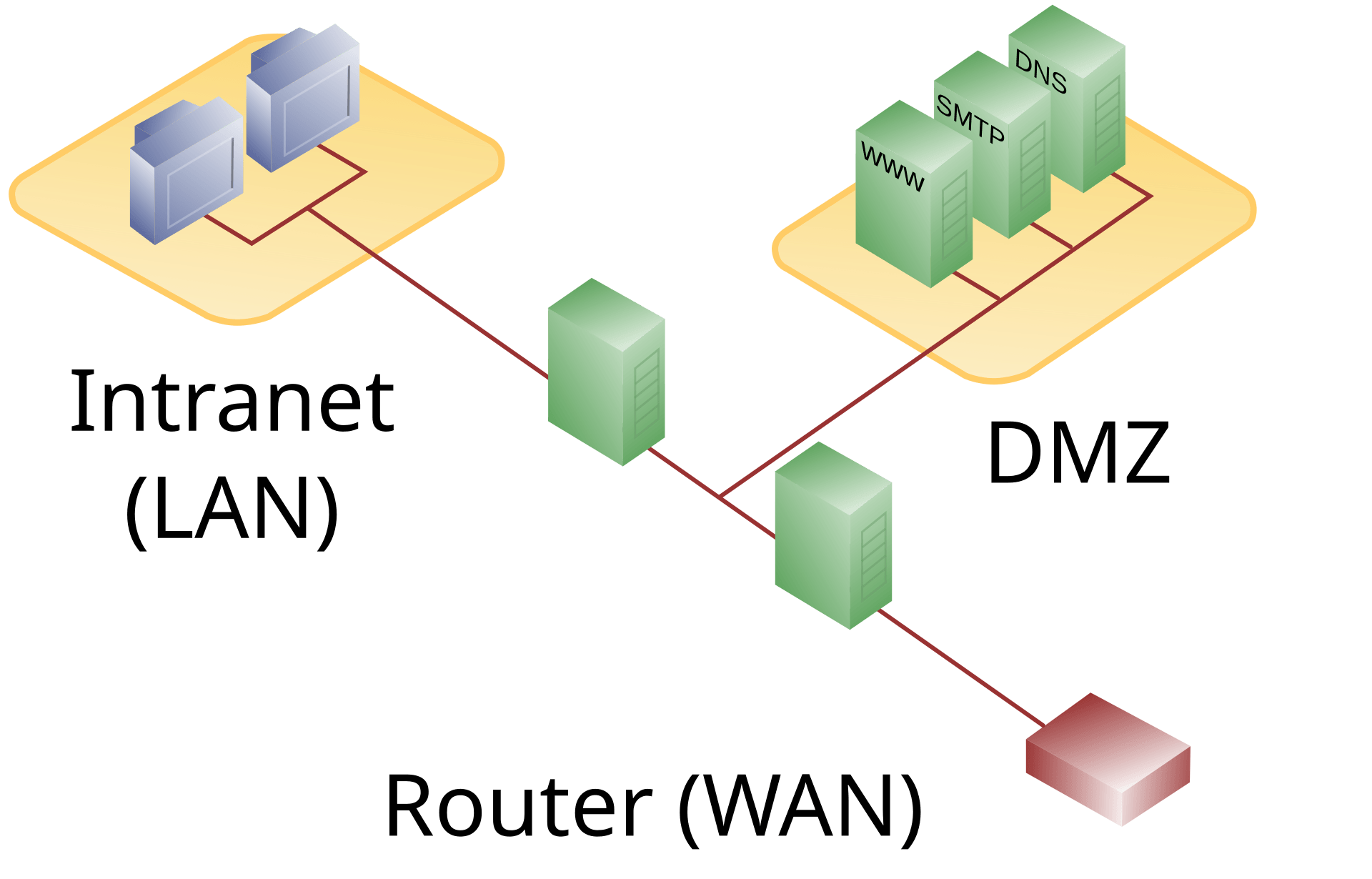
The theory is appealing: an attacker must defeat two firewalls to reach the internal network.
The catch is that this only holds if the two firewalls are genuinely different. Two appliances from the same vendor running the same firmware share the same vulnerabilities, so the exploit that defeats the first defeats the second. You have doubled your cost and your operational burden for very little additional security.
Different vendors gives you real defense in depth and gives your team two products to master, two patch cadences to track, and two configuration languages to keep consistent. For a small team, that operational load is itself a risk, because misconfiguration is a far more common cause of breach than firewall exploitation.
Our position: one well configured, well monitored, promptly patched firewall beats two poorly maintained ones. We start with the three legged design and revisit this when the team is large enough to operate two products properly.
How a firewall actually decides, and why rule order matters
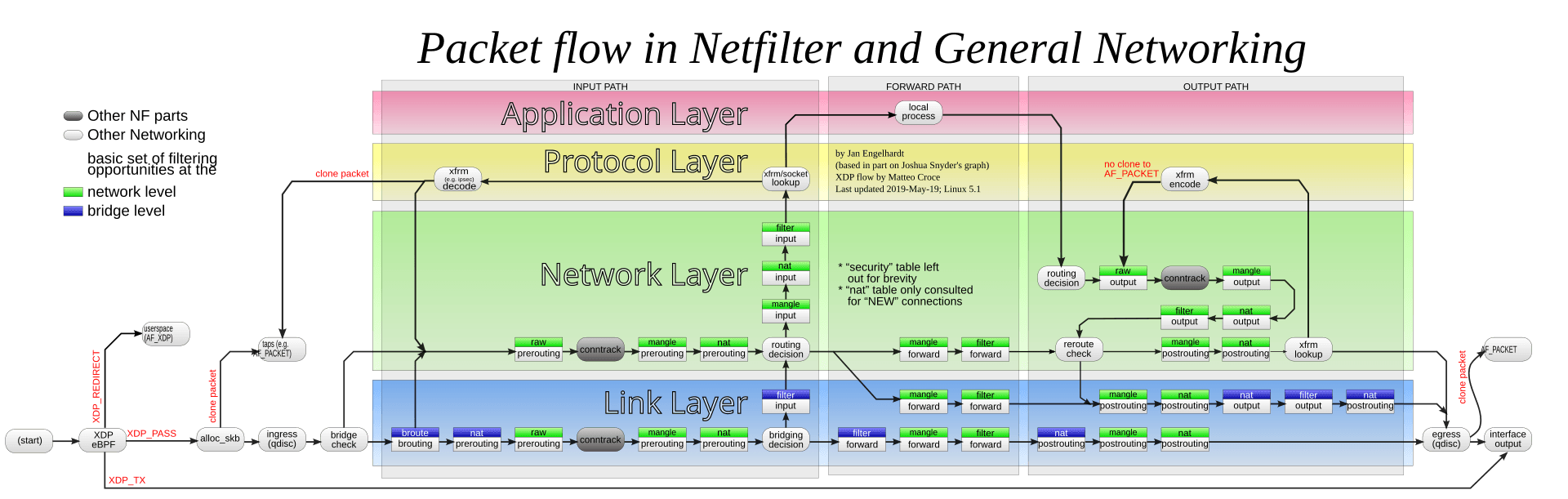
That picture intimidates people, so here is the honest reading. You do not need to memorize it. You need three facts from it, and they explain most firewall confusion you will encounter.
1. A packet takes different paths depending on where it is going. Traffic destined for the firewall itself goes through the input path. Traffic passing through goes through the forward path. This is why a rule that works for reaching the firewall does nothing for traffic crossing it, and why "I allowed it but it still fails" happens.
2. Address translation and filtering happen at different stages. Look at where the nat boxes sit relative to the filter boxes. Destination NAT happens before the routing decision and before filtering. This is why your filter rules must reference the translated address, not the original one, and getting that backwards is genuinely the most common port forwarding mistake there is.
3. Order is absolute. Rules are evaluated top to bottom and the first match wins. A broad permit placed above a specific deny means the deny is dead configuration that will never be consulted. It reads correctly and does nothing.
That third point is why our rule set is grouped and commented by purpose, and why rule review means reading the order, not just the rules.
A stateless filter looks at each packet alone, with no memory. A stateful firewall keeps a connection table and remembers conversations it has already approved.
The two words that appear in every rule set:
NEW: a packet trying to start a conversation. This is what your rules actually decide about.
ESTABLISHED: a packet belonging to a conversation already approved. Allowed automatically, usually by one rule at the top.
Why this is the concept that makes the zone matrix work: you write one rule allowing management to initiate to guest networks, and the replies come back without any rule permitting inbound guest to management. One directional rule, bidirectional traffic, no inbound hole. Without stateful inspection you would need an inbound permit for every outbound one, and the matrix would collapse into mush.
The operational consequence: the connection table is finite, and filling it is a denial of service. Session table capacity is on the buying checklist below for exactly that reason.
Inbound policy: what we publish, deliberately and minimally
| Service | Port | Destination zone | Notes |
|---|---|---|---|
| Customer portal and public API | 443 | DMZ | HTTPS only, HTTP redirects, HSTS as promised in Doc 1 |
| Authoritative DNS | 53 UDP and TCP | DMZ | Authoritative only. Never an open resolver. Section 6 explains why that matters enormously. |
| Inbound mail | 25 | DMZ | Plus submission on 587 for authenticated customers |
| Console proxy | 443 | Public | CloudStack CPVM. Needs the public VLAN, as Doc 3 explained. |
| Status page | 443 | Externally hosted | Deliberately off our own infrastructure, so it survives our outage |
| Staff VPN | One UDP port | Firewall itself | The only management path from outside. Section 3. |
| Customer services | Per customer | Public, then Virtual Router | Never an edge rule. Customers configure this themselves. |
Put your status page on your own infrastructure and it goes down exactly when customers need it, which is during your outage.
You then have an outage and no way to communicate about it, so your support queue fills with people asking whether you are aware, and your team spends the incident answering that question instead of fixing anything.
Host it externally. It is one of the cheapest operational decisions in this document and it directly supports the incident communication commitment in security and trust posture.
The ports that must never be publicly reachable
Port 8250, the management server agent port. This is how hypervisor hosts talk to the management server. It belongs on VLAN 20 and nowhere else. Exposing it offers attackers the channel that controls your hypervisors.
Port 8096, the integration API. Read this carefully: it is unauthenticated by design. It exists so local automation can call the API without credentials, and CloudStack ships it disabled or bound locally for that reason.
An exposed port 8096 is a complete, unauthenticated takeover of your entire cloud platform by anyone who finds it. Not privilege escalation, not a data leak. Full control, no password, no exploit required.
Our position: 8096 stays disabled. If some automation genuinely requires it, it binds to localhost only and is reached through an SSH tunnel from the jump host, never through a firewall rule.
And it goes in the verification checklist as an explicit external scan, because this is not a control you assume. Exact configuration lands in Doc 5.
Egress control, and why a hosting network genuinely needs it
Most people's instinct is that outbound traffic is fine because it is our machines talking. Here is why that instinct is wrong in a hosting environment specifically.
Compromised machines phone home. Malware needs to reach a command and control server. Block or alert on unexpected egress and you catch a compromise during the attack rather than reading about it in a breach notification.
Data leaves through egress. Every exfiltration is outbound traffic. Filtering egress is the last chance to stop it.
You are legally and reputationally responsible for what leaves your ASN. This is the hosting specific part. Attack traffic sourced from your address space becomes your abuse complaint, your blocklist entry, and eventually your conversation with a transit provider. Section 7 covers the process; the control has to exist here first.
Reflection vectors have to be closed on the way out. Section 6, and it is the difference between being a victim and being a weapon.
| Zone | Egress policy | Reasoning |
|---|---|---|
| Management | Very restricted, through a proxy for patches only | This zone has no business browsing the internet |
| Storage | None. Zero. | Any attempt is an alert, not a policy question |
| OOB | None. Zero. | Firmware arrives via the jump host |
| DMZ | Only what each service actually needs | These are the machines expected to be compromised |
| Guest | Open, but rate limited and with abuse vectors filtered | Customers bought internet access. We still refuse to be an amplifier. |
The guest row is the honest compromise in this entire document. We cannot filter customer egress aggressively, because unrestricted outbound access is a large part of what they are paying for. So we do the two things that reduce harm without breaking the product: rate limit per tenant, so one compromised customer has a ceiling, and filter the specific known amplification vectors, which no legitimate customer needs.
Appliance selection criteria
| Criterion | What to actually ask |
|---|---|
| Throughput | Not the marketing number. Throughput with logging and inspection enabled, which is often dramatically lower. |
| Session table size | How many concurrent connections before it falls over. This is the DDoS relevant number, and it is often the real limit rather than bandwidth. |
| New sessions per second | Separate from the table size, and separately exhaustible |
| HA support | Active passive at minimum, with state synchronisation, so failover does not drop every established connection |
| Logging quality | Structured export to a collector. Logs only viewable in a vendor GUI are close to useless for investigation. |
| API for automation | Non negotiable, because of the GitOps commitment in Volume 0. A firewall you can only configure by hand cannot live in version control. |
| Operational cost | Licences, support, and the renewal that arrives when you have no time to migrate |
| Team familiarity | Underrated. The best appliance misconfigured is worse than a modest one configured correctly. |
One firewall appliance. It is a single point of failure for the entire perimeter, exactly like the single ToR switch in Doc 3.
We do the same three things we did there: write it down as an accepted risk with a named owner, monitor it properly so we know immediately when it degrades, and keep the configuration in version control so a replacement can be brought up from a known state rather than from memory.
The upgrade trigger is the same as the switch pair: the first customer with a contractual availability commitment. A risk with a documented trigger is a plan. Without one it is an excuse that ages badly.
3. Management plane protection
The blunt reality, stated once with no softening
Not "can cause problems". Not "may access some data". Owns.
With management plane access, an attacker can create and destroy any VM, attach any customer's disk volume to a machine they control and read it, snapshot any customer's data, reach every hypervisor, and delete the backups.
There is no other component in HostKid where a single compromise ends the company. This one does.So this section is short, absolute, and has no convenience exceptions. Every rule here costs somebody a small amount of daily friction, and every one of them is worth it.
The analogy: the master key cabinet
A building has a cabinet holding the master keys to every apartment. You do not put that cabinet in the lobby with a sign-out sheet.
It lives in a locked room, inside another locked area, reachable by a short list of named people, and every access is recorded. The inconvenience is deliberate, because the alternative is that a single theft compromises every tenant simultaneously.
The access path, and there is exactly one
| Hop | Control | What it stops |
|---|---|---|
| 1. Staff VPN | MFA, certificate plus a second factor | A stolen password alone is useless |
| 2. Jump host | Key based authentication, per person accounts, session recording | Anonymous action. Everything is attributable to a person. |
| 3. Target | Individual credentials per system, least privilege | One compromised credential does not open everything |
A jump host or bastion is a hardened machine that is the only permitted route into a protected network. You connect to it, then from it you connect onward. Nothing else may cross the boundary.
Three reasons it earns its place:
One chokepoint to harden. Minimal software, aggressive patching, tight monitoring. One machine you can genuinely secure well is worth more than twenty you secure adequately.
One place to log. Every administrative action in the environment passes through here, so this is where you get complete audit coverage rather than partial coverage assembled from many sources.
Session recording. The jump host records the actual session, the commands typed and the output returned.
Here is why session recording matters more than people expect, and it is not primarily about catching malicious insiders. When something breaks after a change, the recording tells you exactly what was done, rather than relying on somebody's memory of a stressful evening. It is an incident response and postmortem tool far more often than a security investigation tool, and it pays for itself in ordinary weeks.
Break glass, designed rather than improvised
Volume 0 committed to one break glass CloudStack account for disaster recovery. Here is how it is protected, and the design principle is that we cannot prevent its use, so we make it impossible to use quietly.
Credentials stored offline, in a sealed physical envelope in a safe, or split so that two people are required.
Use triggers an immediate alert to management and security, automatically, with no way for the user to suppress it.
Every use is reviewed afterwards, regardless of who used it or why, as a scheduled review rather than an optional one.
Credentials rotate after every use, without exception.
The account is monitored for existence, so its removal or modification is itself an alert.
The principle: you cannot stop a legitimate emergency, and you should not try. What you can guarantee is that nobody uses it without everybody knowing. That is what turns a backdoor into a documented control.
Separation of duties
| Identity | Can do | Cannot do |
|---|---|---|
| Infra admin, human | Read CloudStack, investigate, operate infrastructure | Write production config through the UI. Changes go through Git. |
| Terraform pipeline account | Apply reviewed, merged configuration | Be used interactively by a human |
| Portal service account | Exactly the API calls the product needs | Anything administrative |
| Support tooling | Read customer state to answer questions | Modify customer resources without an audited action |
| Break glass | Everything | Be used without an alert firing |
Read that table as a single sentence: humans get read access plus the ability to propose changes, and automation gets write access to apply changes that a human has reviewed. That is the whole Terraform GitOps commitment from Volume 0, expressed as firewall and identity policy rather than as a philosophy.
Doc 3 established that BMCs are the most privileged and least monitored surface in the rack, and that BMC firmware has a poor security history.
The temptation, once you are tired, is to make OOB "just reachable from management" because that is easier during an incident.
Do not. Look at the OOB row in the zone matrix: it initiates to nothing, and nothing initiates to it except the jump host with separate authorization.
The reasoning: if management can freely reach OOB, then compromising management gives an attacker power control and pre operating system access to every machine you own, which is a level of control that survives every reinstall you might attempt as a response. Keeping OOB separate means a management compromise, catastrophic as it is, still leaves you a recovery path the attacker does not hold.
4. Tenant isolation, the product promise
The analogy: apartments versus a shared house
You rent an apartment. It has its own front door, its own lock, and its own walls. Your neighbour cannot walk into your kitchen. You share the building's plumbing and roof, and none of that gives anyone access to your rooms.
Tenant isolation is that promise, and for a hosting company it is not a security feature. It is the product. A customer buying a VPS is buying the assurance that the stranger renting the machine next door cannot see their database. Break that once, publicly, and there is no recovery narrative available to you.
Two models CloudStack offers, and the choice is real
| VLAN per guest network | Shared network with security groups | |
|---|---|---|
| Isolation happens at | Layer 2. Separate broadcast domains. | Layer 3. Filtering in the hypervisor. |
| Enforced by | The switch and the VLAN tag | Rules applied on the hypervisor's virtual interfaces |
| VLAN consumption | One tag per network, so the 4094 ceiling applies | Very few tags, shared across many tenants |
| VPC support | Yes | No. A documented CloudStack constraint. |
| Isolated networks | Yes | No in a security group enabled zone |
| Multi tier customer networks | Yes, which is a sellable feature | No |
| Strength of the boundary | Stronger. Traffic cannot reach the neighbour at all. | Good, and dependent on filtering being correct |
Enabling security groups in a zone is a zone level architectural decision, and CloudStack's own documentation is clear about the consequences: in a security group enabled zone you cannot use VPCs or isolated networks, and such shared networks come with single VLAN range restrictions.
Why that phrasing matters: this is not a setting you toggle later after you have customers. It shapes what your product catalogue is capable of offering, permanently, for that zone.
So the decision belongs here, in network design, before the first customer exists, rather than being discovered by a product manager who has already promised a customer a multi tier VPC.
Why. The stronger boundary is worth more to us than the conserved tag space, for three reasons.
First, we are selling trust as much as compute. Layer 2 separation is a claim you can make plainly to a security conscious customer: their traffic and their neighbour's traffic are not in the same broadcast domain. That is a simpler and stronger sentence than explaining hypervisor filtering rules.
Second, VPC is a product feature we want to sell. Multi tier networks, a web tier separated from a database tier inside one customer's own private space, is exactly the kind of offering that moves a customer up a price band. Choosing security groups forecloses it.
Third, we measured the ceiling and it is not close. Doc 3 allocated VLANs 100 to 999, which is 900 simultaneous guest networks, comfortably beyond the starter business plan.
And when we do approach it, the answer is VXLAN with its 24 bit identifier, which preserves the layer 2 model rather than forcing us to abandon it. So the growth path keeps the property we chose this for, and that is what makes it the right decision rather than merely the current one.
What tenant escape would actually mean
A tenant escape or VM escape is when code inside a customer's VM breaks out into the hypervisor. From the hypervisor, an attacker reaches every other VM on that host.
VLANs do not protect you here, and neither do security groups, because both operate at the network layer and the attacker is now underneath it.
This is why hypervisor patching is not maintenance. It is the control that protects the boundary your entire product is sold on.What follows from that, concretely: KVM and QEMU security updates get an expedited patch path rather than the normal cadence, live migration exists partly so hosts can be patched without customer downtime, and "we will patch it next quarter" is not an available answer for this specific class of update.
This is also the honest answer to a customer asking whether their VPS is as isolated as a dedicated server. It is not, quite, and the difference is this class of vulnerability. Saying so plainly builds more trust than claiming otherwise and being wrong later.
Noisy neighbour versus security boundary
Customers conflate these constantly, and answering the wrong one wastes everybody's time.
"The other customer is slowing me down" is a resource contention problem. It is about CPU scheduling, disk IOPS, and network bandwidth sharing. It is real, it is annoying, and it is not a security issue. The fixes are compute offerings with guaranteed resources, IOPS limits, and the network rate in section 6.
"The other customer can see my data" is a security boundary problem. Entirely different severity, entirely different response, and if true it is a company level incident.
Learn to separate them in the first minute of a support conversation. The first is a capacity conversation that may end in an upsell. The second is an incident. Treating a contention complaint as a breach wastes a day, and treating a breach report as contention is the worst mistake available to you.
Cross tenant traffic
| Scenario | Default | How it is granted if legitimately needed |
|---|---|---|
| Between two different customers | Deny. No exceptions. | It is not. They use public addresses like any two internet parties. |
| Between two networks of the same customer | Deny by default | The customer builds a VPC with multiple tiers, or requests a private gateway |
| Customer to our platform services | Via published endpoints only | Same path as any internet client, no internal shortcut |
| Customer to another customer, both consenting | Deny | Still no. They interconnect over the public internet, encrypted, like adults. |
That last row is a deliberate refusal and worth explaining. Building a private path between two consenting customers sounds accommodating. It creates a bespoke exception in a system whose entire value is uniform isolation, it will be forgotten within a year, and it will surface during an audit as an unexplained hole. The answer is no, and the reason we can say no comfortably is that they have a perfectly good alternative in an encrypted tunnel over the internet.
5. Anti spoofing and source validation
The analogy: the return address on an envelope
Anyone can write any return address on an envelope and post it. The postal system does not verify that you live where you claim.
Now imagine writing your enemy's address as the return address, then posting ten thousand letters that all demand a reply. Ten thousand replies arrive at your enemy's house. You sent small letters; they receive a mountain of mail. And every reply looks entirely legitimate to them, because it came from real, innocent recipients.
That is IP spoofing, and that is a reflection amplification attack, and it works because the internet does not verify source addresses.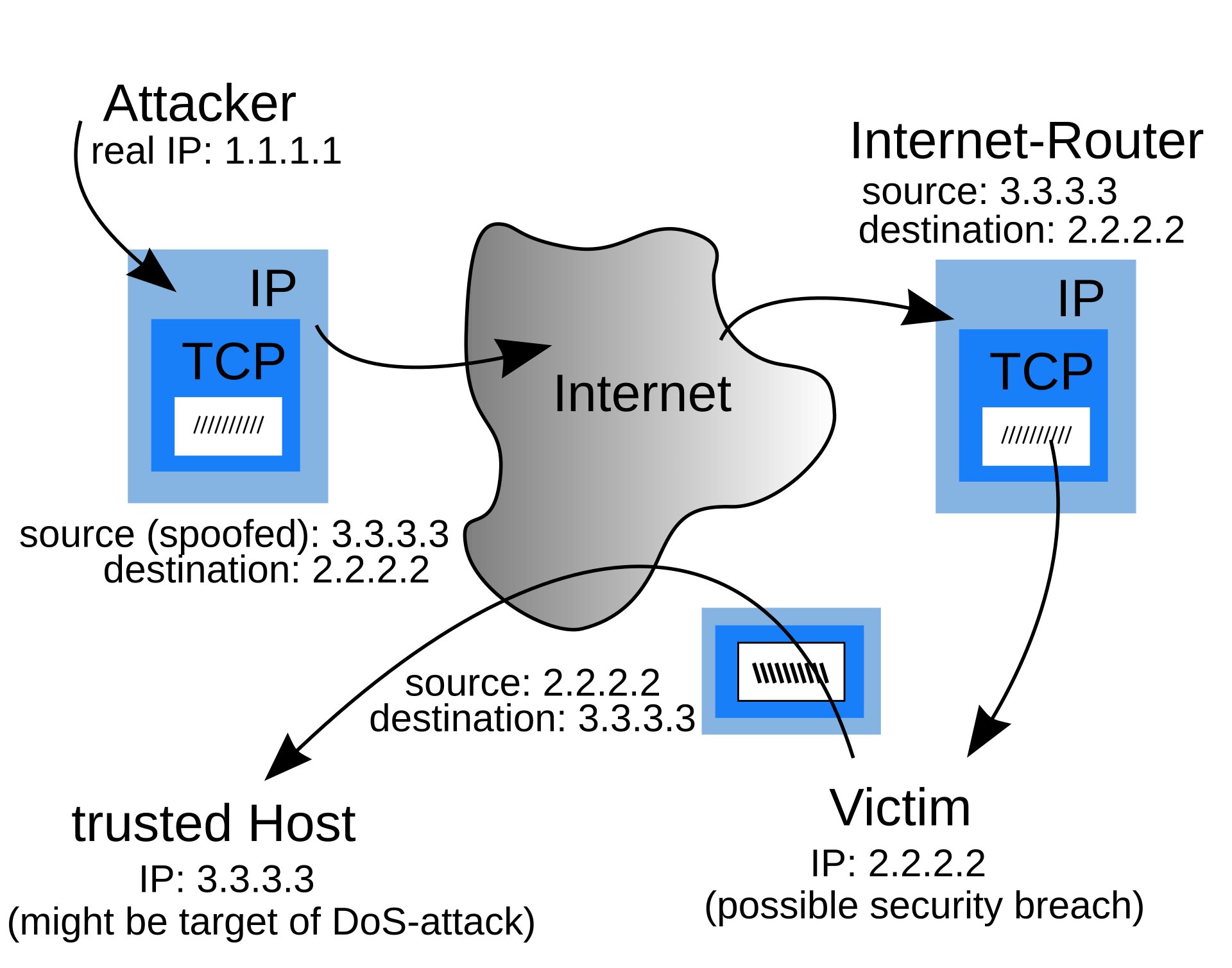
Trace the arrows carefully, because this diagram contains the whole problem. The attacker's real address is 1.1.1.1 and it appears nowhere in what the victim sees. The victim's reply goes to 3.3.3.3, an innocent third party, who now receives traffic it never requested from a source that genuinely sent it.
BCP 38, in one sentence
BCP 38, published as RFC 2827, says one thing:
Never let a packet leave your network carrying a source address you do not own.That is it. If your address space is 203.0.113.0/24, then a packet leaving you with a source of 198.51.100.5 is forged and you drop it. There is no legitimate case for it in a hosting network.
BCP 84, RFC 3704, extends the same idea to multihomed networks where the naive check is too strict because traffic can legitimately arrive asymmetrically.
Why it is called a BCP, best current practice, rather than a standard: it is not enforced by any protocol. It is each network operator voluntarily choosing to be a good citizen. Which is precisely why it remains only partially deployed across the internet decades later, and why the attacks it prevents still work.
Why hosting providers are the worst offenders when they get this wrong
Think about what a hosting provider is: machines with substantial bandwidth, rented to people you have not met, on your address space, under your ASN.
If a tenant on your network can send spoofed packets, then your network is a reflection amplifier available for hire.
Walk through the consequences in order. The attacker rents the cheapest VPS you sell. They send a modest stream of small queries to public services, with the victim's address forged as the source. Those services reply, and the replies are many times larger than the queries and are aimed at the victim.
The victim sees a large attack. The services that replied see nothing unusual. And the traffic that started it all left your ASN.
So the abuse complaint is yours. The blocklist entry is yours. The transit provider conversation is yours. And the attacker paid you five dollars for the privilege.This is why anti spoofing is not one control in one place. It is enforced at four layers below, on the principle that any single layer might be misconfigured and the others still hold.
The four layers of enforcement
The closest layer to the customer, and therefore the most valuable.
CloudStack security groups filter by source address on the hypervisor's virtual interface, meaning a VM's packets are checked before they ever reach a physical wire.
- A VM may only send packets sourced from its own assigned address
- Enforced in the hypervisor, so the customer cannot bypass it from inside their VM, no matter what privileges they hold on their own operating system
- This is the layer that stops spoofing at origin, which is the only place it can be stopped cheaply
Every other layer below is defense in depth, catching what this layer misses.
This layer is the one that prevents the problem, because it operates at the only point in the network where you have complete certainty about which address a packet is entitled to use. A switch sees a frame and has to infer. The hypervisor assigned the address, so it knows.
Verify it is enabled per host, not per zone, and treat a host missing it as an outage.Verification, because assumption is not a control
The uncomfortable truth about anti spoofing is that a broken control is completely invisible.
If IP source guard is misconfigured, nothing breaks. No error appears, no alarm fires, no customer complains. Traffic flows normally. The only observable difference is that spoofed packets now succeed, and you will find out when a transit provider calls you.
So it gets tested deliberately, from a lab VM on a guest network, as a scheduled exercise rather than a one time install task.The first command establishes the truth. This VM owns 10.1.100.42 and nothing else. Everything after is judged against that.
The second command is the attack. The -a flag forges the source address as 198.51.100.99, which this VM has no right to use. One hundred percent packet loss is the passing result. The control worked.
The third command is the part people forget, and it is essential. The same ping with the real source succeeds. Without this, a total network outage would produce an identical result to a working control, and you would record a pass while being completely broken.
A security test that cannot distinguish "the control blocked it" from "nothing works at all" has told you nothing. Always pair the negative test with the positive one.
Then go and find the drop in the logs. A silent drop proves the packet did not arrive. The log entry proves your control dropped it deliberately, tells you which layer caught it, and confirms you would have visibility during a real incident.
6. DDoS: honest expectations for a small provider
The uncomfortable arithmetic, stated first
Suppose we buy a 10 Gbps uplink, which is a serious circuit for a starter hosting business.
An attacker with a modest botnet or a rented attack service can generate hundreds of gigabits per second. Not theoretically. As a commodity service, priced in tens of dollars.
Here is the part that took me a while to accept properly: when the attack is larger than your uplink, nothing you own can help you.Your firewall could be infinitely fast and it would change nothing, because the congestion happens upstream of you, on your provider's link, before a single packet reaches equipment you control. You cannot filter traffic that has already saturated the pipe it would arrive through.
Every honest DDoS plan for a small provider starts by accepting that, and then asks the only useful question: what do we do about the part that is upstream? The answer is section 6's whole point, and it is not "buy a bigger firewall."
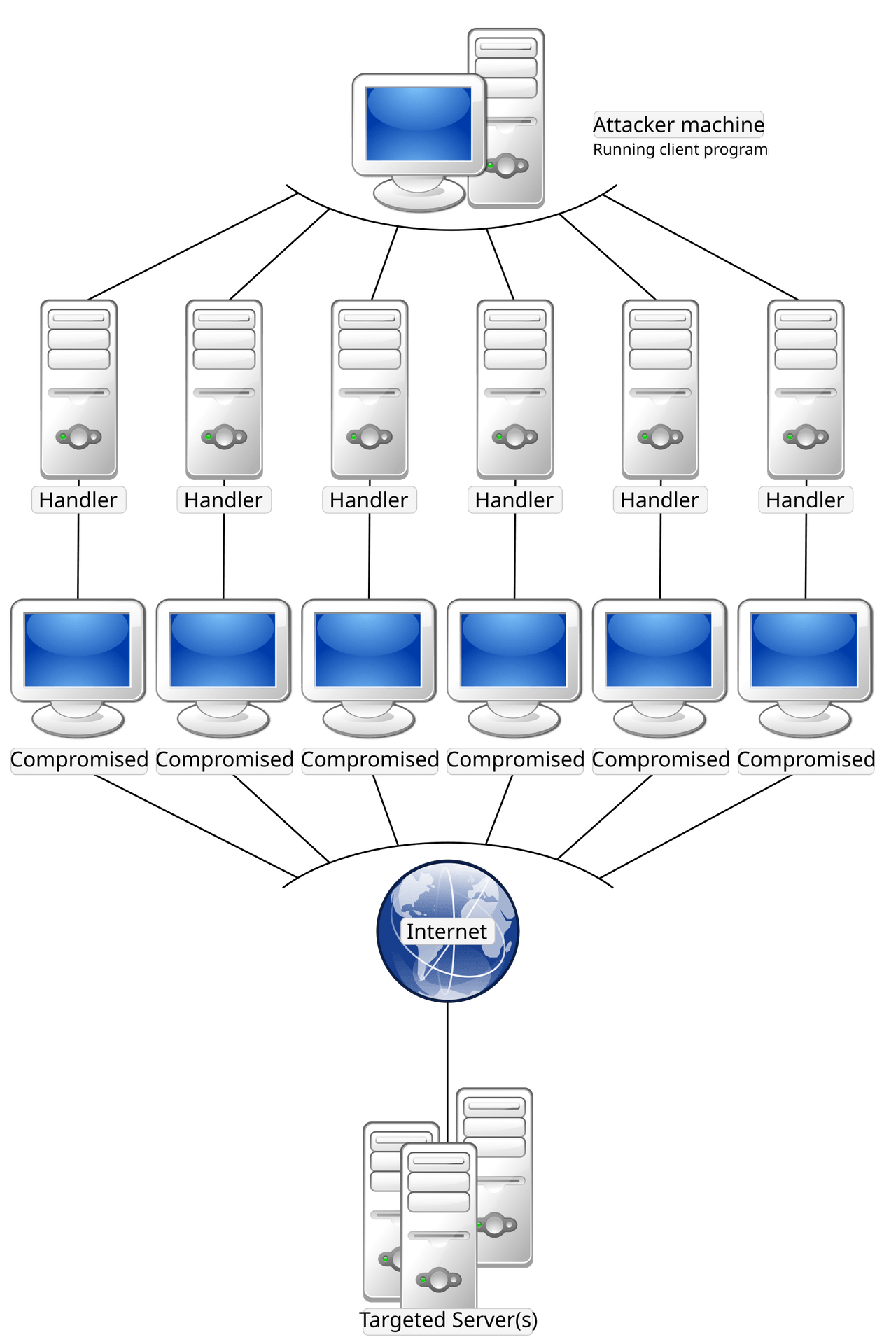
Look at the bottom layer. The traffic arriving at your network comes from thousands of different, unrelated, genuinely innocent machines.
That is what "distributed" means, and it is why the instinctive response fails. You cannot block the attacker's address, because the attacker's address never appears in the traffic. You cannot block a country or a range, because the compromised machines are everywhere including among your customers.
And note the top of the diagram: the attacker sends a handful of commands. The asymmetry of effort is total. Minutes of work on their side, and your entire uplink on yours.
Attack categories, because the response differs completely
| Category | What it exhausts | Example | Where it must be handled |
|---|---|---|---|
| Volumetric | Your bandwidth | UDP flood, amplified reflection | Upstream. Nothing you own can help. |
| Protocol | Your session tables and connection state | SYN flood | Firewall, if it is sized for it |
| Application layer | Your CPU and database | Floods of expensive HTTPS requests | Reverse proxy, rate limiting, WAF |
| Reflection or amplification | The victim's bandwidth, using you as the weapon | DNS or NTP amplification | Egress filtering. Section 5. Prevention, not response. |
That last row is the one where you have real, cheap, complete control, and it is the one small providers most often neglect. You cannot stop being a target. You can absolutely stop being a weapon, and it costs you a configuration change rather than a contract.
Protocol attacks: the SYN flood, since you already know the handshake
Doc 1 taught the TCP three way handshake. Here is the attack that abuses it, and knowing the handshake means you already understand it.
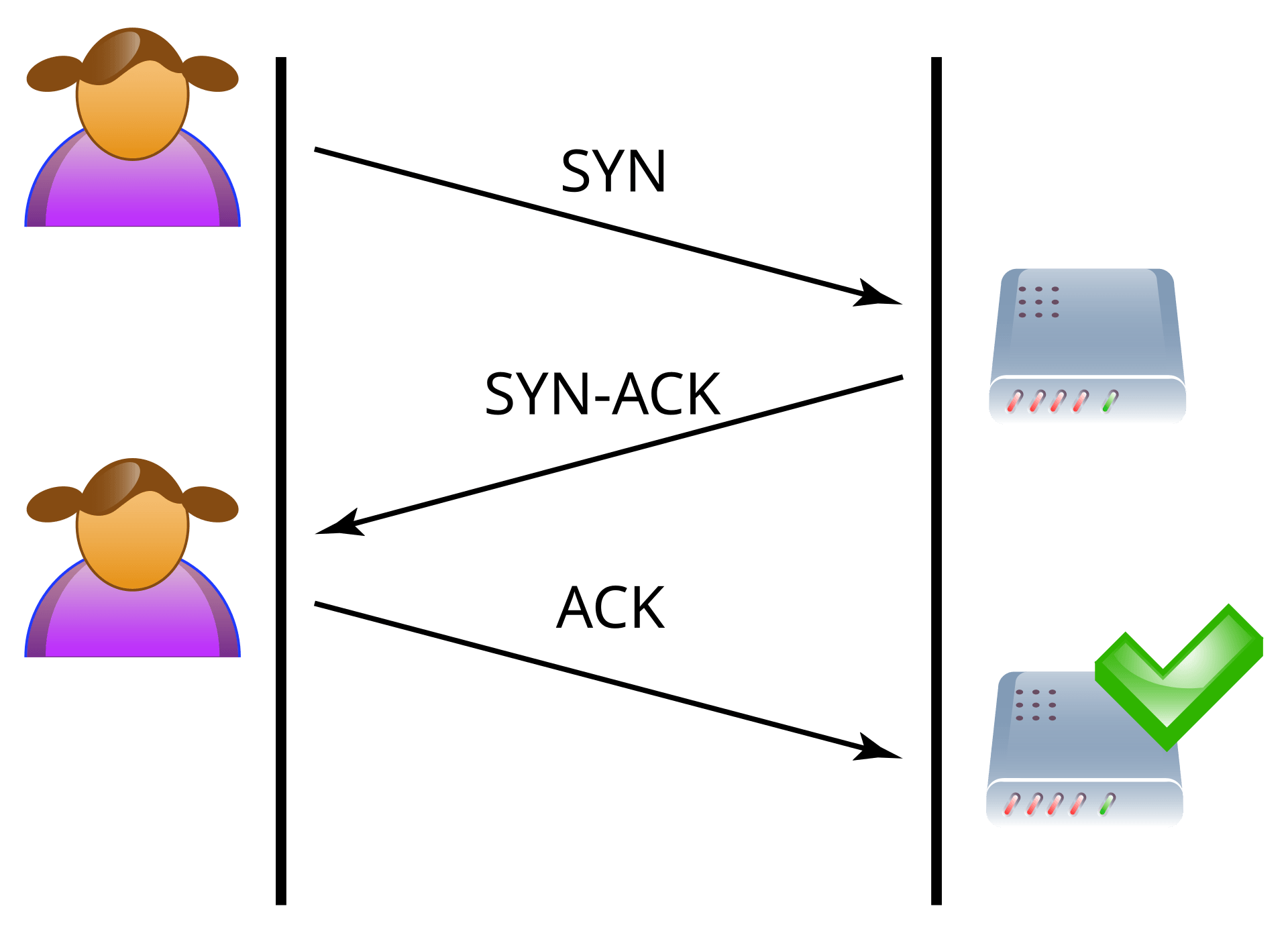
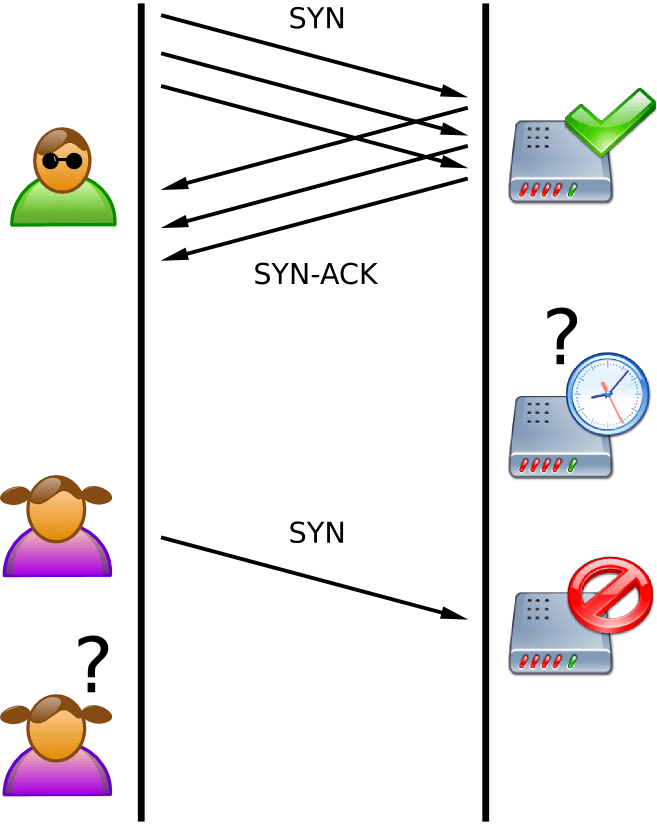
In the normal case, the server replies SYN ACK and reserves memory for a connection it expects to complete. That reservation is the vulnerability, and it is not a bug. It is how TCP has to work.
In the attack, the SYNs carry spoofed source addresses, so the server's SYN ACK goes to a machine that never asked for anything and will never reply. The connection sits half open, holding resources, until it times out.
The asymmetry is brutal: the attacker sends one small packet and never has to remember anything about it, while you allocate state and wait. A few thousand of these per second fills the table, and then legitimate connections are refused. Your server is not overloaded and not compromised. It has simply run out of room to accept anyone new.
Two things follow. First, this is why session table size and new sessions per second are on the appliance buying checklist rather than raw throughput. Second, SYN cookies are the defence: the server encodes the connection state into the sequence number it sends back, so it can validate a returning ACK without having reserved anything. No state held means nothing to exhaust. Enable it, verify it, and know why it works.
The cheapest high value control: remote triggered blackhole
Remote triggered black hole lets you ask your transit provider to drop all traffic to one of your IP addresses, at their edge, before it ever reaches your uplink.
You do it by announcing that address over BGP tagged with an agreed community, a numeric label the provider's routers recognize as "please discard traffic for this."
Why it is the highest value control available to a small provider: it is the only tool that works on volumetric attacks, because it acts upstream of the saturated link. It costs nothing. And it takes effect in seconds once configured.
And now the sentence I most want you to remember from this document: arrange this with every transit provider before you need it.The community value, the technical contact, the escalation phone number, the authorization process, all of it agreed and tested while nothing is on fire. Discovering during an attack that you do not know your provider's blackhole community, or that the person who does know is asleep, is a failure of preparation rather than of engineering.
Read what a blackhole actually does one more time: it drops all traffic to that address.
So you have not saved the customer under attack. You have finished them off, on purpose, to save everybody else. Their service is now completely unreachable, and the difference between that and the attack succeeding is, from their point of view, nothing at all.
What you have saved is every other customer sharing that uplink, who were about to go down as collateral damage.
That is a genuine business decision disguised as a technical one, which is exactly why it needs a documented decision authority and a threshold agreed in advance, when nobody is panicking and nobody is on the phone. Improvising this at 3 a.m. produces either paralysis or an unfair outcome, and both are avoidable.
The decision tree, agreed in advance
| Action | Who may authorize it | Notify |
|---|---|---|
| Firewall rate limits, SYN cookies | On call engineer, immediately | Log it, no approval needed |
| Reverse proxy or WAF rules | On call engineer | Log it |
| Blackhole a single customer address | On call engineer, after attempting to notify the customer | Customer, management, status page |
| Blackhole a shared platform address | Management. This affects everyone. | All customers, status page |
| Engage a scrubbing service | Management, commercial decision | Affected customers |
| Suspend a customer as the source | On call engineer, under the abuse process in section 7 | Customer, abuse log |
The point of naming authority per action is speed, not bureaucracy. An on call engineer who knows they are permitted to blackhole a single customer address acts in seconds. One who is unsure spends twenty minutes finding somebody to ask, and those twenty minutes are the outage.
FlowSpec and scrubbing, briefly and honestly
FlowSpec, where your transit provider supports it, lets you ask for surgical upstream filtering rather than a total blackhole. Something like "drop UDP traffic to this address on this port", which kills the attack while leaving the customer's legitimate traffic working.
That is strictly better than RTBH when it is available, so ask every transit provider whether they support it during the same conversation where you agree the blackhole community. Support is inconsistent, which is why RTBH remains the control we actually rely on.
Scrubbing services redirect your traffic through a provider with enormous capacity, who filters the attack and forwards the clean remainder to you. It genuinely works against volumetric attacks.
When it makes commercial sense: when the revenue you protect exceeds the monthly cost, and not before. For a starter footprint that maths usually fails, so the honest position is that we do not buy scrubbing at launch, we know which providers we would call, and we revisit the moment we sign a customer whose contract makes the arithmetic work.
Per tenant rate limiting, and edge hygiene
CloudStack network offerings carry a network rate, a bandwidth cap applied per network interface.
This is doing two jobs at once and both are worth having.
It is a product feature. Different tiers get different bandwidth, which is a legitimate and expected way to price hosting.
It is a security control. A compromised customer cannot generate more attack traffic than their rate allows. That converts "one compromised VPS saturates our uplink and takes down every other customer" into "one compromised VPS uses its allocation and we notice."
Set it on every offering, including the cheapest one. An unlimited tier is an unlimited liability, and the cheapest tier is precisely the one an attacker will rent.
| Egress hygiene control | What it prevents |
|---|---|
| Rate limit outbound DNS, NTP, SSDP, memcached, CLDAP from guest networks | The classic amplification vectors. No normal customer needs to send these at volume. |
| Our DNS is authoritative only, never an open resolver | An open resolver is one of the most abused amplifiers on the internet |
| Outbound source address filter, from section 5 | Spoofing, which every reflection attack requires |
| Outbound port 25 restrictions for new customers | Spam, covered in section 7 |
| Alert on any guest sending sustained high packet rates | Detects a compromised customer before your transit provider does |
Here is the framing I keep coming back to on this whole section. Being attacked is not a reflection on your engineering, because everyone is attacked and you do not choose your attackers. Being a source of attacks is entirely a reflection on your engineering, because every control that prevents it is cheap, well documented, and within your power. One of those is bad luck. The other is a choice.
Communicating during an attack
The instinct under pressure is to say nothing until you understand everything. That instinct is wrong, and it reliably makes the incident worse, because silence gets filled with speculation and your support queue becomes the bottleneck.
Say early, say plainly, and say what you know:That there is an attack, on the externally hosted status page, within minutes rather than after diagnosis.
What is affected and what is not. Customers can plan around a known blast radius.
What you are doing about it, in one sentence a non engineer understands.
When you will update next, and then actually update at that time even if nothing has changed. A silence after a promised update is far more damaging than the original problem.
What not to do: speculate about the attacker, promise a resolution time you cannot support, or go quiet while you work. This is the incident communication commitment from security and trust posture, and an attack is the day it either holds or does not.
7. Abuse handling, the process nobody plans for
The analogy: being a landlord
You rent apartments. One tenant starts running a business from theirs that generates complaints from the whole street.
You did not do anything wrong. And it is unambiguously your problem, because your name is on the building, the neighbours call you, and if you do nothing the city eventually comes after you.
Abuse handling is that, and here is the thing nobody warns you about: it is not an occasional exception. For a hosting company it is a routine, permanent, staffed business function.It looks like an operations or legal topic, and here is why it sits in Volume 1.
The controls that make abuse response possible have to exist in the network before the first complaint arrives.When a complaint lands, you need to answer four questions quickly: which customer was using that address at that time, what were they actually doing, can you prove it, and can you stop it right now without touching anything else.
Every one of those depends on infrastructure decisions. Flow telemetry has to already be collecting. Logs have to already be retained with accurate timestamps. IP assignment history has to be recorded. Per tenant network controls have to exist so you can throttle one customer without affecting neighbours.
None of that can be retrofitted during your first serious complaint, which is precisely when you will wish you had it. Design it now, use it later.
Where abuse reports arrive, and all four must work
| Channel | What it is | Requirement |
|---|---|---|
abuse@ mailbox | The internet convention. People will use it. | Must exist, be monitored, and be answered by a human. |
| RIR contact records | The abuse contact registered against our address space and ASN | Must be accurate and kept current. This is where professionals look first. |
| Blocklist notifications | Automated notice that our address space has been listed | Monitored, because listings damage every customer sharing the range |
| Upstream complaints | Our transit provider forwarding a complaint to us | Highest urgency. Ignoring these risks your connectivity. |
An unmonitored abuse@ address, or an out of date RIR contact, does not make complaints go away. It makes them escalate.
The reporter cannot reach you, so they go to your transit provider instead. Now the conversation is not "please look at this customer", it is your provider asking why they are receiving complaints about a customer who does not respond. That conversation has a much worse ending available to it.
Being reachable and responsive is, genuinely, most of abuse handling. A provider who replies within hours and acts within a day almost never escalates further, even when the underlying abuse takes time to resolve. The responsiveness is the reputation.
Categories, and the right first response for each
| Category | Typical cause | First response |
|---|---|---|
| Outbound spam | Compromised site, or a deliberate spammer | Throttle or block port 25 immediately, then investigate. Reputation damage compounds by the minute. |
| Phishing hosting | Compromised site, or deliberate | Fast action required. Real people are losing money while it is up. |
| Malware distribution | Usually compromised | Suspend the specific content, notify the customer |
| Port scanning or brute forcing | Almost always compromised | Rate limit, notify, and give a remediation deadline |
| Participating in a DDoS | Compromised, or rented for the purpose | Immediate network suspension. This one does not wait for a reply. |
| Copyright complaint | Customer content | Legal process, not a technical one. Forward, document, follow jurisdiction. |
| Cryptomining on a free tier | Deliberate abuse of trial resources | Terms enforcement, usually suspension |
Most abuse comes from customers who are victims, not villains. Someone ran an outdated content management system, it got compromised, and now it sends spam. They usually have no idea.
That deserves a completely different tone from a deliberate spammer, and getting the tone right is a commercial decision as much as an ethical one.
For a compromised customer: stop the harm, then help them. Tell them plainly what you observed, when, and what they should look at. A customer you helped through a compromise becomes loyal in a way that marketing cannot buy.
For a deliberate abuser: terms enforcement, and no negotiation.
The response ladder below is identical for both, because the network harm has to stop either way. What differs is everything about how you communicate, and that difference is worth caring about.
The response ladder
| Rung | Action | Reversible? | Who decides |
|---|---|---|---|
| 1. Notify | Tell the customer what we observed, with evidence and a deadline | Yes | Support, from a template |
| 2. Throttle | Reduce their network rate, or block a specific port | Yes, immediately | On call engineer |
| 3. Suspend network | VM keeps running, network access removed. They keep their data and can still access the console. | Yes | On call engineer |
| 4. Suspend service | VM stopped, data preserved | Yes | Management |
| 5. Terminate | Account closed per contract | No | Management, with legal review |
Suspend network, keep the VM running. Study this one, because it is disproportionately valuable and teams often skip straight past it.
It stops the harm instantly, which is the obligation you owe the internet.
It preserves the evidence, because the machine and its logs are intact rather than destroyed by a reinstall.
And it leaves the customer able to fix their own problem, because they can still reach the console through CloudStack, read their logs, and clean up.
So a compromised customer can remediate their own machine while causing no further harm to anybody. That is a genuinely good outcome for every party involved, and it exists only because network access and compute are separable in our design. Which is a network architecture decision, made here, enabling a support outcome later.
Evidence, and what we can actually prove
An abuse report says: "your IP 203.0.113.47 attacked us at 14:32 UTC on 2 August."
To act on that you must answer:
Which customer held that address at that moment? Requires IP assignment history with timestamps, not just current state.
What was that address actually doing? Requires flow telemetry, retained.
Is the report credible? Requires your own data to corroborate or contradict it.
Is it still happening? Requires current visibility.
And the one that catches people out: every one of those answers depends on accurate, synchronized clocks. If your timestamps are wrong by even a few minutes, you will identify the wrong customer, because public addresses get reassigned. Suspending an innocent customer based on a bad timestamp is a serious, avoidable failure.
So NTP across all infrastructure, in UTC, monitored for drift, is an abuse handling control. It looks like housekeeping and it is evidentiary integrity.
| Evidence | Retention | Why that long |
|---|---|---|
| IP assignment history | Long. Months at least. | Complaints arrive weeks after the event |
| Flow telemetry, sampled | Weeks | Enough to corroborate a typical complaint |
| Firewall deny logs | Weeks | Investigation and pattern detection |
| Abuse case records | Years | Repeat offender detection, and proof of diligence to upstreams and auditors |
| Customer notifications sent | Years | Proves you acted, which is what an upstream or regulator asks |
Retention specifics and shipping land in Volume 18 logging. What matters here is that the requirement originates from this document, so the logging platform is built to satisfy it rather than being retrofitted after the first complaint you could not answer.
Mail, which deserves its own subsection
Doc 1 covered SPF, DKIM, DMARC, and the reputation economy of email. Here is the operational consequence for a hosting provider.
One spamming customer can get your entire IP range blocklisted, and then every legitimate customer's mail stops being delivered.That is a shared fate problem, which makes it different from every other abuse category. A customer running a port scan harms the scan target. A customer sending spam harms every other customer you have, and they will not know why their invoices stopped arriving.
So the controls are pre emptive rather than reactive:Port 25 blocked by default for new customers, opened on request after basic verification. This single control removes most casual abuse, because a spammer who has to ask and be verified usually goes elsewhere.
Outbound rate limits per customer, so a compromise is bounded rather than unlimited.
Reputation monitoring on our own ranges, so we discover a listing ourselves rather than through a confused customer's support ticket.
Separate our platform mail from customer mail, on different addresses, so a customer's mistake cannot stop our own password reset emails from being delivered.
Correct reverse DNS on every sending address, which Doc 2 set up the delegation for.
Blocking port 25 by default will annoy a small number of legitimate customers. It is still correct, and the honest way to handle it is a fast, friendly verification path rather than pretending the restriction does not exist.
Who owns this
| Department | Responsibility |
|---|---|
| Support | First response, triage, customer communication, case records |
| Infrastructure and IT | Technical verification, throttling, network suspension, evidence gathering |
| Security | Pattern analysis, repeat offenders, control improvements after each case |
| Management | Service suspension, termination, legal escalation |
| Legal or external counsel | Copyright, law enforcement requests, jurisdictional questions |
Ownership matters more than sophistication here. A simple process with a named owner at every rung beats an elaborate one where everybody assumes somebody else is handling it. Department definitions live in organization and departments.
8. Visibility: you cannot defend what you cannot see
The analogy: cameras versus locks
Locks stop people getting in. Cameras tell you who tried.
You need both, and here is why the second is underrated: after any incident, the only questions that matter are what happened, how far did it get, and is it over. Locks cannot answer any of those. Only recordings can.
Every control in this document is a lock. This section is the cameras, and without it you will never know whether any of your locks are working.Flow telemetry, and the questions it answers
NetFlow and sFlow export summaries of traffic metadata rather than content. For each conversation you get source, destination, ports, protocol, byte and packet counts, and timing.
What they deliberately do not include is the payload. That is a feature, not a limitation, for three reasons: full packet capture at line rate is enormously expensive to store, most traffic is encrypted so the payload would be useless anyway, and metadata avoids capturing customer content you have no business retaining.
sFlow samples, taking a statistical fraction of packets, which is cheap and excellent for volume and trend questions. NetFlow tends to account for flows more completely, which is better for precise per customer accounting. Both are on the switch buying checklist from Doc 3.
The privacy point is worth stating explicitly, because customers ask: we record who talked to whom and how much, and not what they said. That is a defensible position in a review and it happens to be all we need.
| Question | How flow data answers it |
|---|---|
| Are we under attack, and how large? | Traffic volume by destination, in near real time |
| Which customer is generating this? | Volume by source address, which is the abuse triage question from section 7 |
| Is a customer compromised? | Unusual outbound patterns, such as sudden scanning behaviour or a spike in port 25 |
| Did the attacker move laterally? | Unexpected traffic between zones, which is the boundary crossing question |
| Do we need more uplink? | Utilization trends, which is capacity planning rather than security |
| What does normal look like? | The most valuable answer of all, because every anomaly detection depends on it |
That final row deserves emphasis. You cannot detect abnormal traffic without knowing what normal traffic looks like.
So flow collection is enabled on day one, during the quiet period before you have customers, precisely because that is when you learn the shape of your own network. Turning on telemetry during an incident gives you data with nothing to compare it against, which is a fraction as useful.
This is the workflow, and it is only two commands.
The first output identifies the target. 203.0.113.47 is receiving 402 gigabytes in fifteen minutes at 3.8 gigabits per second, while the next busiest address is receiving fifty times less. That is not a busy customer. That is an attack, and the address is the target.
The second output identifies the shape. Filtering to just that destination and ranking by source, look at what you get: the top sources are all sending roughly identical volumes, around 5 megabits each, from completely unrelated networks.
That evenness across unrelated sources is the fingerprint of a distributed attack, and it is exactly the bottom layer of the botnet diagram in section 6 seen from the receiving end.And notice what you cannot do: there is no small set of sources to block, because the load is spread evenly across thousands. Which is precisely why the decision tree in section 6 routes a volumetric attack on a single customer address to RTBH rather than to a firewall rule. You have now confirmed with data that a firewall rule would be futile.
Logging: what to keep and what to sample
| Source | Policy | Reasoning |
|---|---|---|
| Firewall denies on internal boundaries | Keep all | Low volume and high value. A deny between internal zones means something is misconfigured or somebody is probing. |
| Firewall denies from the internet | Sample or aggregate | Enormous volume and low value. The internet scans everything constantly. |
| Firewall permits for published services | Sample | Useful for baselines, too voluminous to keep whole |
| Management plane access | Keep all, forever, tamper evident | This is the audit trail that matters most. Section 3. |
| Jump host session recordings | Keep all | Incident reconstruction, as section 3 argued |
| Switch anti spoofing drops | Keep all | Rare, and each one indicates a customer machine misbehaving |
| Honeypot events | Keep all | One hundred percent signal, as section 1 explained |
| Configuration changes | Keep all | Git history is already this, which is a benefit of GitOps people forget to claim |
An attacker who compromises a machine will edit or delete its logs. That is not sophisticated behaviour, it is standard behaviour.
So logs ship off the host as they are written, to a collector the source host cannot modify or delete from.
The property you want is append only from the source's perspective. A compromised web server can stop sending new logs, and it cannot reach back and alter what it already sent. So your record of the compromise survives the compromise, which is the entire point.
Deception feeding the dashboards
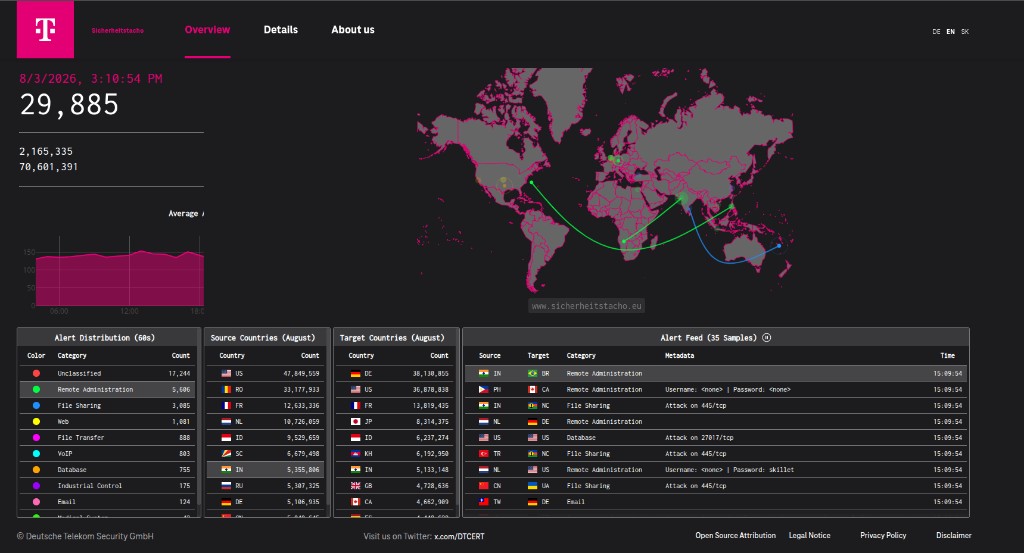
Volume 0 committed to this dashboard in governance, risk and compliance. Here is the network design that produces it.
| Element | Our design |
|---|---|
| Sensor placement | VLAN 60, on public addresses from our range, so attackers find them naturally |
| Isolation | The Deception row of the matrix. Outbound to internet only, deny to every internal zone. |
| Data path | Events pushed out to the collector. The collector never connects in. |
| What we learn | Which services are targeted, which credentials are tried, which exploits are current, which sources are hostile today |
| How it improves defence | Credentials seen in attacks get audited against our real systems. Exploited software gets patch priority. |
Note the third row carefully. Sensors push events out. The collector never initiates a connection into the deception network.
Because if the collector reached into VLAN 60 to gather data, then a compromised honeypot would have a documented, permitted path toward your monitoring infrastructure. You would have built the exact bridge that section 1 said must not exist, and you would have built it for a convenience that push delivery provides anyway.
Small design detail, and it is the difference between deception being an asset and deception being an attack path.
Alert thresholds
| Signal | Threshold | Response |
|---|---|---|
| Inbound traffic to one address | Above a set share of uplink capacity | Page on call. Section 6 decision tree. |
| Guest outbound packet rate | Sustained above the tier's normal envelope | Investigate for compromise |
| Outbound port 25 from a guest | Any, if not authorized | Block and investigate. Section 7. |
| Connection attempt from Storage or OOB outbound | Any at all | Page immediately. This should be impossible. |
| Denied traffic toward the Management zone | Any from an unexpected source | Investigate. Somebody is probing. |
| Anti spoofing drop at the switch | Any | Identify the customer, treat as possible compromise |
| Firewall session table | Above a set percentage of capacity | Investigate. Possible protocol attack. |
| Break glass account used | Any | Page management. Section 3. |
An alert that fires constantly is not an alert, it is background noise with a notification attached. And the failure mode is not that people ignore it deliberately. It is that they stop seeing it, so the one time it matters, it looks like all the other times.
Two rules keep this list honest.
Every alert needs a documented action. If the answer to "what do I do when this fires" is "look at it", it is a dashboard metric, not an alert. Move it.
Tune thresholds against your baseline, which is why baselining is in this section rather than in a monitoring volume. Thresholds invented before you know your normal traffic will be wrong in both directions.
Alert routing and the reactive automation this feeds are developed in Volumes 17 and 18.
What leadership sees
| Executive signal | What it tells the business |
|---|---|
| Attack volume trend | Whether our exposure is growing, which informs security investment |
| Blocked categories | Which controls are earning their cost |
| Top attacked services | Where hardening effort should go next quarter |
| Abuse case count and time to resolution | Our standing with upstreams. Rising counts with slow resolution predicts a difficult conversation. |
| Incidents with customer impact | The number that actually reaches the SLO reporting in executive metrics |
These are the reactive, query driven dashboards Volume 0 promised. The reason they can exist is that the telemetry decisions in this section were made before anybody asked for a dashboard. Metrics you did not instrument for cannot be reported on later, no matter how good the dashboard tool is.
9. The finished policy artifacts
Everything above produces documents. Here is the inventory, so you can check whether you actually finished.
| Artifact | From section | Consumed by |
|---|---|---|
| Zone to zone matrix | 1 | Firewall configuration, and every future architecture review |
| Edge firewall rule set outline | 2 | Implementation in Volume 5, audited against the matrix |
| Management access runbook | 3 | Identity work in Volume 9, and the on call rota |
| Tenant isolation decision record | 4 | Doc 5, because it determines the CloudStack zone type |
| Anti spoofing control list | 5 | Switch and firewall configuration, and the verification checklist |
| DDoS runbook | 6 | On call, with transit contacts and communities filled in |
| Abuse runbook and templates | 7 | Support, and the RIR abuse contact record |
| Telemetry and alerting plan | 8 | Volumes 17 and 18 |
The comment convention for firewall rules
Firewall rule sets outlive the people who wrote them. A year from now, somebody will look at a permit and have to decide whether removing it breaks production.
If they cannot tell, they will leave it. That is how rule sets grow monotonically and never shrink, until nobody will touch the configuration at all.
So every rule carries four things, in the comment:The purpose, in plain words, written for somebody who was not in the room.
The requester or owner, a named person.
The change reference, linking to the merge request that introduced it.
The expiry or review date, if it is an exception rather than baseline policy.
Because the rules live in Git as part of the GitOps model, the change reference gives you the full discussion that produced the rule. That is the difference between a rule set you can confidently prune and one that only ever grows. It is also, incidentally, most of what an auditor wants to see.
ISO control mapping
Volume 0 committed to ISO alignment. The temptation is to treat that as a separate exercise performed later by somebody with a spreadsheet.
Do it now, while the reasoning is fresh, because the mapping is nearly free at this moment and expensive to reconstruct in six months.| Artifact | The audit question it answers |
|---|---|
| Zone matrix | "How is your network segregated, and who approved it?" |
| Firewall rule set with comments | "How do you control network access, and how do you review it?" |
| Management access runbook | "Who has privileged access, and how is it authenticated and logged?" |
| Break glass procedure | "How is emergency access controlled and reviewed?" |
| Abuse runbook and case log | "How do you handle security events involving your customers?" |
| Telemetry and retention plan | "What do you log, for how long, and how is it protected?" |
| Verification test records | "How do you know your controls actually work?" |
That last row is the one most organizations cannot answer, and it is the one we are best placed to answer well, because every section of this document ended with a test rather than an assertion.
Labs and deliverables
| Deliverable | What proves it works |
|---|---|
| Zone to zone traffic matrix | Every cell has an explicit allow or deny with a reason, and the firewall configuration matches it cell for cell |
| Edge firewall policy outline | Reviewed against the matrix with no orphan permits, meaning no rule that the matrix does not justify |
| Spoofing test | A crafted packet with a foreign source is dropped, the log entry proving it, and the paired test with the real source succeeding |
| Management isolation test | An external port scan showing 8250 and 8096 unreachable, and admin interfaces reachable only through VPN and jump host |
| OOB reachability test | BMC reachable via jump host, and unreachable from a guest VM and from the internet |
| Tenant isolation test | Two VMs in different guest networks cannot reach each other, verified by attempt and by packet capture |
| Blackhole drill | Live or tabletop test of the transit blackhole path, with the community value confirmed by the provider |
| Abuse response tabletop | Walkthrough of a compromised customer sending spam, from report to resolution, timed |
| Baseline traffic record | Two weeks of flow data captured before launch, so anomalies have something to be anomalous against |
Every other test on that list is technical, and technical tests either pass or fail unambiguously. The abuse tabletop tests something harder: whether your organization can act.
Run it properly. Somebody plays the complainant and sends a realistic report to abuse@. Then the team has to actually identify the customer from the address and timestamp, actually find corroborating evidence, actually apply a throttle, and actually draft the customer notification.
You will discover missing pieces. Everybody does. Usually it is that nobody knows how to map an address and a timestamp back to a customer quickly, or that no notification template exists so the first one gets written under pressure and badly.
Finding those gaps during a drill costs an afternoon. Finding them during a real complaint costs your reputation with a transit provider.Success criteria
You are done with this document when you can:
- Point at any two zones and state the allowed traffic, the direction, and the reason, without looking it up
- Explain the difference between edge firewall policy and tenant Virtual Router policy, and say why customer provisioning must never touch the edge
- Name all four anti spoofing layers, what each one catches, and how you verified it
- Explain why strict uRPF belongs on customer interfaces and loose uRPF on transit interfaces
- Describe exactly what happens in the first ten minutes of a volumetric attack, including who is authorized to do what
- State from memory why ports 8250 and 8096 must never be publicly reachable
- Walk the abuse process end to end, including what evidence you retain and for how long
- Explain why a honeypot must never be able to reach production, and what you do with what it tells you
The answer should include distinguishing this from a noisy neighbour complaint, treating it as a potential company level incident until disproven, knowing which isolation model you deployed and therefore which boundary is being questioned, and knowing that a genuine tenant escape probably means a hypervisor vulnerability rather than a network misconfiguration.
Second: "Your transit provider calls. They are seeing attack traffic leaving your network. Talk me through it."The answer should be almost boring, and that is the point: identify the source from flow data, confirm with your own telemetry, throttle or suspend the network access of that customer specifically, notify them, notify the provider that you have acted, and open an abuse case. Minutes, not hours, and no improvisation.
If both answers come out fluently, this document did its job. Neither is a trick question, and both are Tuesdays for a hosting provider.
Security here is architecture, not a product you buy. Tools come in Volume 22. The boundaries, the decisions, and the authority to act come from this document, and no tool can supply any of the three.
Look at what the four documents did together.
Doc 1 explained how the internet works, so you understand what a packet is and what happens to it.
Doc 2 established our identity on that internet: address space, an ASN, and provable routing.
Doc 3 built the physical thing: a rack, power, cabling, switching, and VLANs you can verify.
Doc 4 decided who may talk to whom, and what we do when something hostile arrives.
Every promise those documents made has now been paid. ARP spoofing from Doc 1 is answered by dynamic ARP inspection. Rogue router advertisements from Doc 2 are answered by RA guard. The switch features from Doc 3 now have the configurations that justify buying them.
One question remains, and it is the one that decides whether any of this was correct: does the platform actually accept the design we just built?
Next: CloudStack network requirements & IP plan. Time to check our design against what the platform actually demands, and find out whether we got it right.